Search the Community
Showing results for tags 'localization'.
Found 6 results
-
Hi All. I want to know if Romanian Language will be in new version ? if will be need , i can help with this Localization.
-
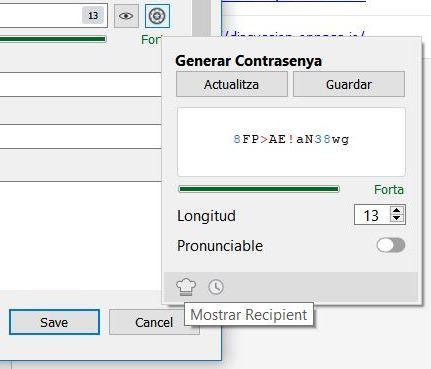
The tooltip shown in the attached image should say "Mostrar recepta", instead of "Mostrar recipient"
-
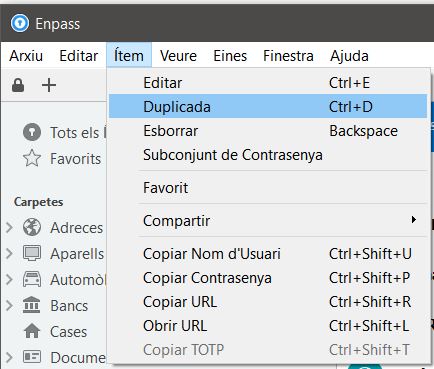
Hi, Just a small correction to the Catalan localization: The highlighted item should be "Duplicar", meaning "Duplicate"; the current translation "Duplicada" means "Duplicated" Thanks for this great software.
-
Hi, Just wanted to point two errors about the spanish localization in the UWP app: When right clicking an entry inside the folders' or favorites' section it should show 'Eliminar', but shows 'Remover' instead (which means 'stir' in english, not 'remove'). In the main section appears correctly. In the spanish language there is no capitalization in titles and such as there is in english. All of them are capitalized and this is just wrong. For example: 'Tarjeta de Crédito' should be 'Tarjeta de crédito' 'Iniciar Sesión' should be 'Iniciar sesión' ... Otherwise the app keeps getting better and better, keep up the good work with the UWP!
-
Hi, Is any translation to Swedish in progress?
-
Hi Enpass-Team, I have already written you some time ago on localization@enpass.io, that I would help to improve the German translation. Yesterday I was doing something in the setting on iOS and I found out, that there are some translation errors, which I would help to correct. Please inform me, how I can help. Cheers, edenhaus




