Search the Community
Showing results for tags 'migrate'.
Found 4 results
-
Hi everybody. Recently I change my mobile phone from Android to iOS. I bought endpass for Android and I would like to know if ther is any way to hava Enpass in my iPhone without paying again. Thanks in advance.
-
I had purchased the upgraded version of Enpass on my previous Android phone (BlackBerry Priv) and it was working properly. I just migrated to a new phone (LG V20) and Enpass is only showing 16 of my 120 entries. I've looked for an option to upgrade the new phone, but so far I can't find it. Suggestions?
-
Hi, I recently moved from Android to iOS. I had Pro on Android but I cannot find a way to bring that over to iOS. I use macOS as well. I remember using enpass premium on macOS when I had purchased it on Android. No separate payment was needed for macOS once it was purchased on Android. Do I need to pay $11.99 for each iOS and macOS to keep using enpass? Do I need to pay once via iTunes to get it on both iOS and macOS or can I bring over my premium account from Android to Apple platforms? Thanks.
-
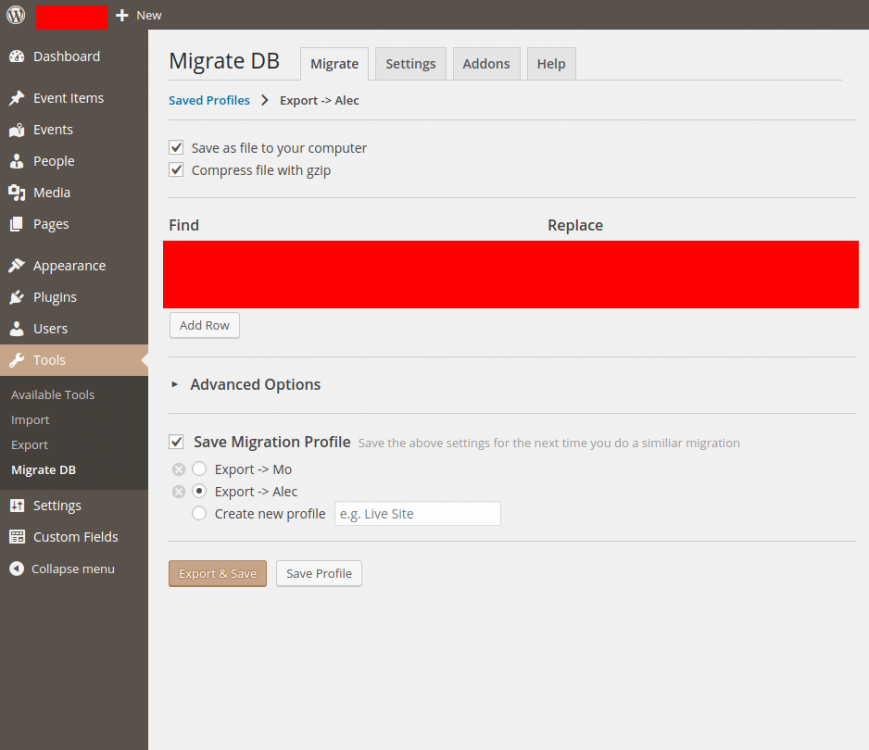
 To reproduce this bug: 1. Install Google Chrome + the Enpass Password Manage extension 2. Access a Wordpress admin dashboard with an admin account 3. Install the WP Migrate DB Wordpress plugin 4. Go to Tools -> Migrate DB 5. Fill out the form and select 'Save Migration Profile' 6. Type a profile name and click 'Save profile' 7. Go back to Tools -> Migrate DB 8. Select your saved migration profile, you should see something similar to this: 9. Click 'Export & Save' What should happen: The form is submitted as-is What happens: Somehow the Enpass Password Manager Chrome plugin clicks on the 'Create new profile' radio button before the browser submits the form.