Search the Community
Showing results for tags 'multiple devices'.
Found 3 results
-
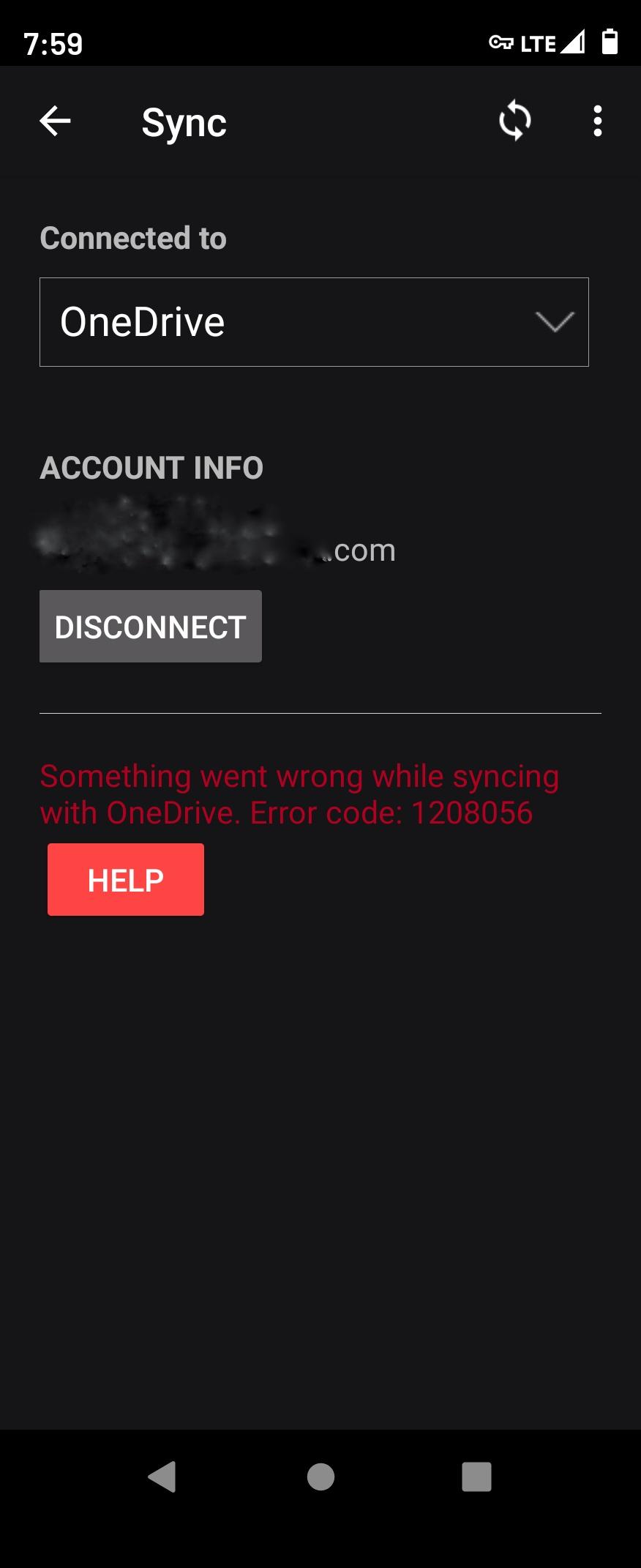
OneDrive Sync Error Code:1208056 Seems to happen after i update my vault on my tablet or phone, both androids, and then switch to the other device and try to sync up to the updated vault.
-
Hello, Can someone please provide a step by step guide on how to sync 1 vault between two devices by using a folder sync application? I'm using resilio for this. I can create a new vault on one device and setup a sync via folder. I can see my .enpassdbsync file property shared between my devices. However, when I try to set up the second device, there is no option to immediately setup a synced vault. This means that I have to create a second vault and then I can only setup a sync for that vault too.. I want to only have 1 vault, not 2. If I try to restore the synced vault on my second device, it works fine but when I try to setup syncing, then it duplicates the vault file.. Could someone help please? Thanks!
-
 Hello, I've bought a Premium License and I would like to know how I can change my Master Password of all my devices at once. I use a MacBook Pro, iMac, iPad and iPhone; and I don't like that If I change Master Password from my MacBook Pro, anyone with my old password can still access my Vault in my other devices. I hope my point is clear. Is it possible by hosting the Vault in the Cloud? so that if changing Master Password in one device, automatically affects all my devices in order to get in. Thank you for reading me.