Search the Community
Showing results for tags 'whatsapp'.
Found 2 results
-

whatsapp Customer Support on Whatsapp or Telegram
Dinesh Sitapara posted a topic in Feature requests
Dear Developer, I'm an Pro user of enpass since 2017 and the app is great. Recently I seen so many reviews on web, youtube and elsewhere.. most of the reviews says so many cons of enpass like customer support.. I request you to take feed back via whatsapp or telegram group and connect with customers via whatsapp or telegram so you can find better solution.. every users can not use emails of forum.. your whole feedback and discussion available on forum only.. but whatsapp or telegram used by everyone so try to reach via whatsapp or telegram so no one miss the update and every release gives details via telegram channel or group.. every big Companies use more social platforms so that they can reach with more users...as a professional student I know the value of marketing and business expansion.. so try to go via telegram and whatsapp so users can send u feedback very fast and effectively.. so more and more users gain your info and gives very positive path to your business. Hope u considered my feedback as a valuable and take reasonable steps as soon as possible.. -
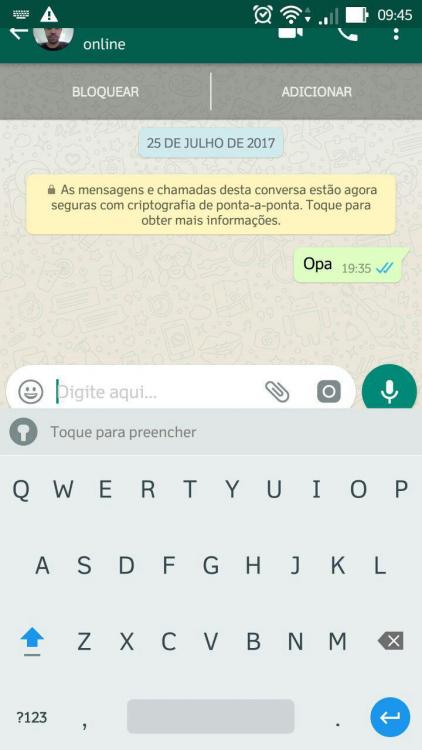
Enpass Keyboard is too big The enpass keyboard is not adjusting in apps messages, it is very large, which ends up cutting the contact photo and part to the typeful area.