
JPC
Members
-
Joined
-
Last visited
-
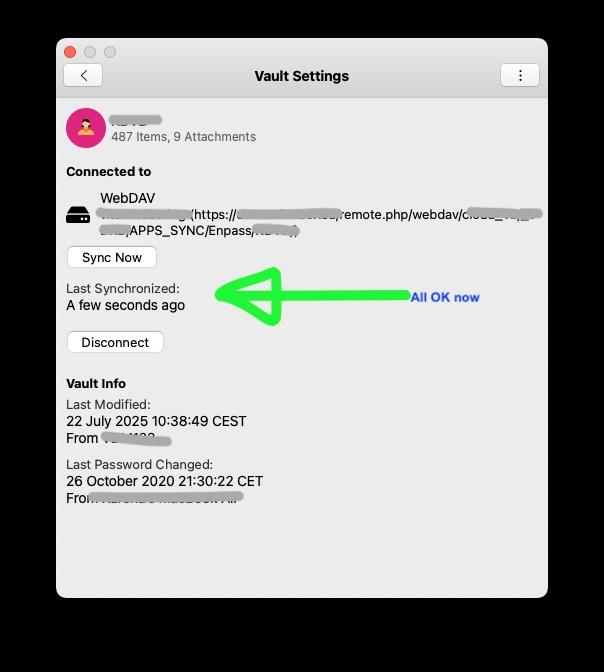
Thank you! We found out what the problem was. It indeed was a Network issue. our Cloud has very strong brute force protection. In our case there was a mobile device trying to sync with the cloud, but was set-up with wrong login-data. It kept repeatedly trying to connect to the server with the wrong credentials. The cloud server thought it was a brute force attack and throttled this IP for 30 seconds upon each log-in attempt. We now fixed it and it seems to be solved.
-
Understand... but how come it works fine for one or two days, but then suddenly it does not work any more? Nobody has change any password.... and it happened twice within the last two days...
-
I could not resolve the issue. But I deleted all the data on the WebDAV and synced new from my DeskTop... now it works again. Must have been that some data on the WebDAV was corrupt.... never happened to me in all the years that I was using ENPASS with WebDAV... Any insight why this might happen? Thanx.
-
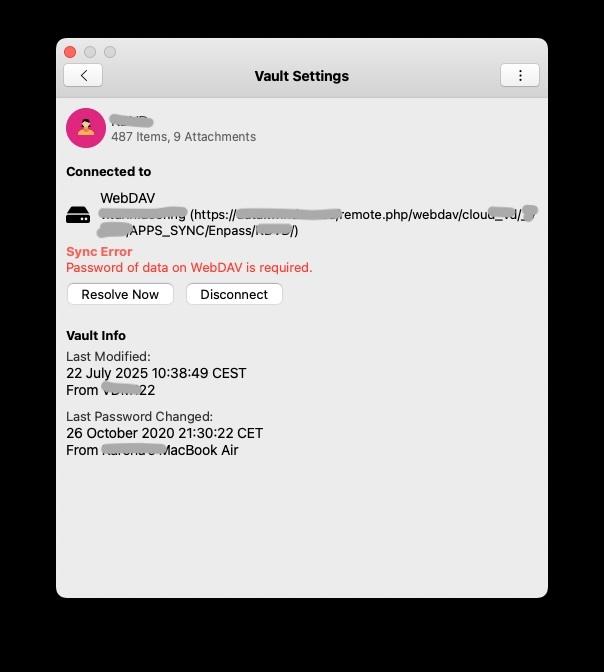
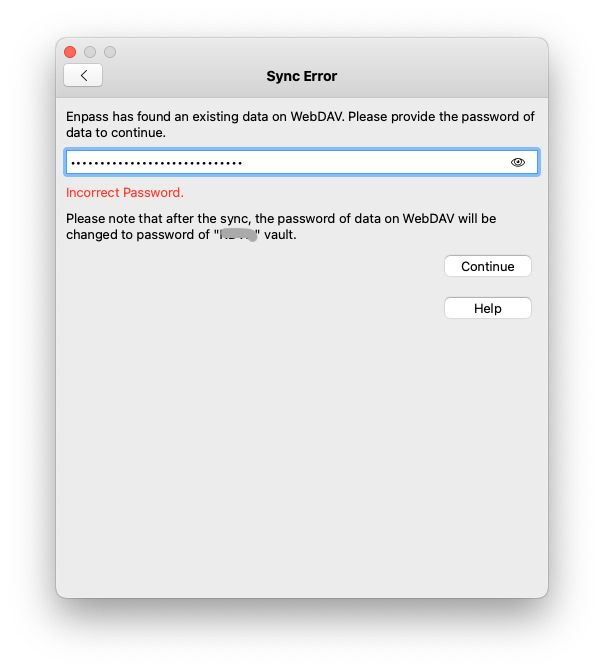
Set-Up: MacOS 15.5 NextCloud There are 2 separate Vaults on the NextCloud So Far: Both Vaults have been syncing correctly for the past few years Problem: Since today, one of the Vaults does not want to sync I set-up the synchronisation new, does not solve it. Error: SYNC ERROR - Password wrong. The same WEBDAV password works for the other vault. What is the issue?
-
For example QR-Codes with 103 dynamic code system. That means according to the definition of the 103 dynamic code system, the QR Code on the users device is constantly changed (similar to the OTP numeric code), making it virtually impossible to make a hard copy of the QR Code or copy the same...
-
More and more controls are with QR codes, and specifically dynamic QR codes. There are many access controls where authentication takes place with a dynamic QR code. Can ENPASS add such a feature? It then probably would be necessary to also be able to chose the type of dynamic algorithm... possible?
-
I had the same problem and thanks to this thread, I could solve it. But I agree with @fmb suggestion - this feature should be available also when ALL VAULTS is selected... I see this request was suggested one year ago but still not solved? Thanx
-
-
I have been using 1Password before. They had 2 great features I am missing in ENPASS When creating a NEW LOGIN, in the password field, 1PASSWORD would pop-up with a button "CREATE PASSWORD"... and one could create a great password. WHen openign a web page where one is to enter login credentials, the 1Password icon appeared in the USERNAME (or PW) field, one could click that and it would abstract the LOGIN credentials form the PW dartabase... this feature was great and would be great to have here as well. Same was on the iPhone app. Now, when open a page where one has to LOGIN on the iPhone, one cannot "FORCE" ENPASS to send the credentials of registered user A or user B, etc.... not possible. One has to manually type the user name of one of the users... Thank you for your kind attention.
-
on MacOS, I am used that clickin on one entry selects it. Clicking on another entry deselects the previous entry and selects the new one. However, clikcing on another entry keeps the old entry selected, and selects the new entry in addition (similar as when holding hte SHIFT key down in other programs). This behaviour does not always happen, and I am not sure how to reproduce it. It happened several times after performing a search...
-
The last comment is already understood - iOS requires a paid subscription for multiple VAULTS. I already purchased it.
-
Hi @Pratyush Sharma, thank you for your quick reply. I could now set up 2 vaults by specifying a different folder path for each vault. It works. 3 Suggestions: After entering the WEBDAV server credentials: webdav/ (incl. user ID and PW), one is given the possibilioty to select the folder path where the Enpass data is being stored (by selecting the destination folder by mouse... browsing through the folder structure). That would make set-up a piece of cake. Now one has to enter the folder path manually (i.e. /webdav/level 1/level 2/level 3/)... this reminds a bit of MS-DOS times. It seems that Enpass by default creates a folder /Enpass/ to store its data in there. Can this be "switched off"? If one specifies the destination folder, there would be no need to again create an Enpass folder on the iOS Enpass APP, there is not way to enter a <SPACE> upon entering the sync path. It makes it impossible to enter the backup path. If above point 1 would be solved, it would also solve this propblem. And a question... is it understood corectly that the MacOS Enpass can create more than on VAULTS in the free version, but the iOS version can only work with more than 1 vault in the paid version? This is not to be understood as a complaint, just to understand correctly. Thank you and regards, JPC
-
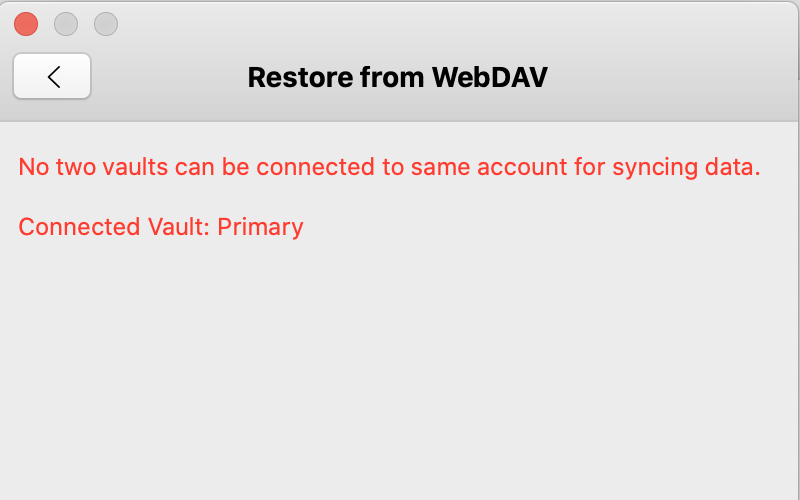
I now also saw the feature of adding vaults... but two new questions: I cannot sync the second vault via WEBDAV... see error attached How can I specify a folder in my WEBDAV sync?
-
JPC changed their profile photo
-
ah.. I saw that there is an import feature from 1Password. Next question. Can one have several file vaults in ENPASS? For example on private one, and one shared with team members?
-
JPC joined the community
-
I also plan to switch from 1Password to ENPASS due to the inablity to sync 1Password with WEBDAV. Is it possible to import the 1Password passwords to ENPASS? 1Password can export the passwords to TEXT or CSV files...