


Niesfisch
Members
-
Joined
-
Last visited
-
Hi everyone, I'm experiencing a persistent error 1208400 when trying to sync my personal vault with OneDrive using my Microsoft 365 account. I have tried all the usual troubleshooting steps but the issue remains. Environment: - Enpass Windows: 6.12.2 (2558) on Windows 11 - Enpass iPad: 6.11.22 (1229) on iPadOS - Cloud: Microsoft 365 personal account (OneDrive) What I already tried: 1. Removed Enpass app permissions from Microsoft account at account.microsoft.com/privacy/app-access 2. Deleted the local OneDrive sync folder at C:\Users\[user]\OneDrive\Anwendungen\Enpass 3. Reconnected sync in Enpass → folder gets recreated but remains empty → error 1208400 appears immediately 4. Checked the app cache folder at %LocalAppData%\Packages\SinewSoftwareSystems.EnpassPasswordManager_fwdy0m65qb6h2\LocalCache — no OneDrive tokens found 5. Same error occurs on iPad with the same Microsoft 365 account Important note: I have a second vault (family vault) which syncs perfectly fine using a separate dedicated Microsoft 365 account on the same devices. The error only occurs with my personal Microsoft 365 account. This suggests the issue might be related to a corrupted or stale token/session specifically tied to my personal Microsoft 365 account in Enpass — possibly from a previous failed sync attempt with a different vault. Has anyone encountered this issue and found a solution? Is there a way to completely clear all stored OneDrive credentials/tokens for a specific account in Enpass without reinstalling? Thanks in advance!
-
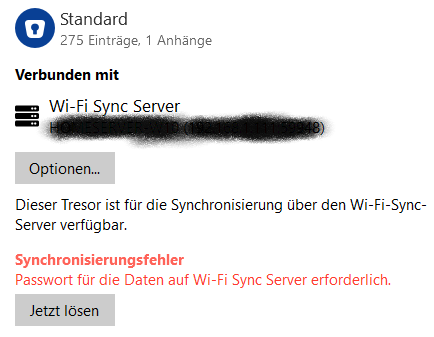
I have been using WiFi Sync for some vaults since some weeks for some IOS Devices. Now i get the following Error on the Windows Desktop Master WiFi Sync. "Password required for the WiFi Sync server" > Button "Resolve now". I get this error now on the Sharing Master Desktop and all other IOS Devices. I didn´t change the Master Database Password or the Wifi Sync Server AuthKey for this Vault. I have tried the Master PW or AuthKey from Manual Setup. Update Enpass, Reboot PC, Disconnect/Reconnect. But nothing works. Sharing another Vault with Wifi Sync works but not my Standard Vault. my Version: 6.8.2(1085) - Win10 Any ideas? Thanks Christian
-
Hello, I have the same problem. My USB Fingerprint works with Windows Hello. Windows Login is ok but while starting Enpass i have to enter the Master Password. After that i can unlock Enpass with my Fingerprint Device. Enpass 6.5.2 (724) / Windows Store Version