Welshdog
Members
-
Joined
-
Last visited
-
If there is no solution to this Apple Mac Enpass Handoff problem please let us know. My workaround is to paste the clipboard from Mac Enpass into a Note, then copy the data from there to my iPhone. Not ideal, but it works.
-
Solved issue by letting sync fail and then "Disconnecting" the other instances of Enpass from the WiFi server. After that reconnection worked fine with no requests for a non-existent password.
-
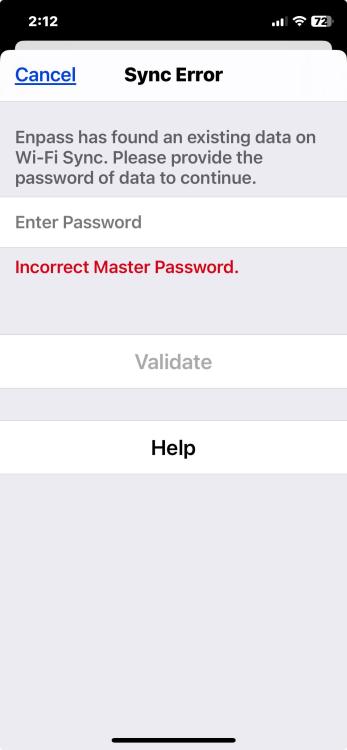
So more information. This is what I see when I enter my master password in an attempt to resolve the error:
-
Just today I see that my primary vault is not syncing to other devices via Wi-Fi. The error message in the desktop app (which is the sync server) and on devices is "Password of data on Wi-Fi Sync Server is required". I don't know what this means. I don't have a separate password for the Primary vault, just the main password. What is it asking for exactly? I have rebooted and relaunched everything and there is no change. Thanks!
-
I use Carbon Copy Cloner to make a backup of my hard drive. The encrypted backup is put in a bank vault for safety. I noticed today that CCC copies the Enpass folder in my Home folder, but the "Backup" and "Vaults" folders on the backup are empty. I can manually drag the files over to the backup drive, but I'm wondering why this is happening. Is there something special about these folders that causes CCC to ignore them? Time Machine seems to copy the Enpass files without issue so this definitely a CCC or Mac OS thing. Thanks!
-
I says in settings that "Master password is required every time you restart Enpass". My wife does not use Enpass that often on her Macbook Air, but when she does it almost always asks her for the password which she does not remember. This makes her angry. Why can't the app exclusively use Touch ID and never require master password entry even if it has been restarted?
-
Been getting this error in the Enpass Mac App "Destination Folder For Sync Is Unreachable" for some time now. Once that error appears I can no longer sync to devices. If I disconnect the vaults from WiFi I can then re-establish sync with individual devices. However, the error eventually returns and sync is lost. Not sure what to do next. Have rebooted the computer, rebooted WiFi systems - no change. Enpass 6.8.6 (1360) MacOS 13.4.1 (22F82)
-
•When I copy something from Enpass (Mac desktop) and try to paste it to an iOS device via Universal Clipboard, the field is blank. It acts like it pasted something, but nothing is visible. On the Mac if I paste the Enpass text into a note and then copy the text from there, I can paste into an iOS device. •From Enpass on iOS to the Mac copy/paste works fine. •In the past I was able to copy from any instance of Enpass (iOS or Mac) and paste into Apple TV via Universal Clipboard. This no longer is working. This functionality is part of Apple's Continuity system. Wondering if anyone else has seen this behavior? Enpass 6.8.3 (1150) MacOS 12.6 on a 2017 Macbook Pro.
-
FYI I finally broke down and deleted Enpass from the iPad Pro. After reinstallation I was able to connect and sync to the Mac serving WiFi. What I don't know is if I lost any Enpass entries made on the iPad since it had been unable to sync to the vault on the Mac over the last several months. I did made a backup of the iPad vault first, but I did not see a way of merging/syncing it with the up-to-date vault on the Mac. It's probably fine as I don't think anything critical was created on the iPad that could not be recovered.
-
I have installed both the Mac and iPad Pro updates of Enpass and the WiFi sync still does not work on the iPad Pro.
-
Thank you sir.
-
Update on when iPad Pro Enpass will be updated and this sync bug fixed?
-
Any estimate on when this issue will be fixed on iPad Pro models? Still on version 6.7.1
-
If anyone is wacko here it's you, not to mention being outrageously rude to the devs.
-
I tried 6.7.1 on the iPad Pro and it still cannot see the WiFi server on the Mac.