


Skip to content
View in the app

A better way to browse. Learn more.

Enpass Discussion Forum

A full-screen app on your home screen with push notifications, badges and more.

To install this app on iOS and iPadOS
  1. Tap the Share icon in Safari
  2. Scroll the menu and tap Add to Home Screen.
  3. Tap Add in the top-right corner.
To install this app on Android
  1. Tap the 3-dot menu (⋮) in the top-right corner of the browser.
  2. Tap Add to Home screen or Install app.
  3. Confirm by tapping Install.

Ferdinand

Members
  • Joined

  • Last visited

  1. This happens in Linux as well on all devices that I tested. When will this fix be released?
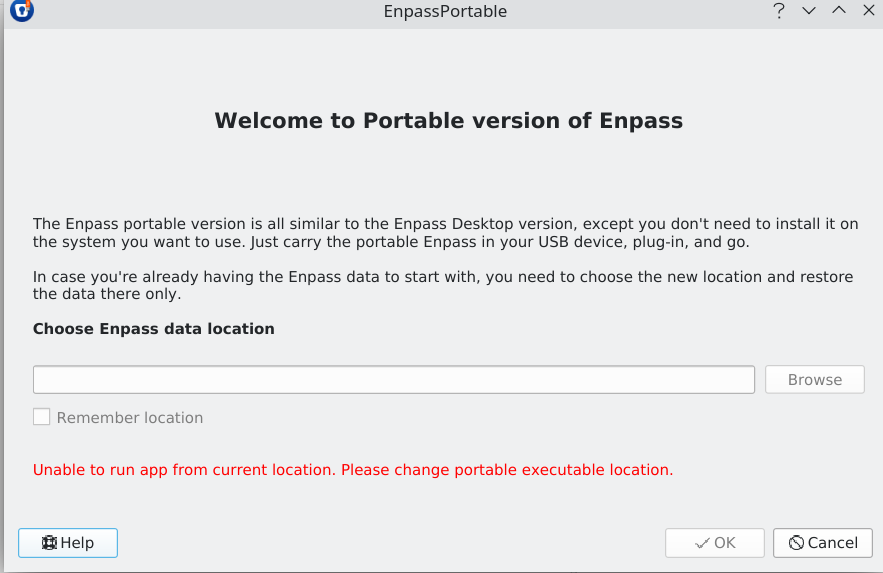
  2. I have been using Enpass for years on a couple of Linux machines and on my wife's Windows device. Now I tried to use Enpass Portable. I downloaded v6.6.1 for Linux, unpacked it and copied the contents to a 2 GByte USB-stick with ext4 file system. When I try to start the executable, I get a notification, saying I need to change Enpass data location. There is an installed Version of Enpass on the device, but from what I read, it should work anyway. There is nothing I can do apart from hit Cancel. (see attached screenshot). The same thing happens on all other devices I have tried. I have seen mentions of this behavior from Mac users here and that was quite a while ago. Is there a solution by now?
Account

Navigation

Search

Search

Configure browser push notifications

Chrome (Android)
  1. Tap the lock icon next to the address bar.
  2. Tap Permissions → Notifications.
  3. Adjust your preference.
Chrome (Desktop)
  1. Click the padlock icon in the address bar.
  2. Select Site settings.
  3. Find Notifications and adjust your preference.