
Bragoon
Members
-
Joined
-
Last visited
-
OK, first I have to click “Add New,” then “Clone Existing” to select an existing template. That's one more click than before. Is that really user-friendly? I can edit an existing template and save it with the same name. If I want to create a new item, I end up with two templates of the same name to choose from. So I can’t actually modify an existing template; a new template with the same name is ALWAYS created. Sorry, that’s nonsense! The terms in “quotation marks” are translations of the German terminology.
-
The new layout is much more visually appealing. It takes some getting to used the new structure. What I'm missing is the ability to edit templates. There's only a button for “Add New.” Where can I access and edit existing templates? For the individual fields, I still miss the option of a freely editable dropdown field for a selection. For example: Year: 2024 2025 2026
-
A field with the option to choose one possibility from several options would be very practical. Selection: A B C
-
Can I change the connection from the WiFi server to Nextcloud in a vault? If not, how can I transfer all data, categories, and templates to a new vault?
-
Unfortunately, nothing has happened since February 2023. The sorting option in the Android app still does not work correct. Pixel 8 pro / Android 15 / Enpass V6.11.9.1081
-
Thanks for your answer. I use both possibilities of your answer. Nevertheless one template for several categories minimizes the effort in creating new items in different categories. My old password manager allowed to use folders. With categories and tags you have a double structure, even if you can hide categories.
-
Bragoon changed their profile photo
-
Also using Win 11 Pro 26100.3194 I have no problems. Some minutes ago I got a new version of Enpass: 6.11.9 (1915). May be it helps you.
-
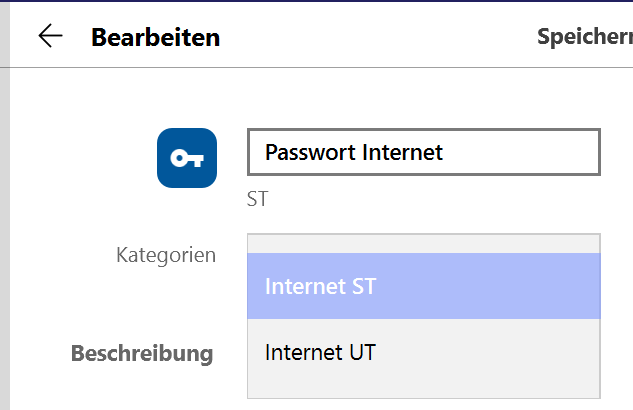
Unfortunately, I can't find the solution I'm looking for in the instructions. In the example, I can assign the “Password Internet” template to either the “Internet ST” or “Internet UT” category. How can I assign the template to BOTH categories?
-
Pressing a button is much quicker than clicking on the eye symbol. It would be nice if the protected items could be made readable with a function key - e.g. F12.
-
Hi, I'm new to Enpass and not yet familiar with all the possibilities. I would like to know how I can assign a template to several different categories. Is this possible?