KhakiMan
Members
-
Joined
-
Last visited
Everything posted by KhakiMan
-
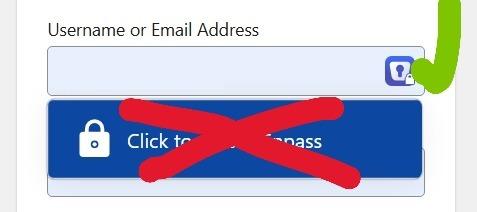
I'm fine with the inline icon that appears in the form field on a webpage provided by the browser plugin. But is it possible to get rid of the large blue dropdown that appears? It's big, obnoxious, unnecessary, and gets in the way. If not, please add this as a feature request for the browser plugin settings as an option to disable.
-
-
Longtime user of Enpass for Windows and Android. I decided to create a new vault for Business accounts and keep the original vault for Personal. Both are saved to OneDrive. Business vault created normally and it duplicated all password accounts from the Personal vault. Not a big deal... I can delete Personal accounts from Business and vice versa. It turns out, that doesn't work. If I delete an account from one vault, it automatically deletes the account from the other. Restoring from Deleted, restores from both Vaults. Strange behavior overall. I wouldn't expect a separate vault to mirror all changes. Any advice to remedy? Do vaults have to reside in different clouds (OneDrive and gDrive)? Thanks
-
I just noticed that the new Windows desktop version now allows fields to be reordered! I asked for this a while ago and am stoked this was added. When creating custom section/fields and having to re-edit, the old version left the account a mess. Now I can re-order and clean things up logically. For those who haven't used it, when editing an account look for the three lines on the right of the field. This is the handle to drag and drop the field to a new location. It's a little hard to see with dark mode, but it's there. Thanks again Enpass!!
-
Not exactly a customer friendly approach. I would have expected advanced notification of unsupported versions (in app, email), rather than being cut off summarily. It is interesting that it was syncing properly between versions/platforms until May 21, so that shoots a hole in your explanation.
-
I still use a Windows 10 Mobile phone, but I'm seeing that Enpass is not updating to match what the Windows10 app has. I know the Win10 app has been redesigned, but have you abandoned the Mobile app? I tried a restore, but the file is not recognized to select for a restore. Both apps are set to sync with OneDrive. The mobile app says it last synced May 21 and last attempted today. A manual sync does not remedy. Was OneDrive syncing stopped?
-
The Enpass Extension is almost invisible Edge with Dark Mode enabled. Please create a new icon with colors that are viewable in both Dark and Light modes. Thanks