


d1abo
Members
-
Joined
-
Last visited
Everything posted by d1abo
-
Can confirm it is fixed on Mac OS 12.4. Thanks a lot !
-
Hello everyone, it seems fixed on my side. Did you do anything ? Thanks a lot !
-
Hi guys, any news related to this ? Thanks !
-
Hi there, any updates on this ? Thank you a lot.

-
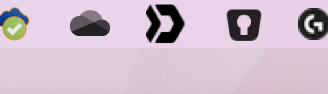
Mac OS X Mojave - 10.14.6 (18G87) Resolution is MacBookPro15,2 native one : 2560 x 1600 As seen on screenshot Enpass (and SwitchDrive which is based on OwnCloud) icons, do not appear as "Cisco Jabber" and "Traps antivirus". Hope this helps. Thanks for your reply.
-
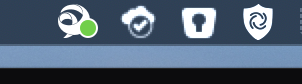
Hello guys, I recently got a new Macbook Pro 13'' (with touchbar) and just saw that menu bar icon is not crystal clear. I mean, it is pixelated and seem to not be able to show in HIDPI. Do you have any information about this ? There is a screenshot showing how it appear on my screen. Thank you very much, you really made a great product.
-
Is this issue fixed ? It seems to me that my MBP is not switching to dGPU now when openning and when my computer is set to use only iGPU if possible.
-
Hi there, I have a problem with my MacBook Pro GPU, that causes some Kernel Panics. I'm using a small tool for avoiding this problem : it tells the computer to keep using iGPU and to not use GPU. (gfxCardStatus) Unfortunately, when Enpass is launched I can't force using iGPU because of Enpass. Maybe Enpass uses GPU as soon as it is present, and do not let other apps tell him what to do. Do you think that could be the case one day ? What I mean is, do you think it makes sense that Enpass can run on iGPU even when a GPU is present ? Thank you very much. André
-
Hello Anshu, OS X 10.11.6 (can't go upper, Mac Pro 2008) Enpass 5.6.11 I am using Little Snitch (firewall), but it shouldn't make any issue as I never had them on other OS'es or computers. Let me know as you have any new information or if I can help you with some more information. Thank you very much for your quick reply. EDIT : This morning, Firefox gets Enpass extension to open without any problem. Don't know what happened the other days.
-
Hello guys. First of all congratulations on Enpass, it really is a great product. Trying to use Firefox (instead of Chrome) I downloaded the last version. Unfortunately the extension does not work with Firefox 62. The extensions keeps saying that we need to activate "browser extension support" in app, but they are enabled. Do you have any ideia about this issue ? Thank you very much ! André Camacho
