

Skip to content
View in the app

A better way to browse. Learn more.

Enpass Discussion Forum

A full-screen app on your home screen with push notifications, badges and more.

To install this app on iOS and iPadOS
  1. Tap the Share icon in Safari
  2. Scroll the menu and tap Add to Home Screen.
  3. Tap Add in the top-right corner.
To install this app on Android
  1. Tap the 3-dot menu (⋮) in the top-right corner of the browser.
  2. Tap Add to Home screen or Install app.
  3. Confirm by tapping Install.

NetWeb

Members
  • Joined

  • Last visited

  1. Please add second pin auth after faceID not working with mask. Can’t use Enpass with faceID in train/bus/subway!
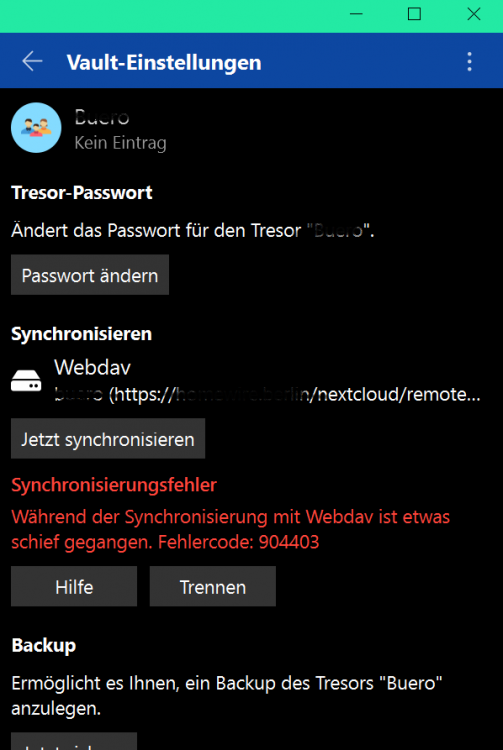
  2. I try to setup sync via webdav on several devices (Windows 10 Store, iOS) and i get the error code 904403. I cannot find anything that could explain this error code. Please. I payed for lifetime Pro and Premium and get everyday more dissapointed by your service. I've 2 Vault setup with the same Nextcloud Instance. It's working, but not for the new Vault.
  3. NetWeb replied to NetWeb's topic in iOS
    Its an iPohone XR iOS 13.5 ... still the same bug there. i got the newest app version.
  4. NetWeb replied to NetWeb's topic in iOS
    After upgrading to 6.4 the bug is still presented.
  5. NetWeb joined the community
  6. NetWeb posted a topic in iOS
    when i try to insert my password it show duplicate items. how can i fix this?

Account

Navigation

Search

Search

Configure browser push notifications

Chrome (Android)
  1. Tap the lock icon next to the address bar.
  2. Tap Permissions → Notifications.
  3. Adjust your preference.
Chrome (Desktop)
  1. Click the padlock icon in the address bar.
  2. Select Site settings.
  3. Find Notifications and adjust your preference.