

Andre Dierker
-
Posts
8 -
Joined
-
Last visited
-
Days Won
3
Everything posted by Andre Dierker
-
Okay Guys, I'm happy to see a new version of Enpass. I like it very much so far. Is this the thread where I can post problems with beta? There is still no bug tracker I'm on Android 7.1 and updated from latest stable to 6.0.0.91 from Playstore. Seems like the automatic (I think there is one) database transition is not working, at least for me. App is doing something (spinner is spinning), then app is crashing after a new start I have to give my master password but there are no entries in the standard vault I can't find a option to manually import my old V5 database so there is a empty enpass for me UPDATE BREAKER A manual Import option is missing For me it feels like there should be an option in Settings -> Vaults -> vaultName -> Import Vault info should probably show some file name on sync target(??) A option to override the device language and use english would be very cool - now I stuck in german Desktop app 6.0.0 (149) (Fedora linux) is still using the Enpass6-Beta directory so I can't test the sync
- 77 replies
-
- 1
-

-
- android
- beta for android
- (and 1 more)
-
Hi, I recently found a file named data.xml in my enpass directory. What is that for? And why the hell, it contains my email credentials in PLAINTEXT?
-
Sites where autofill is not working
Andre Dierker replied to humidmark's topic in Autofilling and Desktop Browser Extensions
Hi, login @ tumblr.com works not -
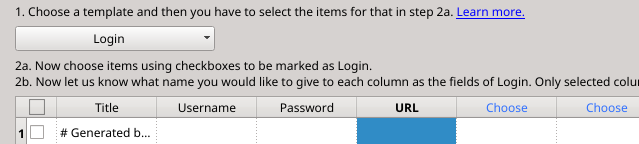
You can use this plugin https://addons.mozilla.org/de/firefox/addon/password-exporter/ Export to csv and import it as Generic CSV/DSV. Do some settings, done.
-
I got the same issue. I think this happens after waking up the computer from suspend. Killing Enpass and start it again solves it for me.
-
Several password manager are broken. I found this: https://team-sik.org/trent_portfolio/password-manager-apps/
-
Hi, RHEL and CentOS are still using yum, fedora is using dnf which is using the old yum configs and repos. But, guys do you know https://build.opensuse.org/ ? It's open for everybody, it's automated and a lot of archs and distros are supported. (I never used it.)
-
Hi folks, I'm a mostly happy EP user on Linux and android. Updating the desktop app is nearly not possible, since there is no possibility to start the maintenance tool from the app. Do you think about a way to start the update process manually from inside the app? Or to provide a rpm? *hint* *hint* Nice work, bye andre