

FuN_KeY
-
Posts
40 -
Joined
-
Last visited
-
Days Won
12
FuN_KeY's Achievements






-
Enpass incorrectly report sites as "missing 2FA"
FuN_KeY replied to FuN_KeY's topic in Windows 10 (Store)
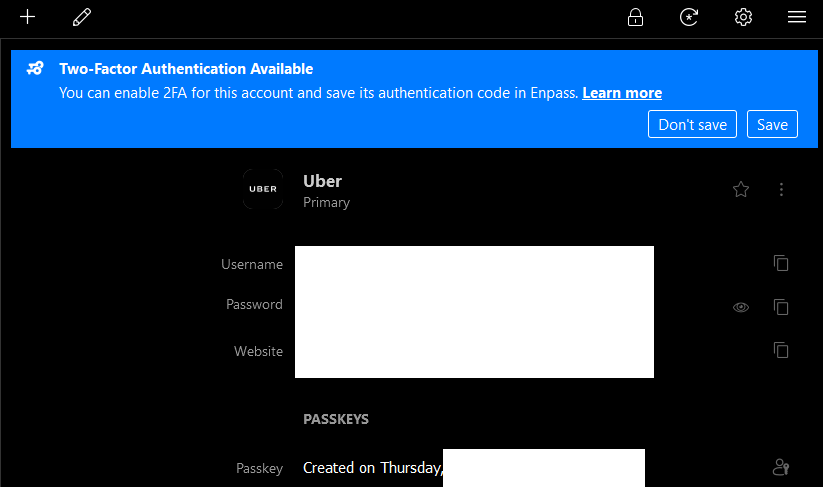
Version is the only one that yet supports passkey: 6.9.2 for Windows 11 URL is Uber - as shown in the capture -
Dear support, While it is awesome to now have Passkey support - thank you. I just realized that Enpass incorrectly reports sites as missing 2FA, while Passkey is configured. Passkey should count as a second factor IMHO Enpass should even propose to activate passkey on services that support it (i.e. something like Passkeys.directory)
-
Hello @Gulshan Dogra The problem is still present on my end. Had the team found the time to work on that?
-
Windows Hello doesn't work on system boot, must restart Enpass
FuN_KeY replied to PGTipz's topic in Windows 10 (Store)
Okay, I ""solved"" the problem on my end. I bought a dedicated TPM for about 5$ and with that one it works flawlessly. This then confirms that it is 100% related to the AMD fTPM and nothing else. -
Windows Hello doesn't work on system boot, must restart Enpass
FuN_KeY replied to PGTipz's topic in Windows 10 (Store)
So, I tried again with the patch installed (February 14, 2023—KB5022845 (OS Build 22621.1265) - Microsoft Support) and it is still not working (AMD 5900x with fTPM). If this damn patch is at the root of the issue, then the extreme delay sadly makes sense. Now that the OS has been patched the Enpass team might have a greater chance to have it working. Please let them know @Abhishek Dewan ! -
Windows Hello doesn't work on system boot, must restart Enpass
FuN_KeY replied to PGTipz's topic in Windows 10 (Store)
Could it be related somehow to that: The Pursuit of HAPPY…. Uhhh TPM AMD Happyness (Part 3) - Call4Cloud? I am not expecting that the Windows patch will fix the issue - but apparently MS had to adjust some code related to AIK for it to work with AMD. I would not be surprised that Enpass needs to make the same adjustment. -
Windows Hello doesn't work on system boot, must restart Enpass
FuN_KeY replied to PGTipz's topic in Windows 10 (Store)
@Abhishek Dewan any news? 6 months have passed, a few other reports echoed what was already stated (it does not work with AMD TPM). Any status is better than silence. -
Passkeys are foreseen as the future and are meant to end passwords as we know them. Still, they have one major pitfall: cross platform sync. I strongly believe that Enpass should hop on this train and support it asap. Other big names are already hopping in (Passkeys: the future of authentication in 1Password, Passkeys in Dashlane – Dashlane, https://www.reddit.com/r/Bitwarden/comments/xpywl7/comment/iq6lrq2/?utm_source=share&utm_medium=web2x&context=3) and it will be a key differentiator. It does not look good, because Webauthn - one of the foundations of passkeys is (was?) not on the roadmap: Support WebAuthn - Feature requests - Enpass Discussion Forum
-
Windows Hello doesn't work on system boot, must restart Enpass
FuN_KeY replied to PGTipz's topic in Windows 10 (Store)
Not sure if it is really related to AMD or Intel. Can't get it working on either platform right now; but it used to work on my Intel laptop until I reinstalled windows from scratch. I am pretty sure that it used to work with a previous version (at least for me - I already read complain here). Either a later version of Enpass broke it, or something changed with Windows - don't know. It never worked on my AMD, but I purchased it much later - so it never had a chance to run the code that I knew was working. Don't ask me which version it was - I have absolutely no clue; I just know it used to work. -
It works again for me ! My only action was to complain & wait
-
I just did the update, and Enpass refuses to start. I am greeted with "Enpass Password Manager is currently not available in your account. Make sure you are signed in to the Store and try again. Here’s the error code, in case you need it: 0x803F8001" Having all my passwords in Enpass, it is a major annoyance. I am, of course, signed-in to the Microsoft Store. It used to work fine before the update. Please help
-
Windows Hello doesn't work on system boot, must restart Enpass
FuN_KeY replied to PGTipz's topic in Windows 10 (Store)
That is the problem. Credentials does not get persisted in the TPM, you are requested to type in the master key when Enpass start. Once it is started MS Hello works as expected. In the option it is written "Master password is required every time you restart Enpass"; it should not act like that if you have a properly configured TPM. It used to work for a while, but it broke and nobody really care anymore apparently. -
I too would be extremely interested to see something happening around webauthn Having a platform agnostic competition to Apple passkeys won't hurt!
-
Windows Hello doesn't work on system boot, must restart Enpass
FuN_KeY replied to PGTipz's topic in Windows 10 (Store)
Thank you very much for your answer. While I realize that you are doing your best to keep us posted, I am longing for more. In a few weeks we will celebrate the 2-year anniversary of this topic. We are past the monitoring of feedback (it has been clearly established that it is broken); now either Enpass is unwilling to fix this, or it depends on broken external dependencies (i.e. broken TPM API, ...). Either way it would be fair to let your customers know. -
Windows Hello doesn't work on system boot, must restart Enpass
FuN_KeY replied to PGTipz's topic in Windows 10 (Store)
@Abhishek Dewan while I get that solving such issues can take time, I find the lack of communication about this one disappointing and close to inacceptable. According to the thread replies, this is one of the most reported issues affecting a vast number of your customers. From my little chair, fixing this should be your top priority. As far as I am concerned the lack of solution (and even communication) is turning me off recommending Enpass to anyone anymore. If nothing changes on that front, I will ask for a refund - as the feature is clearly not working as advertised.
