Search the Community
Showing results for tags 'translation'.
Found 3 results
-
Hello, Enpassians! Our users informed us about inconsistency in our Greek strings/fonts related to the specific use of singular and plural words. Greek words "Αδύναμος" and "Πολύ Αδύναμος" needed to be replaced with "Αδύναμοι" and "Πολύ αδύναμοι". Having investigated this, we are happy to inform you that strings have been fixed in the recent Enpass update 6.7.4 (919). We again appreciate our users' efforts to tell us about this and help us improve our product.
-
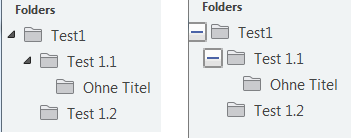
Hi there, I just downloaded the portable windows version, but I assume, the findings can be found in other version as well. 1. in the passwordgenerator you can select the seperator when using speakable passwords. In german language, the dot (.) is translated with "Zeitraum". Even if the english word "period" means both when translated in german, it means "period of time". So you go better with "Punkt", which is the punctuation. 2. In the "New entry" dialog, you can select TOTP as new field. If doing so by error and deleting that field later on, you can never reenable the field. It is no longer available in the dropdown or in the curstom field selection. 3. Another translation error can be found in the "New Entry" dialog. You can "Save" (-> "Speichern") or "Cancel" (->"Abbrechen"). Both buttons remain in english where as the rest is translated. 4. By default, besides folders, which contains subfolders, there is a little triangle to expand the list. When I click to create a new entry, that symbol change to a + or - (depending on whether it is collapsed or expanded), which is much more uglier (See attached picture). This remains until Enpass is restarted. Lock/Unlock does not work. 5. In the section "Control password", the subitem "Duplicate" would better be "Duplikate" in the german translation, which is the noun of the current "duplizieren" (duplicate in english). If I will find anything more, I will add it to this post
-
Hi everyone, First of all, great job with Enpass. Keep going like that! I'm not sure if creating a topic for this is the good solution. Well, I'm using the Android App on a french phone and when I successfully unlock my Enpass, the word "Unlocked" is translated "Déverrouilleé". It should be "Déverrouillée" instead. Have a good day