

Leaderboard
-
MoonRaven
Members2Points24Posts -
Abhishek Dewan
Enpass team member2Points1605Posts -
Fadi
Members1Points38Posts -

AnakinCaesar
Members1Points160Posts




Popular Content
Showing content with the highest reputation on 08/18/23 in all areas
-
Hi @utilisateur38 We appreciate you taking the time to provide your feedback. Rest assured, we have taken careful note of it for our future consideration.1 point
-
1 pointMy only guess is that the team is too small for this task and unable to match 1password 500 employee power. I too would like to know if Enpass is being deprecated so I can invest my time with a more serious project. It was my #1 choice after abandoning 1password for their squeezescription model but if they are throwing the white towel I might as well just migrate to a more active project. Password storage is high priority software, it can not be neglected and one better be safe than sorry. Can't recommend Enpass as a security haven currently for any one I know compared to the competition.1 point
-
Abhishek, too be honest is it so annoying i almost moved to a different password manager. But... i have been a happy user until this so i wanted to at least so where this topic would lead. And i am happy to hear you where able to replicate the problem, and your engagement into my topic/problem also very good. So i am staying and will wait for the solution a wise man once said: it is not about the problem, it is about the way you solve it. That is wat people will remember. in short Thumbs up!1 point
-
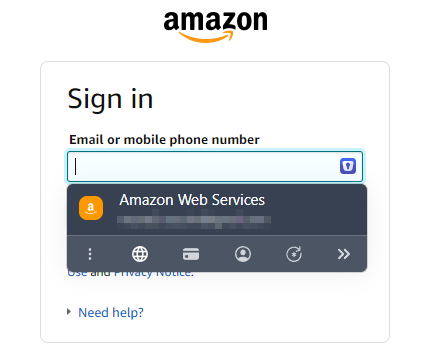
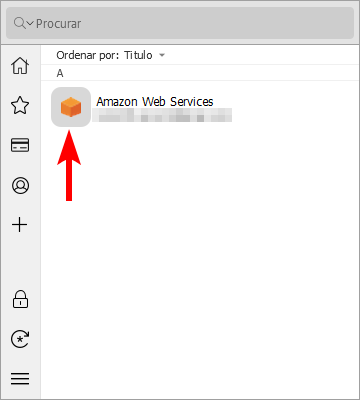
1 pointI was about to start a topic on the same issue. This problem began right after updating from version 6.8.6 (1365) to version 6.9.0 (1465) of Enpass. Additional Information: Operating System: Windows 10 Pro 22H2 (Build 19045.3324) Enpass Version: 6.9.0 (1465) (website version) Browser Extensions: Chrome v115.0.5790.171 + Enpass Extension v6.8.6 Edge v115.0.1901.203 + Enpass Extension v6.8.6 Firefox v116.0.2 + Enpass Extension v6.8.3 Update: The issue was fixed in version 6.9.2 (1563) of Enpass. As noted in the release notes: “Fixed a problem with the browser extension’s inline menu misbehaving for Items with a custom icon in Enpass.”
 1 point
 -
1 pointFunny thing is that they can just programmatically take the datetime of the computer and use the year from that for the copyright notice... They keep saying things are forwarded to the development team. That may be true, even if the development team consists of 0 people1 point
-
1 pointYes, maybe you're right. I don't think they forgot to update the year because it's almost 2 years. But I'd like an official statement about the development of Enpass, wheter it's being active or dead.1 point
-
1 pointif you take a look at the copyright notice in your app on PC or MAC you can see it's only listed from 2006 - 2021. So I guess that's the point where they officially gave up?1 point
-
1 pointPeople expect Enpass to come back with new and improved features, but it's unclear what's happening behind the scenes.No buddy has even a clue if enpass is even planning to release any new version with major upgrades including new features. They have made features request section in forum, but mostly those requests get noted than no buddy knows if anyone is even working on them. The response received only acknowledges that the request has been forwarded and that it will be reviewed. However, there is no indication as to when the requested feature will be implemented.1 point
-
1 pointYup, Enpass could've been a market leader if it actually was something they still wanted to develop...1 point
-
1 pointHi @rps Welcome to the Enpass Forums. I certainly understand your point. There is an active development effort underway for Enpass. In addition to tracking feature requests and bugs via our internal software, we also release new features/improvements in subsequent updates. It is always a pleasure to hear feedback from our users. Planning, feasibility checks, implementation, and testing are all necessary for developing a new feature or fixing a bug. In order to avoid giving inaccurate information, we are not able to provide an ETA or share any roadmap at the moment. When we add a new feature or fix a bug, we notify our users via email and forums. When a new version is released, you can also check our release notes to see what new features/bug fixes are included.1 point



