
AnakinCaesar
Members
-
Joined
-
Last visited
Everything posted by AnakinCaesar
-
While my .csv export looks nothing like what you're presenting here, I also don't understand what your message and your image are referring to. Could you get into a more descriptive explanation of your problem please?
-
-
-
There's no way to recover your master password. Either figure it out or start new.
-
A common issue many users run into is a time mismatch between the WebDAV host and the client. Could you check whether both system clocks are properly synchronized?
-
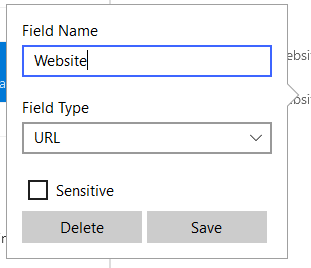
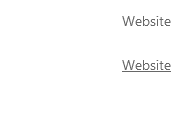
First you have to click on the name itself. After you have entered the new field name, you have to make sure you click on "Save" and not just outside the small rename window. Happened a lot to me aswell, and I believe its a design flaw...
-
-
Guess this was a "special" offer during the last promo.
-
-
I guess you have to wait for the dev team to fix this somehow. But with how slow they have been in some cases I’d rather use another fork of Chromium in the meantime or change the password manager…
-
-
While I agree with you on all those points, there's nothing I can do. And I believe subfolder support is nothing on the omnicious roadmap from Enpass themself.
-
This seems to me, that the browser addon is not authorized for the enpass app itself. "18.2.2026, 11:37:41 : Authentication required" looks as a clear indicator for me. But I'm no Enpass tech team, this is just my understanding. So I'd suggest uninstalling the addon, reinstalling it, waiting for the auth screen to appear and hoping for the best. Otherwise you'll have to wait for the support team.
-
If I recall correctly from other topics over the past few years, I'd say subfolders in any cloud storage are not supported. Therefore the WebDAV will not work either.
-
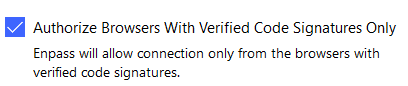
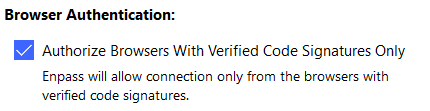
By connected you mean, you've inserted the code to authenticate the extension to Enpass itself? Firefox and Chrome have been tested with the same webpage? Have you checked maybe to disable Browser Signature Check? I'm not completely sure, but maybe the current Brave build has a signature, that is not allowed by Enpass.
-
While I was a firm believer in Enpass for many years, recent developments have convinced me that this has turned into nothing more than a cash grab. The product is no longer user-oriented and shows little to no real focus on improvement. At this point, I honestly believe the software itself is essentially dead. Development feels stagnant, communication is minimal, and critical issues keep piling up without meaningful action. I can no longer recommend Enpass, even though I personally convinced more than six people to adopt it in the past. The way the “team” handles requests, bug reports, and improvement suggestions is simply unacceptable and, frankly, business-killing. I’m not even convinced there is a real team left, it feels more like a handful of people copy-pasting AI-generated responses. Letting something as basic as a signature expire only reinforces the impression that they no longer care. For users on a monthly subscription, my honest advice is to cancel and switch to an alternative. For those of us who paid for a “lifetime” license: I’m still trying to figure out how to get out of this without just writing it off as a loss.
-
Don't get your hopes too high, implementing new features takes ages...
-
This has to be a joke right? You know about this request for almost 5 years and its still under review?!
-
Easiest way would be a fresh start on your PC, where you sync the vault again, that is connected on your phone.
-
So you chose to completly ignore my advise on Reddit?
-
You just have to enter your email address again and there you'll recieve a code to authenticate you.
-
Seems like you dont understand the silent agreement in cyber security and how things are handled. After a disclosure in private (April) Enpass rolled out a temporary fix in May. While working on a permanent solution, the world was notified, that this problem exists (August) and then Enpass rolled out a permanent fix just 4 days later (some popular managers still have no fix [1Password, LastPass, KeePass, iCloud]...) This is still common and in my eyes quite a rapid reaction. Also, change logs indicated the fix in May already. There is a common ground that has to be found between telling users and risking "bad guys" actively acting on the notification and not telling the users and increasing the change of the vunerability not gaining a lot of attention. It's a fine line.
-
Maybe you should keep reading the Data Security forum posts here: https://discussion.enpass.io/index.php?/topic/31873-update-on-dom-based-extension-clickjacking-vulnerability-in-enpass-browser-extension-fixed/
-
Do you store your vault in a OneDrive location? If so, the token might be expired and needed a re-authentification.
-
I guess one way to do this kind of easy would be exporting your entire vault and then searching in the created file for the affected entries. Then you could either clear all current entries in your vault and import the corrected export file. Or manually open all entries (after finding them in the exported file) and correct them. Not a nice way, but from my pov and knowledge the fastest/easiest.