
AnakinCaesar
Members
-
Joined
-
Last visited
Everything posted by AnakinCaesar
-
Maybe update both FF and Enpass plus Expansion. I do not see the error nor can I reproduce it. Plus DKB is not even in the Top10 of banks, and as if it would matter.
-
Actually this is common practice on devices with biometic logins. And should be common sense to remember the master pass. I truly believe how severe your situation now is, but this is not a problem with Enpass itself, rather the user. Sorry to break this to you. How should Enpass warn you, when you change the fingerprint inside system settings? lol, Enpass doesn't monitor this.
-
Well, it dissappeared in my American Express App aswell and had to manually enable it again. So maybe (just maybe) Apple is also not without flaws (not saying Enpass isn't).
-
I had a similar experince using an old Notebook to do some manual configuration of my network stack. Couldn't open Enpass to view my data. Dissapointing. Please fix this urgent @Amandeep Kumar
-
Can confirm no option for logs. WIn 11 Store Version. I guess this is not a good option as many people use the store version when they are not allowed to install other programs. Maybe implement it? @Tarun Singh Rawat
-
Not sure if an update to iPadOS 18 would fix this. Nevertheless, I had some similar issues with other apps aswell, so my guess here is a bug on Apples side.
-
What iPhone and iOS are you using?
-
You could just easily move all your data from Vault#2 to Vault#1 by following these steps: 1. Select Vault#2 in the generall Enpass window. 2. Click on any entry and then hit "CTRL + A" to select all entries. 3. Rightclick on the marked entries. 4. Select "Add to Vault" 5. In the new window choose Vault#1 and hit "Move to Vault" 6. You're all set and done.
-
What exactly is your problem with the exported .csv file? It is a totally usable file - maybe another manager has just issues with the phrasing. Without more information it will be hard assisting you.
-
This is extremly sad to hear. I do understand, that for "new features" at some point an upgrade fee would be acceptable, but not providing existing users with some sort of discount is some malpractice and not supporting of longtime users. I myself bought a lifetime Pro license I think back in 2016 and would willingly upgrade to Premium for a discounted fee, but ~100€ just for the feature to get 2FA and breach notifications? Thank you, but no.
-
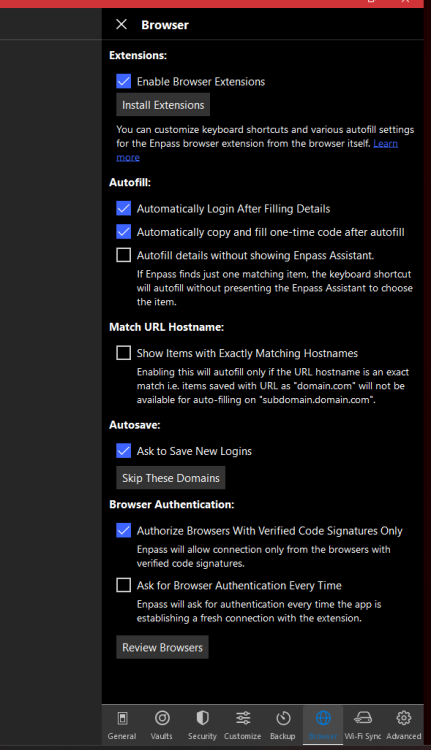
Try turning Browser Signature Verification off. This should be a workaround with the problem.
-
If I am not mistaken the problem lies within Enpass' field type selection. As of right now, there is no option to set a specific field as adress / zip code / city. Therefore the autofill will not work. But this is a nice to have feature, so I'll add a +1 to request that feature.
-
-
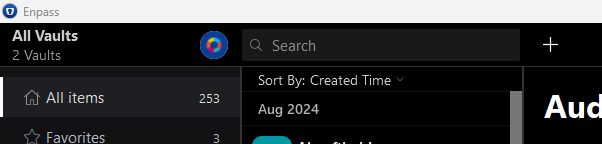
I myself am not using Mac, but in Windows if I open the entire Enpass window, right underneath the Search Box I can choose "Sort by: xxx" and am able to select "Created Time". Maybe this works for you too?
-
Oh well, you're welcome! Glad I could help Thanks for that intensive testing. I'm not that sure how every single OTP instance is working BUT some more failing seems like a sync error with the timezone for me. So I'd kindly ask you to check all your devices, if the time zones are correctly set to "automatic" or your time zone and daylight saving is also correct. This might help. If not, some more investegation is needed, which as of right now, I am not sure how to perform.
-
is this problem only present with your Eneba account or did you experience it with any other aswell? Normally a failing OTP means either wrong timezone or wrong account...
-
1. Create a completly new vault at another sync location. 2. Mark all your current entries and select "Add to Vault". Select your new valt and choose "Copy". Now you'll see all your entries duplicated into the new vault. 3. Now try exporting your entries from the new vault.
-
I tried replicating your bug, created a vault with 716 entries, including attachements. Synced it with OneDrive. Exported without issues. So my guess is, maybe your vault file is somehow corrupted? When you say, you can reproduce the bug on every device - have you tried setting up a new vault and copying all your entries into the new one, exporting it? I know this is not a good procedure, but it might help you in the long run?
-
This seems to be a recurring "issue" with him haha. Besides this, have you checked, if Enpass has all the accessrights to the folders its exporting from and to? Someone else in a completly different post stated for a complete unrelated topic, the folder he had to use needed the name "Enpass". Have you tried this for exporting?
-
I do not know, what you all are rambling about, but I have not yet seen a generated password using non-uni characters as ö,ä,ü and their likes. Therefore I do not see any issue here.
-
Hey there, So I added your numeric name into a new entry and did not face the conversion you are talking about. So what PC system are you using? I tried Win 11, no issues here. Did you set the name in Android and synced it to PC and/or vise-versa? In another note maybe try to set the try of content for this field to a different kind / check if it's set to username. To do so, open Enpass fully on PC, edit the entry and click on the written "username". A submenu appears, where you can change the field settings. Be sure to click Save before closing the submenu, otherwise changes will not be saved.
-
Popular Icons are already build in
-
-
Have you checked, if on all devices your timezone and current time is set correct? This problem mostly occurs, when time settings differ between devices.
-
I would suppose you use a different service for that feature, as a password manager is not for storing large data.