

AnakinCaesar
Members
-
Joined
-
Last visited
Everything posted by AnakinCaesar
-
That's good to hear, you were able to resolve the issue on your system. I do hope and expect the Enpass team to be ready for the newest Windows versions.
-
Sadly, from what I saw over the last few months, Nextcloud always leads to sync errors, origin unknown. Sometimes it just works after a few days, but for many it just keeps on not syncing anymore. Maybe you could search for Nextcloud here and read through possible solutions, in the hope one of it might help you (which I sadly doubt). Good luck.
-
Are you still running "Windows 11 - 27802.1000 " -> That's an insider build I guess, so it might lead to problems (even though it maybe should not). I'm running Win 11 Pro 26100.3194 with your same Enpass version and am facing no issues. Also, are you running the Windows Store version or the single installer?
-
Did you by any chance, change your OneDrive password and not update the connection towards Enpass? Nevertheless, I do believe that there is no option to regain your entries, other than having a local backup form before the reset.
-
Where do you sync your Vault to? OneDrive, GDrive, iCloud? The issue I saw, is a frequent log-off from iCloud and sometimes OneDrive, both I believe are due to policies in place by the providers themself, not Enpass. Therefore, if you had an expired connection, your entries haven't been synced. Sadly you can only see the issue, if you open Enpass in full window, but when using autofill, no prompt will be given.
-
If you use Cloud Syncronisation, indeed you can just restore your vault(s) from there. With the clean install you just have to authenticate your connection to Google Drive and Enpass will handle the rest. No need for you to move any files. My initial response was towards the option of you not having cloud sync activated.
-
Enpass will not automatically find the location of your backup file, as you can save it whereever you want (USB drive, different hard drive, network drive, CD, etc). In the open dialog, just choose the location where you saved it and it will be restored to the default enpass folder structure.
-
No, it will not. You can feed/load the backup file from any location.
-
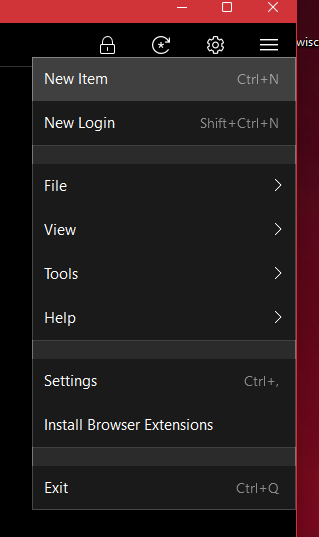
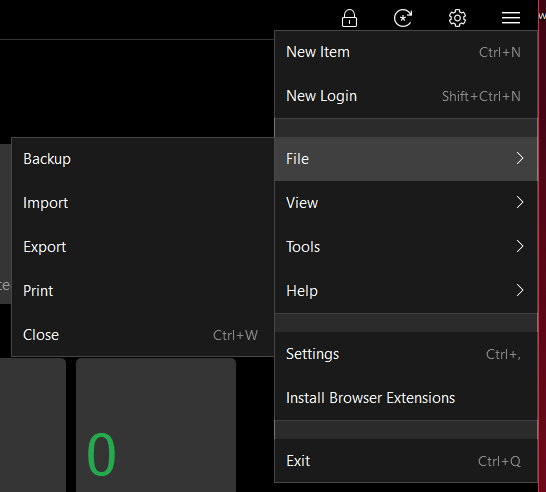
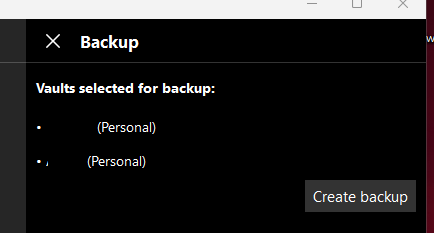
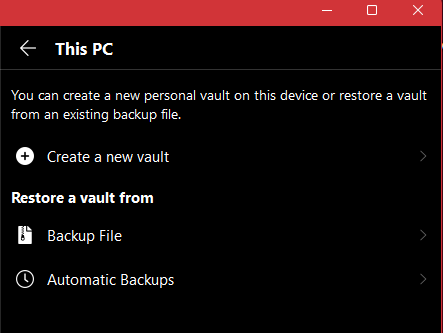
Assuming you have no online sync activated, you can easily backup and restore your vault(s). To achieve it, proceed as followed: 1. Open the "burger menu" 2. Click on "File" -> "Backup" 3. Check that your requiered vaults are listed 4. Click "Create Backup" and choose location to save. 5. Setup new Enpass. 6. Choose "This PC" when selecting vault location. 7. Select "Backup FIle" and insert the backup file.
-
I second this feature, as I also work with a lot of different ports and subdomains and I face this issue almost on a daily basis.
-
Export as CSV or similar and print it then. But that should not be needed, if you sync your Vault to a cloud drive.
-
Yes, OTP code can be added for every entry that supports them. You can also add Passkeys into your Enpass Vault from websites that support it already.
-
I believe the easiest way would be for you to create a new vault at a new cloud location and just copy all your items to the new vault and then just delete the old one, before copying your files *again* to the old cloud location but with a newly created vault.
-
But why do I have to reauthenicate my PC... I've licenced my version with the first install and if it's a system that runs w/o internet after initial setup, why would I need to reauthenticate? That's not in the spirit of a One-time purchase software.
-
The window opening up is a terminal window, but as of right now I also do not know if there is a possibility to not show it.
-
Direct bank != bank, you should have clarified. https://www.bank-verlag.de/fileadmin/user_upload/TOP_100___07.23.pdf I dont work for Enpass, little grumpy man. Your post still suggests old versions, so either update or don't complain.
-
Maybe update both FF and Enpass plus Expansion. I do not see the error nor can I reproduce it. Plus DKB is not even in the Top10 of banks, and as if it would matter.
-
Actually this is common practice on devices with biometic logins. And should be common sense to remember the master pass. I truly believe how severe your situation now is, but this is not a problem with Enpass itself, rather the user. Sorry to break this to you. How should Enpass warn you, when you change the fingerprint inside system settings? lol, Enpass doesn't monitor this.
-
Well, it dissappeared in my American Express App aswell and had to manually enable it again. So maybe (just maybe) Apple is also not without flaws (not saying Enpass isn't).
-
I had a similar experince using an old Notebook to do some manual configuration of my network stack. Couldn't open Enpass to view my data. Dissapointing. Please fix this urgent @Amandeep Kumar
-
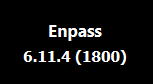
Can confirm no option for logs. WIn 11 Store Version. I guess this is not a good option as many people use the store version when they are not allowed to install other programs. Maybe implement it? @Tarun Singh Rawat
-
Not sure if an update to iPadOS 18 would fix this. Nevertheless, I had some similar issues with other apps aswell, so my guess here is a bug on Apples side.
-
What iPhone and iOS are you using?
-
You could just easily move all your data from Vault#2 to Vault#1 by following these steps: 1. Select Vault#2 in the generall Enpass window. 2. Click on any entry and then hit "CTRL + A" to select all entries. 3. Rightclick on the marked entries. 4. Select "Add to Vault" 5. In the new window choose Vault#1 and hit "Move to Vault" 6. You're all set and done.
-
What exactly is your problem with the exported .csv file? It is a totally usable file - maybe another manager has just issues with the phrasing. Without more information it will be hard assisting you.