Klaus Heim
Members
-
Joined
-
Last visited
-
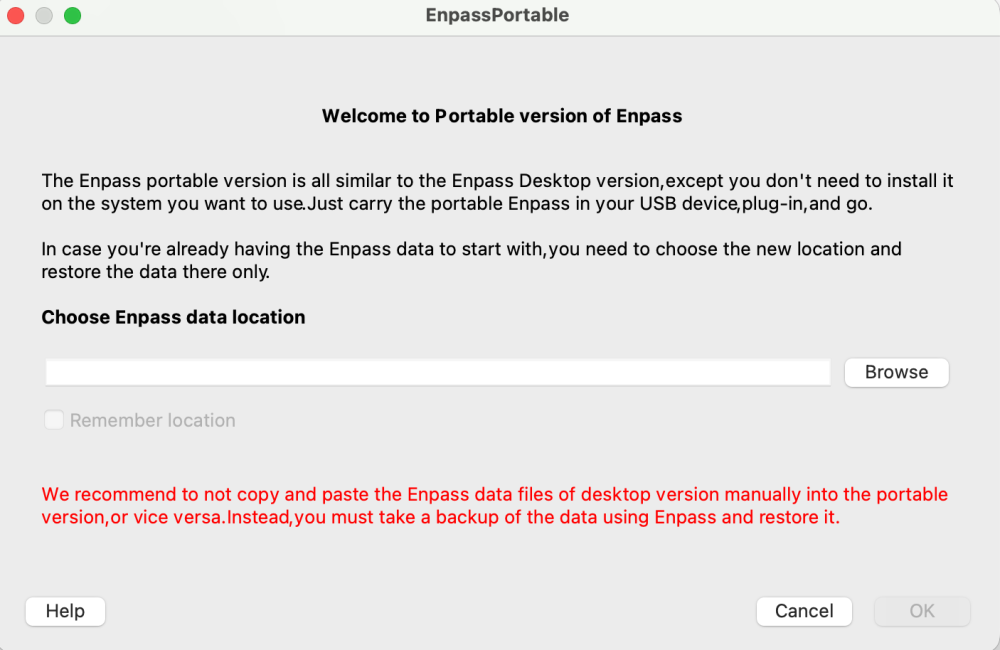
I found a workaround for Mac users that works for me. I copied the EnpassPortable app to a USB stick formatted as Mac OS extended. Previously, I double-clicked on EnpassPortable in Finder and got the error message “Unable to run app from current location...”. Here's how I was able to start EnpassPortable. I started a terminal and moved the working directory to the USB stick. In my case, “/Volumes/Volume,” so: cd /Volumes/Volume and then open EnpassPortable.app/. The above error message appeared when I started it for the first time. However, it no longer appears when I start it for the second time; instead, the Screenshot #2 screen appears. Here, I set the data location to /Volumes/Volume (my USB stick device), selected the Remember location checkbox, and confirmed with OK. And now the EnpassPortable app launches. To exit the app, please do not use the “red cross” but instead select Enpass -> Quit Enpass. This is the only way to exit the app properly. I hope this procedure works for other users as well. I "imported" a backup and noticed that restoring the vault took a very long time. I assume this is mainly due to the speed of the USB stick.
-
The size of Enpass vault.enpassdbsync of of the affected vault is 4 MB. This size also seems a bit large to me. I have another vault whose .enpassdbsync is 5.6 MB in size and contains very few entries. The WebDAV Software ist MagentaCLOUD (German Telekom) which use Nextcloud Software. Unfortunately, I do not know the exact software version. It only happened to me once. What was very strange was that it happened while I was on vacation and I accessed the vault from abroad. Between the last time I accessed it before leaving and the time I accessed it abroad, no one else accessed the vault. I am always available to assist with troubleshooting. I have spent my entire professional career in software development.
-
I “overwrote” the vault's master password and solved the problem. Can you tell me why the password is no longer accepted even though it hasn't been changed? I'm a little concerned because synchronization suddenly became impossible. Incidents like this cause you to lose confidence in the password manager.
-
Dear Support, I use Enpass on Mac and iOS. My vaults are synchronized via WebDAV. Recently, I received the following error message: “Synchronization error. Password required for data on WebDAV.” Which password is meant here? The vault password or the password for accessing the WebDAV account? Regardless, I am 100% sure that neither password has been changed. Regards, Klaus
-
Thank you for your support
-
I want to delete the Standard Enpass database that is currently stored in the iCloud. How do I do this? How can I check that no data is “left over” in the iCloud?
-
Hi is there any news on this matter? I have tried version 6.6.1 on Mac and it does not work as described here. On Windows the portable version works fine. It is very surprising that none of the developers seem to be available for the improvement.
-
I have exported my standard vault as .json and imported it into a new WEBDAV vault. In the new vault, I noticed that all passkeys are missing. Is this a bug or a feature. Is there a recommendation on how to copy an existing vault into a new vault, e.g. to change the cloud? Thank you for your help. Klaus
-
Dear @Abhishek Dewan Thank you for your answer.
-
Dear Support Team, I use Enpass on my MacBook. As a vault I use the primary vault. My wife also uses her primary vault on a Windows machine. I would like to import the backup file of the Windows computer on my MacBook. How can I import my wife's primary vault as an additional vault (e.g. wifes-vault). Thank you, Klaus
-
Hi marcor, unfortunately it happens again and again that a new update of Enpass leads to the fact that the synchronization with the iCloud does not work. Is it the primary Vault or an additional one? If it is currently not working, then unfortunately there is no other option than to trust that an upcoming update will make everything work again. I would be very happy if there was a way to install a new version of Enpass alongside the existing version. This would ensure that a working version would always be available.
-
I would like to join in and support the suggestion. I also miss this opportunity. Please restore the original functionality.
-
Dear Support, in version 6.2.0 the functionality of the password field was changed. In edit mode of a new entry you can not copy the password anymore. This is very bad. When creating a new account it can happen that a chosen (generated) password is not accepted. For this reason I get a password generated by Enpass, copy the password and enter it in the browser. Only after the change has been accepted by the website do I save my change in Enpass. I would be very grateful if you could find a copy option. Thanks Klaus
-
Hi HQJaTu, is it possible that you mean version 6.2.0? In this version I have the same problem. I opened the ticket ECS-1966. But the second level support is absolutely incapable! Instead of working on the problem, it closes the ticket for the 2nd time without answering or commenting. I find the behavior absolutely impossible. Regards Klaus
-
I tested with OneDrive, GoogleDrive, Dropbox and iCloud. iCloud is my preferred Cloud with my primary fault. As I mentioned before that primary and all other vaults are different. All clouds can be synched. But all other than iCloud are only for test with few items. My OneDrive Vault is synched and every thing is fine.