macRBC
Members
-
Joined
-
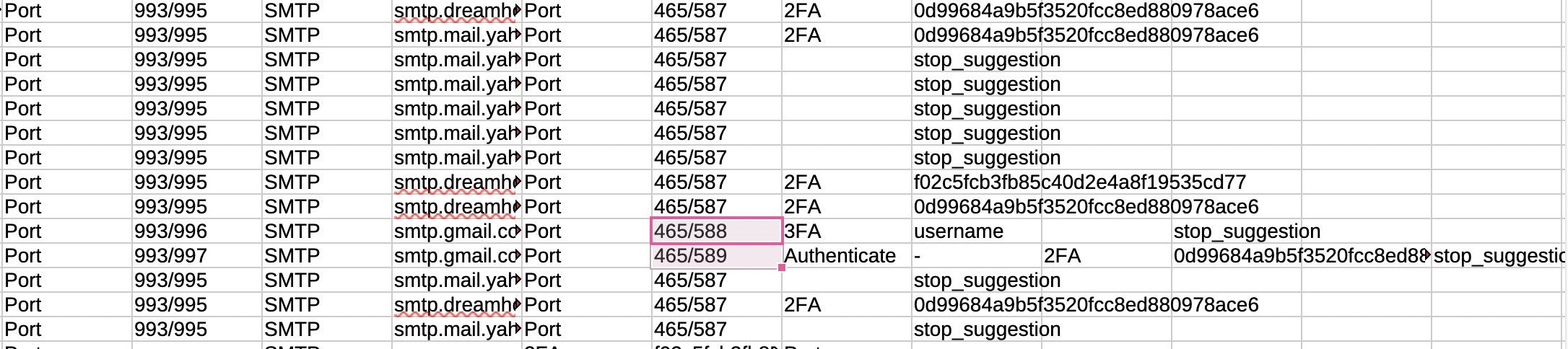
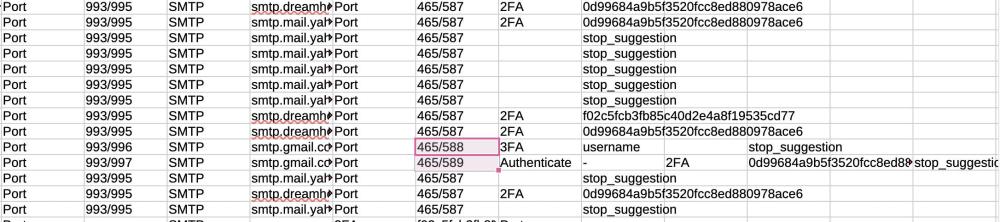
I exported my passwords (relating to my email addresses) and upon viewing the CSV file, noticed strange info that's not in any record! (Starts with the 2FA into the next columns). What is causing this? Using 6.11.19 (2206)
-
I signed into my MacOS iCloud account and do not see Enpass there, want to the app, clicked Vaults and iCloud. Signed into my iCloud account but do not see Enpass. Your #2 -- device is current iOS (26.2) so too MacOS (15.7.3) Your #3 -- not sure what you mean by "fresh setup..." Went to my iOS and tried to connect by selecting iCloud (as I did on MacOS) but got error that I have not set up an iCloud account. Did you mean delete Enpass and reinstall with same info from macOS? Your #4 -- not sure where the prompt fits in
-
I'm making another attempt to have my Enpass (6.11.17 (2132)) macOS device (15.7.2) passwords to "sync" over to my iOS device (26.1). Ages ago tried to get support and nothing ever worked. I've recently gone through every password and changed to secure passwords. Done on my iMac. Now I need those passwords on my iPhone SE. Not understanding why it doesn't "sync" like the other apps I use (email, calendar, notes, etc).
-
From what I've seen online, Enpass is not compatibe with macOS Sequoia. I've never had need to have the browser extension* install for Enpass to offer username/passwords. I cannot find option to use Enpass versus Apple's Password so only Password works. Enpass 6.11.8 (1860) works as an application in Sequoia so not sure if I have to settle on using two password managers. *using the browser extension states Enpass can read and alter sensitive information hence I've never activated.
-
As found in Google (AI) when searching "IS ENPASS COMPATIBLE WITH MAC SEQUOIA" According to information available, Enpass is not compatible with Mac Sequoia as it appears to be a non-existent macOS version, and recent Enpass updates have specifically addressed issues related to compatibility with older macOS versions, indicating that "Sequoia" is not a supported operating system. So, I ask -- will Enpass be updated? Apple's new Password app is terrible.
-
I upgraded my macOS to Sequoia recently and find I no longer can save usernames/passwords to Enpass. Only option seems to be Apple's Passwords. My preference is Enpass 6.11.8 (1860)I have paid version of Enpass on my iPod iOS 12.5.5. Followed your instructions to set autofill in my Settings. However, when on a Safari website requiring password, if I select Enpass, it takes me to the app instead of entering the user/password.I use Enpass mostly from the icon in the menubar. While I can create a new record, the Save button is greyed out. MacOS: Catalina 10.15.17 Enpass 6.8.2I only have one vault. Version is EnglishI use the Mac menu icon to access Enpass on my iMac. I've had problems many times tot being able to type into the search field. Only workaround is to open the full version which is not optimal. iMac OS Catalina; Enpass 6.8.0I keep Enpass in my menubar for ease of use. However, most times once it opens, I cannot click into the search field to type. I'm left having to open the full application. MacOS 10.15.7 CatalinaI'm confused which thread to use but still wanted reply to how to apply new template to existing records.I would like option to open a URL in browser of my choice I I don't want the default Safari. (Mac).I use the browser extension to retrieve username/password. Sometimes though data needs modifying. It would help if I could be taken to the same record when I open Enpass application (desktop),