Egregius
Members
-
Joined
-
Last visited
Everything posted by Egregius
-
+1 For this. Found out that I have lots of "old" password history. It would make my database a lot smaller if I could remove these.
-
I'm having quite the same problem but it only happens after multiple sleeps. If I quit and reopen Enpass it works perfectly fine. Then I put my Macbook in sleep. Upon wake Enpass asks for fingerprint authentication, again no problem. But if I put my Macbook to sleep a second time the Enpass extension doesn't work anymore. Then I have to close Enpass and reopen it again.
-
Working again here, thanks! Funny enough I downloaded from the beta page, after installing and opening another update popped up. Installed that one to before testing.
-
Also in DB5 still the same problem and no Enpass Beta yet. When may we expect that?
-
You're not gonna publish on https://www.enpass.io/beta/?
-
Indeed, same here.
-
And that's why I posted here. The developers aren't supposed to follow all forums etc. Now they know it and they can start looking for fixing it before the release of Sequoia. If a beta comes available to test I will be more than happy to test it. Ones you are used to the ease of use with Enpass you miss it a lot when it's gone!
-
I already did all these steps before posting. Did them again but the problem remains.
-
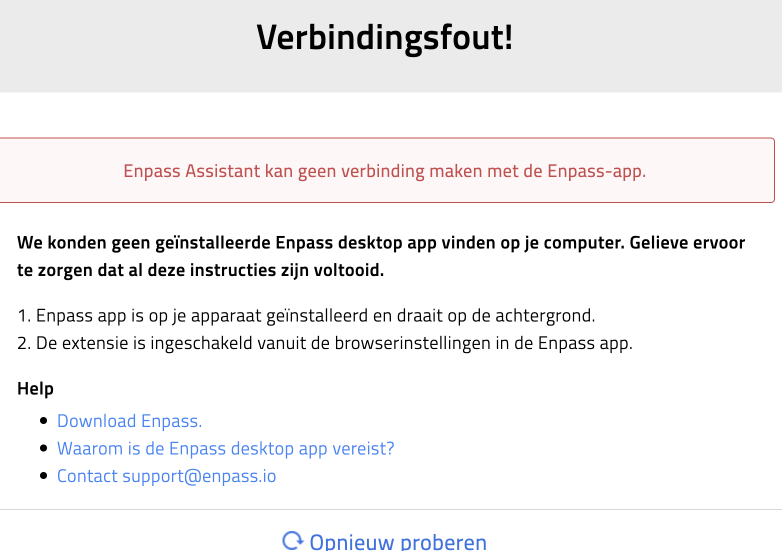
Since I've updated my Macbook to Mac OS 15 Sequoia developer beta 1 the Enpass extension doesn't work anymore in both Safari and Chrome.
-
Sorry, don't understand that part. Where can I ad them? Or do you mean I have to manually re-add them completely? Is it possible to do it with a export/import?
-
I got it working now in Enpass 6.7.4 on Mac I duplicated my entry to have a backup of it. Than copy/pasted all required fields to the login page of Bitvavo and the webform got saved. After that I had to change the webform mappings and can now confirm that the login works as expected. Is there any way to add fields to the webform without needing to re-add the entry to Enpass? I have lot's of entries where I would like to add a "remember me" checkbox to the webform.
-
It does, I like it! Thanks for that great update!
-
Alltough my primary computer is an iMac I tested the 6.7.4 on Windows and the issue remains. I do like the new "default password manager" in Chrome on Windows! Is that also coming to Mac?
-
Thanks for the update! Glad that the team could reproduce it, that't the first step in fixing something Please let me know when I can beta test it.
-
Any new on this?
-
Hi, Thanks for testing! I already had that option enabled, so I disabled and enabled it again. Same results for me. When I select the site from the browser extension username and password are filled in and the form is submitted. That results in an error because the TOTP isn't filled in. Then the TOTP is filled in and the form is resubmitted after which a successful login occurs. But, then a mail arrives for the unsuccessful attempt and after a number of those you have to fill in a captcha check. I just tried this in several browsers: Chrome 94.0.4606.81 on Mac OS Monterey 12.0 Safari 15.0 on Mac OS Monterey 12.0 Chrome 94.0.4606.81 on Windows Server 2016 Tried with these Enpass versions: Enpass Beta 6.7.2 (885) on Mac, Enpass 6.6.0 (775) on Windows and Enpass 6.7.2 (887) on Windows.
-
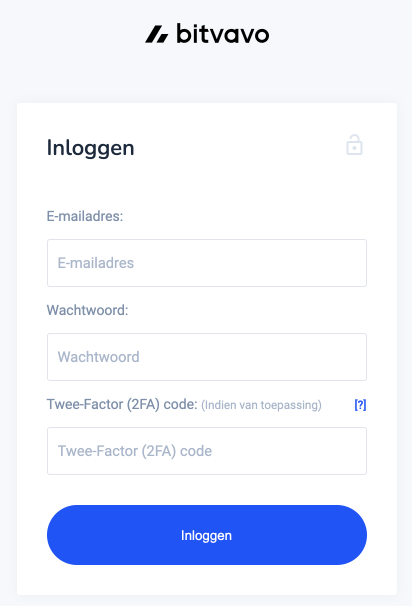
Hi Forum, I've been using Enpass for quite a while now and I'm absolutely a fan of it. Recently I joined the website bitvavo. bitvavo is a crypto currency site, so 2FA is a must. The problem on this site is that the login form asks for username, password and TOTP in 1 form. Enpass is only filling username and password resulting in an error. If I first copy/paste the TOTP it works ok, but of course it would be nice not needing to do that. Thanks for looking into this!