


Abhishek Dewan
Enpass team member
-
Joined
Everything posted by Abhishek Dewan
-
Hi @aurelien.rasse Our development team is aware of this bug and they are working on fixing it. I will be unable to share any ETA at the moment but will be sure to update this forum once a patch addressing this issue is released. We appreciate your kind understanding and patience in the interim.
-
Hi @rdfhrn Thank you for sharing the details. It seems that you are using an older version of Enpass. Kindly update your Enpass app to the latest version 6.8.5 and share your findings. If the issue persists, do share the version of the Enpass Extension, OS and browser as well.
-
Hi @TomsCat I understand that you wish to sync Enpass vaults with different Nextcloud accounts but the browser limits you to login with the first Nextcloud account. In this scenario, I suggest you after syncing your first vault, log out the Nextcloud account from your browser and clear its browser cache and try to sync the second vault. Let me know if again you got the first vault’s Nextcloud account login. Also share the below details with me and I will gladly get this investigated for you - The exact version of the Enpass app and OS you are using on all your devices. Kindly create a demo account and DM me its URL, username and password.
-
-
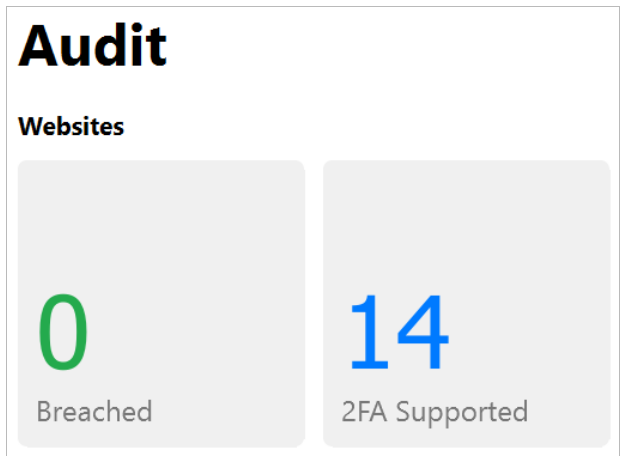
Hi @Vini Enpass’s Password Audit lists all your Items that could be upgraded to app-based 2FA security. From this list, Enpass can help you update those Items to automatically fill in the required one-time codes whenever you log into a 2FA-secured account. To learn more about how you can use Enpass to check for 2FA supported Items, please refer to this link.
-
Hi @Petr For troubleshooting purposes, please try the below steps - Kindly check that you have the latest version of browser installed. Also, try re-configuring the extension, and reinstalling it from here. Try clearing the cache and cookies of the browser. If the issue persists, please share the below details and I'll have this further investigated for you - The version of the Enpass Extension you are using. The URL of the webpages on which you are facing this concern.
-
Hi @Christoph Sonnen I would like to share that Enpass displays the 'Save as Webform' option if the webpage has a password type field. If the webpage has a password type field and still you are not getting the option to save Web-form, then please let me know the URL of the websites on which you are facing this issue along with the Enpass app, Enpass Extension and browser version you using on the same device.
-
Hi @GeoCrackr Thank you for sharing your valuable suggestion. You will be pleased to know that Enpass developers are aware of this feature request, and they are already working on implementing it. Moreover, I have also shared your comments as feedback with them. I will be unable to share any ETA for the same, but I will be sure to update this forum once it is released. Your support and patience in the meantime are greatly appreciated. #SI-3240
-
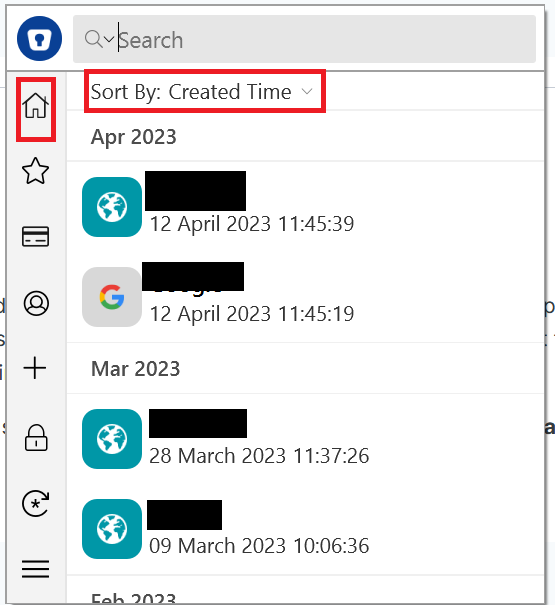
Hi @jyuviole Welcome to the Forums. If I have understood your concern correctly, and do correct me in case I'm wrong, you are referring to Enpass Extension when you mention Enpass tray panel and you are unable to view recently added Items on Enpass Extension? If that is correct, I would like to share that the Enpass extension automatically detects login forms in your browser and shows you the matching Items in Enpass that can be used to Autofill the form. If you would like to view all the Items, you can do so by clicking the 'Home' icon and then sorting by 'Created Time'.
-
Hi @Piyush_Priyanshu We have received your query on support@enpass.io and have responded to the same. To avoid duplication of efforts and confusion, we request you to please revert to the same. We appreciate your understanding in this case.
-
Hi @Noah Williams Thank you for sharing your thoughts on the possibility of Enpass supporting PassKey, which is gaining popularity across different platforms. As an FIDO Alliance member, we are dedicated to providing a secure solution for managing passwords, and our team is already aware of the request for this feature, rest assured, Enpass will provide support for PassKeys soon. We also agree with you that supporting a PassKey, will be a logical step for Enpass, given our core focus on providing a secure, cross-platform tool for syncing encrypted vaults. Once again, we thank you for your valuable feedback and for choosing Enpass as your preferred password manager.
-
Hi @Ronan We have received your query on support@enpass.io and have responded to the same. To avoid duplication of efforts and confusion, we request you to please revert to the same. We appreciate your understanding in this case.
-
Hi @xmestessox Windows Hello is indeed secure to use. Kindly refer to this link to know more about it.
-
Hi @MrGrumpier Welcome to the Enpass Forums. Please refer to the steps in this link to know about using the browser Extension for Enpass.
-
Hi @Ivarson I certainly understand your point. However, the issue on the forum you are mentioning is marked as fixed. In case you are still facing this issue, I would be happy to get this checked. Kindly share the requested details in this forum and I'll get this investigated for you.
-
Hi @Ronan On the devices on which you are facing this concern, please try the below steps - Take a backup of the Enpass Data on your device from Enpass Settings → Vaults → Select the Vault → Backup. Uninstall the Enpass app from Enpass Settings → Advanced → Erase everything. Reinstall the app and restore using the backup file. Sync the Vault with the Dropbox Account.
-
Hi @justaguy Please share the below details and I'll have this further investigated for you - The version of the Enpass app and OS you are using. Are you facing this issue for all the Items you have saved or any particular ones?
-
Hi @randomusername Welcome to the Enpass Forums. We have received your query on support@enpass.io and have responded to the same. To avoid duplication of efforts and confusion, we request you to please revert to the same. We appreciate your understanding in this case.
-
Hi @c9czechrep Welcome to the Enpass Forums. Your disappointment in this matter is certainly understandable. For troubleshooting purposes, please create a manual backup of your Enpass data and then reinstall the app. If the issue persists, please share the below details with me - The version of the Enpass app, and OS you are using. Your Hardware device specifications (Ram, processor, SSD, etc) The total number of Items, Vaults and attachments you have saved in your Enpass app. The cloud service (if any) you are using to synchronize your data.
-
Hi @Catherine Welcome to the Enpass Forums. Synchronization in Enpass depends on time stamps. When you will set up synchronization between your Android device and the Desktop app, all your Items from the Android app will automatically be available on your Desktop Enpass app. To learn more about Wifi-Sync, please refer to this link.
-
Hello Everyone, We forwarded this request to our developers and we would like to inform you that we were not able to reproduce it. In spite of rigorous testing and quality checks on multiple operating systems/machines, Enpass was not able to locate the glitch/bug reported by the user. During this scenario, we would recommend that Enpass be updated/reinstalled (including OS). In case this issue gets reproduced in the future, we will update this forum. Any inconvenience caused is deeply regretted.
-
Hi @mrc247 Our development team is aware of this bug and they are working on fixing it. I will be unable to share any ETA at the moment but will be sure to update this forum once a patch addressing this issue is released. We appreciate your kind understanding and patience in the interim.
-
Hello Everyone After thoroughly discussing this case with our developers, I would like to inform you that we were not able to reproduce this issue. In spite of rigorous testing and quality checks on multiple operating systems/machines, the glitch/bug reported by you couldn't be identified. During this scenario, we would recommend that Enpass be updated/reinstalled. We will also keep you posted if in future this bug is reproduced. In case you are using the Enpass app Mac AppStore version and the app is crashing for you, kindly share the crash report with us. Any inconvenience caused is deeply regretted.
-
Greetings everyone, I am excited to share that Enpass is planning to integrate a crypto wallet into the Enpass Application. I understand that this has been a long-awaited feature and Enpass appreciates the support of our community. In order to expedite the development process and ensure we meet the needs of our users, I am seeking expert assistance regarding the details and designs for the crypto wallet. Enpass welcomes your valuable input on what you would like to see in terms of features and functionality. I am also posting a proposed template field and would love to receive feedback from those who have already used it. Enpass values your feedback and guidance to ensure that this feature is executed flawlessly. Let me know if there are any changes that need to be made to the proposed template below. Thank you again for your continued support and enthusiasm. I look forward to sharing more updates with you soon.
.thumb.png.b490428fbfc76ca8e6de8b56da9437f8.png)
.thumb.png.613596cbc65c6d5cb29fd6de2be47531.png)
-
Hi @MrElectrifyer In the admin console, please check if you have disabled the below setting in the screenshot -






.png.412996a5224211355a2dc52e8dd3cf65.png)
.png.28257307ad10fa6e268193c8b29c70dd.png)
