Abhishek Dewan
Enpass team member
-
Joined
Everything posted by Abhishek Dewan
-
Hi @paco I appreciate you sharing all the details with me. I have forwarded all the details to our dedicated testing team and will get back to you soon with an update. Your patience in the meantime is appreciated. #SI-3015
-
Hi @paco Thank you for sharing the details. While we look into this issue for you, if possible, could you please also DM me the details of a Demo account and share its URL, login-id and password? That will help us in getting to the root of this issue. We appreciate your co-operation in this matter.
-
Hi @Redeemer Apologies for the inconvenience caused to you in this matter. Please try the below steps to disconnect the endless syncing loop - Go to Enpass Desktop application → Wifi-Sync → Start Wifi-Sync → Select the Vault with the Onedrive issue. It will ask you if you wish to disconnect from Onedrive and use WiFi-Sync. Please choose yes, then close Enpass and reopen. Then visit the same Wifi-Sync page → Disconnect Wifi-Sync. Now, your Onedrive cloud account should be disconnected from the vault. Hope this helps!
-
Hi @APremiumUser We are still investigating this concern as to why this issue is occurring in order to get to the root of it. I will not be able to share any ETA at the moment but rest assured, I'm personally following up on this case for you and will notify you in case of any updates on this matter. Enpass appreciates your co-operation and patience while we look into it for you.
-
Hi @wuesti In that case, could you please share the Webdav configuration of your server? It will help us in replicating this issue on our end.
-
-
Hi @paco Thank you for sharing the details. You can enable logs in our website version of our application. Here's how you can do it - Go to Settings → Advanced → Logs → Enable. Try synchronizing your laptop. When the error occurs, open the Enpass app and visit the same Settings as above and click on 'Show Logs'. You can then copy the content of the logs in a .txt file and share it with me here or DM me. Also, I would appreciate it if you could also share your laptop device details (Enpass and OS version) and if you are using any VPN/Antivirus service.
-
Hi @microg Thank you for notifying me that the issue you were facing got fixed in apache 2.5. Moreover, we’re always excited to welcome valuable suggestions from our users and entertain users requests for new features. Your inputs have been forwarded to our dedicated team for further consideration. We appreciate your patience in the meantime.
-
Hi @paco Welcome to the Enpass Community. To assist you better with your query, please share the below details with me and I'll have this investigated for you - The version of the OS you are using on your Mac. If possible, could you please also DM me the details of a Demo account and share its URL, login-id and password? That will help us immensely in identifying the issue.
-
Hi @ThomasH Welcome to the Enpass Forums. We are still looking into this concern. Could you please share the version of the Enpass app and the OS of the device you are using on which you are facing this issue? I will then pass the details to our team for a thorough investigation of this concern.
-
Hi @APremiumUser Thank you for sharing the details. I have forwarded them to our dedicated team for a thorough analysis of the issue you are facing. As soon as they update me, I will get back to you on this forum. Your patience in the meantime is appreciated.
-
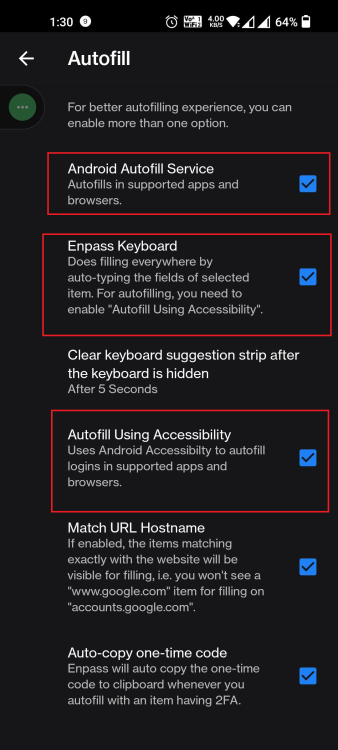
Hi @ralphi Welcome tot he Enpass Forums. For troubleshooting purposes, please disable and then re-enable Android Autofill Framework (Service), Autofill using Accessibility and Autofill using Enpass Keyboard in your Enpass Android app → Settings → Autofill. Let me know if the issue persists.
-
Hi @olno I appreciate you trying the troubleshooting steps I shared with you. If the issue persists, you can personally message me the details of the Demo account, and I'll get it checked for you.
-
Hi @APremiumUser Kindly share the version of the Enpass app and OS you are using. I will then have this further investigated with the team.
-
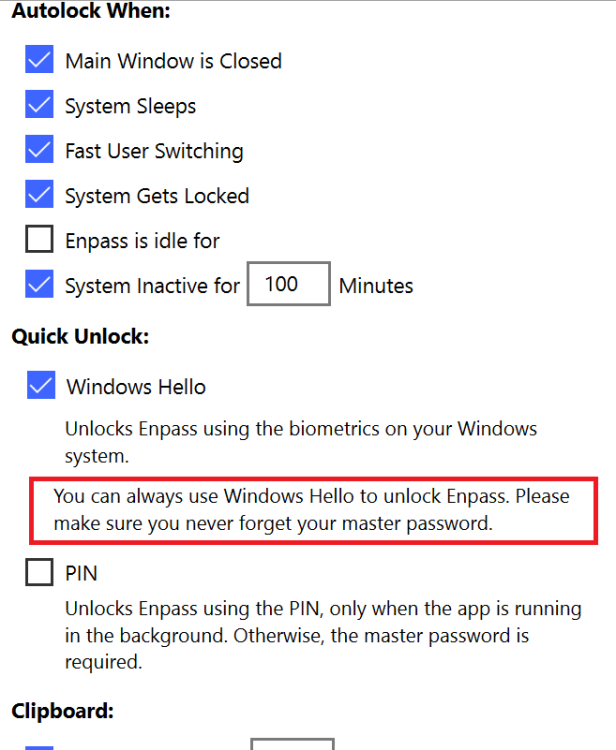
Hi @APremiumUser We are glad to hear that you like using Enpass; thanks for all the support! Enpass does support Full-Time Windows Hello, even when you restart your device. Whether the full-time Window Hello will work on any device totally depends on the Windows itself. To determine the compatibility of the device to support Full-time Windows Hello (feature is only available with Enpass Store version), Enpass relies on this API provided by the Microsoft . It is the only way to distinguish whether the security keys are generated by a legit Hardware TPM. There is little Enpass can do in this case. Although for external TPM is available in the market we cannot ensure that they will support the given API. If your system supports Full-time Hello unlock, you will see a similar message under Windows Hello -
-
Hi @celavakosa Thank you for the suggestion. I have forwarded your comments as feedback to the development team so they may improve upon it in the future Enpass version.
-
Hi @compoundbow83 We were able to reproduce the concern reported by you, due to which the touch ID is not working for you, and Enpass is not accepting the master password on the first attempt in Mac. Our dedicated team is working on resolving it, and a patch addressing this issue will be released soon. Regarding having to authenticate your Pro license again after completely closing the app, kindly DM me the email address to which the license is linked and the system details on which you are facing this issue. I will then have it investigated for you.
-
Hi @wuesti We are looking into the concern reported by you but require some additional information. Could you please create a demo account of your Webdav server and DM me its login-id and password along with the URL? This will help us in identifying the issue.
-
Hi @compoundbow83 I have forwarded this concern to our dedicated team. As soon as they update me regarding this matter, I will notify you. Your patience in the meantime is appreciated. #SI-2997
-
Hi @wuesti Thank you for sharing the details. I have forwarded this concern to our dedicated testing team and as soon as they update me on this matter, I will be sure to notify you. Your patience in the meantime is appreciated. #SI-2995
-
Hi @daknecht To prevent Enpass from automatically logging you into a webpage after autofilling, you can untick 'Automatically Login after filling details' in your Enpass app -> Settings -> Browser -> Autofill. Hope this helps!
-
Hi @celavakosa We don't recommend synchronizing the Enpass data location folder to any network. You can change the Enpass data location other than the Document folder and then sync your Document folder.
-
Hi @APremiumUser Thank you for your valuable suggestion. You will be pleased to know that the requested feature is already on our development roadmap. Moreover, I have also shared your comments as feedback with our development team. We appreciate your patience while we work on implementing this feature for future Enpass versions. #SI-1899
-
Hi @compoundbow83 We are looking into the concerns reported by you. In the meantime, could you please share the version of the OS and also try disabling and then re-enabling the Touch ID in your Enpass Mac app to check if the issue persists? If you are getting any error, kindly share a screenshot of it as well. We appreciate your co-operation in this matter.
-
Hi @wuesti Welcome to the Enpass Forums. To assist you better with your query, please share the version of the OS you are using on your Android and Linux devices and I'll have this investigated for you.