MacFreek
Members
-
Joined
-
Last visited
-
It seems I was unknowingly subscribed to the beta stream. It was easy to revert, and now Enpass is stable. I guess the good news is that Enpass beta was usually so stable I never noticed. And in other news, the devs probably need to tweak this new version before releasing it @admin, please move this thread to "Enpass beta" category.
-
Since upgrading to Enpass 6.12.0, I experience more crashes than usual. About 3 in the first day after updating. Here is two ways how I can consistently achieve a crash. Steps to reproduce: Open Enpass 6.12.0 on MacOs 15.7.4 Enter the Master Password to unlock Click the "Lock" button in the top right corner of the main window Alternative: Open Enpass 6.12.0 on MacOs 15.7.4 Close the main window (either by clicking the red close button in the top left of the window, or by choosing Close from the File menu) The crashes are consistent and easy to reproduce. I've attached two crash logs. In the mean time, I'll have a look if I can revert to an older version. Enpass crash when clicking lock button.txt Enpass crash when closing window.txt
-
That is a good approach! I quickly found the two affected records, and fixed it. Thanks for the suggestion!
-
I accidentally have a few items in my Enpass database with a trailing space in my email address. E.g. "myname@example.com ". I like to find those entries, but when I search for that, Enpass searches for "myname@example.com", and finds basically all records. Is there any way I can figure out which records have a trailing space in the email address? Sadly, going over each one manually won't work, since I have >500 records in Enpass by now...
-
@Pedro O: I can explain what my work-around was, but it is a bit technical and I doubt if it helps you, sorry. In my case, I was trying to link Enpass on a Windows laptop with a my vaults on a Mac desktop. For whatever reason, the multicast DNS messages that the Mac was broadcasting did not reach the Windows computer. Now I did two things: 1. I tried to open as many firewall ports as possible. Admittedly, this is not a good advice in general, and for me it actually didn't seem to work at first, but perhaps it was required. I don't know, I did it anyway. In Windows Security (In Windows 11, this is an app, separate from Windows Settings), go to the "Firewall & network protection" tab. Here, make sure "Private network" has the word "(active)" behind it. Than, click "Allow an app through firewall". This opens a new window, where I first had to press "Change settings" before I could make any change. Here, I made sure that the tick boxes were ticket (for "Private" (network) in particular) for the following apps: "Bonjour Service" (if it is listed), "Enpass Password Manager", and "mDNS". Note that Bonjour (old name of DNS service discovery) and mDNS (multicast DNS) is the mechanism how an Enpass server announces itself over the network. 2. Now, for whatever reason, it still did not work. Before you proceed, open enpass, and try to add a Vault, till you reach the "Select Server" with the "Looking up for servers..." spinning 'ball'. mDNS services broadcast their presence on the network every 30 seconds or so, and the results are cached. Something seems to go wrong with the caching on Windows, and despite waiting longer than 30 seconds, the server never showed up. However, I found that if I query the advertised service, it will show up, even on other devices. So what I did was use a little app written by Lily Ballard of Tildesoft, called "Discovery" (formerly Bonjour browser) to query the Enpass service. I did so on my iPhone, making sure it is on the same wifi network as the Enpass service. Just open the app, find any service of type "_enpasswifisync._tcp", open it, and click it again for more details. For whatever reason, as soon as I did this on any computer on the same wifi network as the Enpass service, at that same time, it also shows up on the Windows machine, I was able to proceed. Unfortunately, this Discovery app is only available for Mac and iPhone (links point to the app stores), and I do not know of an alternative for Windows or Linux (there is an command line tool called dns-sd, but I never tried that). So if you have a Mac or iPhone on the same network, you can give the DNS-SD discover app an try. It seems like a long shot, but perhaps it works. Let me know the result.
-
Tarun and Amandeep, thanks for your suggestions. I got it to work by fiddling with the firewall settings. My feature request remains, because I doubt that I'm the only one experiencing firewall issues, or that this is the last time I encounter it. For the record, indeed it was the multicast DNS package (which is the network traffic that ensures service discovery for the server) that somehow did not reach Enpass, and connecting to the server (on another computer) worked just fine. So indeed, giving me an option to manually fill it in (like I could with my phone) would still be useful as a backup option. Thanks for considering this.
-
Hi, I finally purchased lifetime license for my 3 family members. I had no issue setting up multiple vaults and syncing them from iPhone, Mac or Android to my Mac. However, the Windows 10 laptop of my wife can't find any servers when I select "wifi sync". I'm sure this is some firewall issue on Windows 10, and I suspect the desktop can community just fine with the Enpass server, it is just the initial server-discovery that does not work. I do have the server address and port (convienantly display in Enpass). How to I manually enter the address of the Wi-Fi Sync Server on the Windows client? Right now, I can only click "Wi-fi sync" and see it searching and searching for a server. I would expected that after a few seconds (or a minute) I would receive a message "no server discovered" with the option to manually enter the server IP address. Is there a way to manually enter the server IP address? And if now, would you kindly consider this as a feature request? Thanks!
-
Amandeep, thank you for taking this feature request into consideration! I hope that it will be easy to implement, and eventually will end up on the Enpass backlog! (And for others who like this feature too, feel free to respond here with a short like or reply. Perhaps that may help moving it higher up the queue).
-
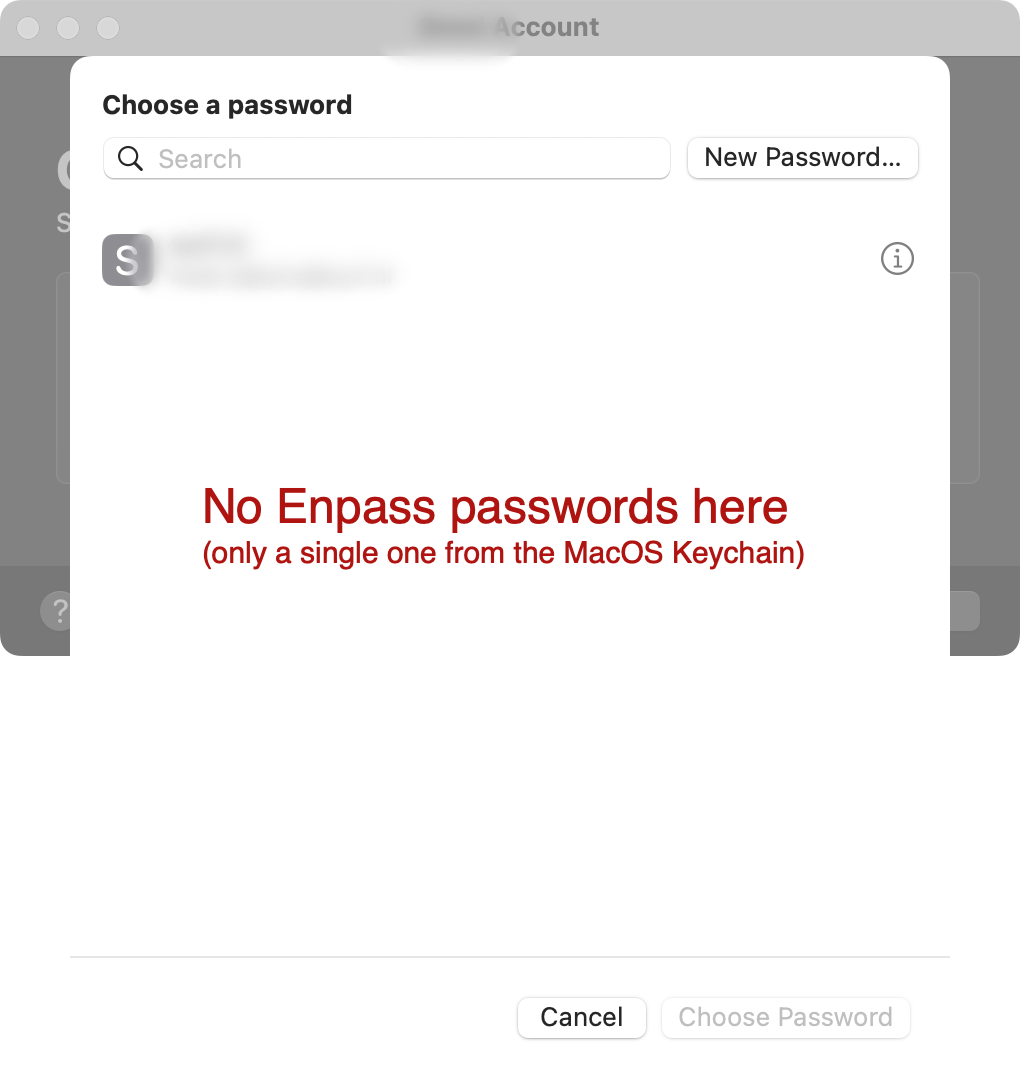
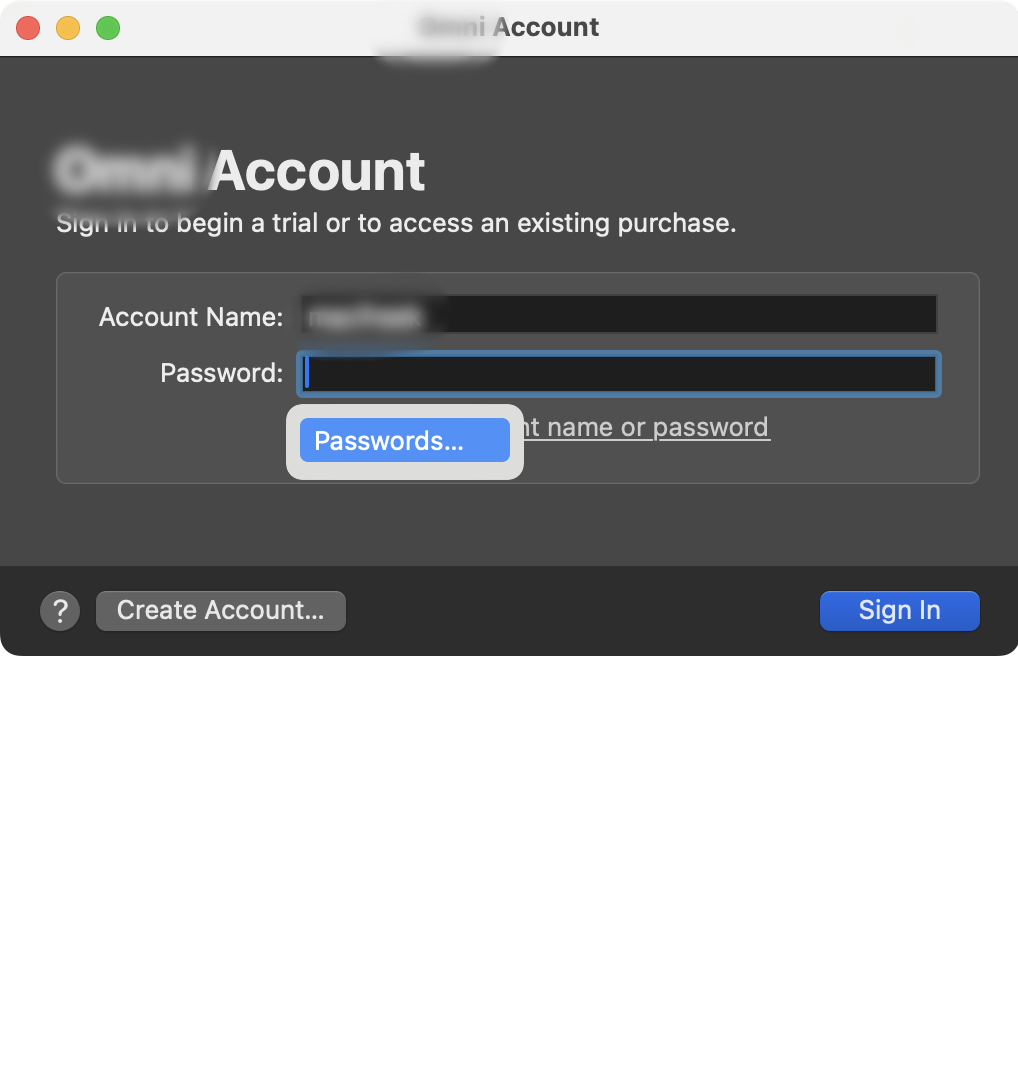
Hi Amandeep, I'm afraid you misunderstood my question. I'm aware of that functionality, but that is not what I meant. I like to use Enpass as a password manager for applications, other than webbrowers. This is possible, for a long time on iOS, and recently I've noted that MacOS applications are also have to possibility to access a password manager other than the build-in KeyChain. Here is an example what I'm missing. The screenshot below an example of an Application asking me to log in. I have that account stored in Enpass, but it does not show up in MacOS. With the functional described in my post above, all Enpass passwords would be made available, and on iOS, this already works flawlessly. I would love this functionality to come to be available on MacOS too. Hope this clarifies my question. → Freek
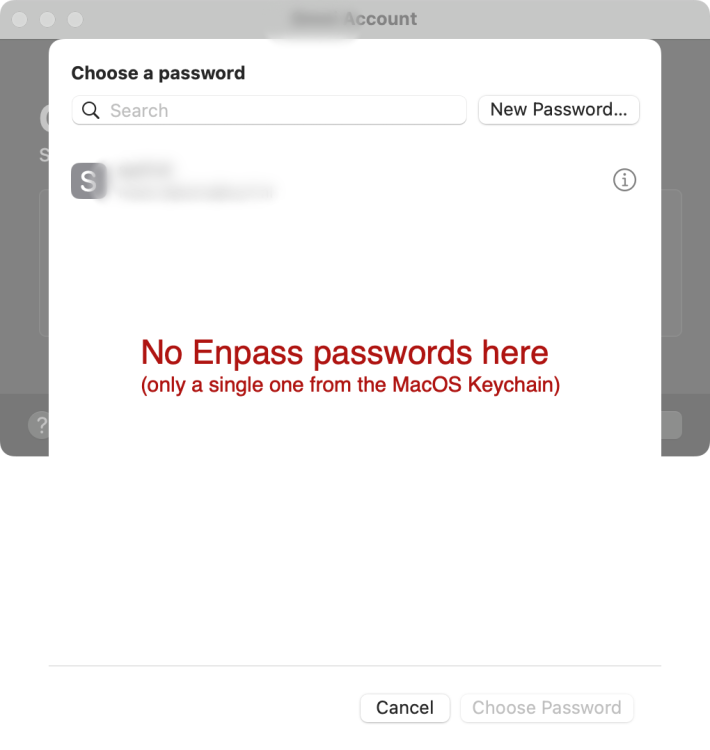
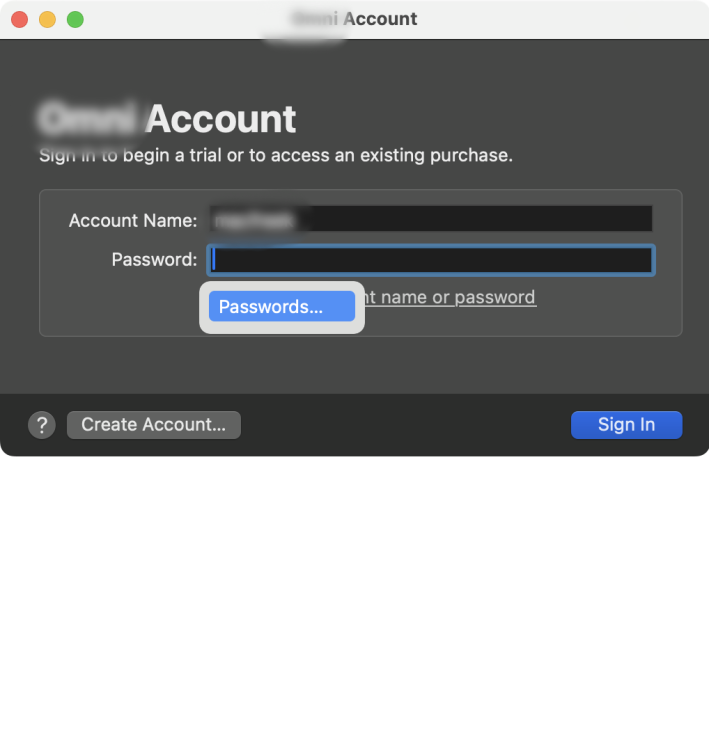
-
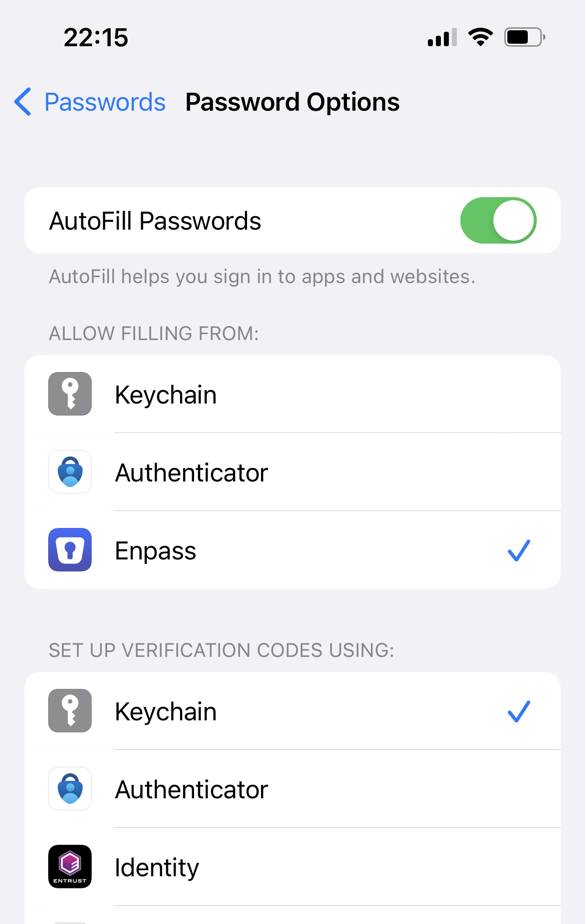
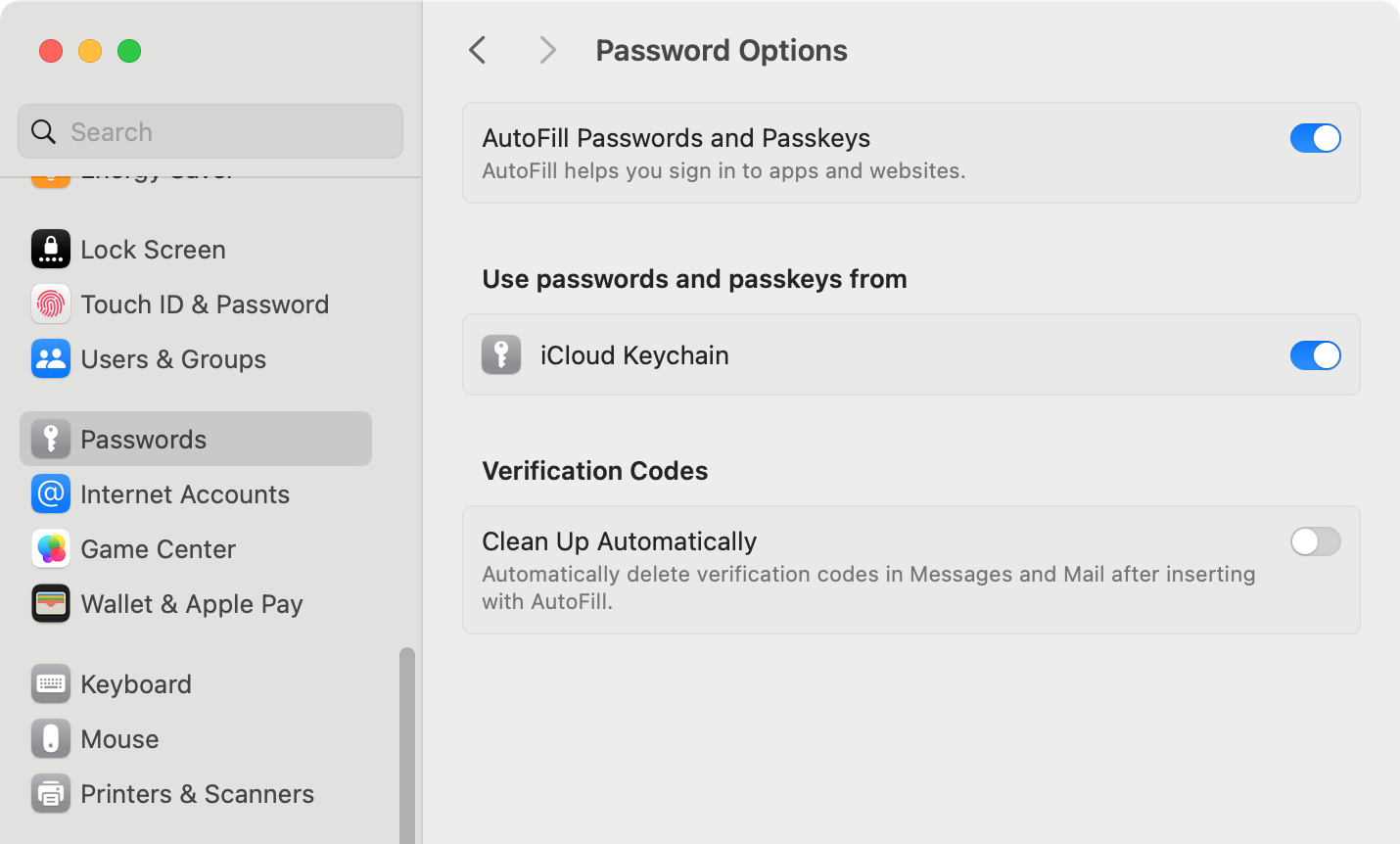
Hi, on iOS it is possible to set Enpass as the default password manager, so other apps use it too. This is done in Settings > Passwords > Password Options. (See screenshot) Is this possible on MacOS too? With Enpass 6.9.4 on MacOS 14.3.1, it does not show up in the Settings: I would love Enpass do have the same integration on MacOS as it has on iOS!!
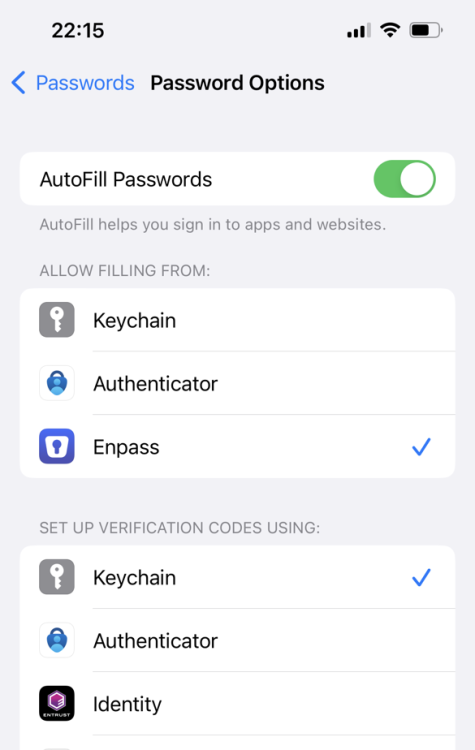
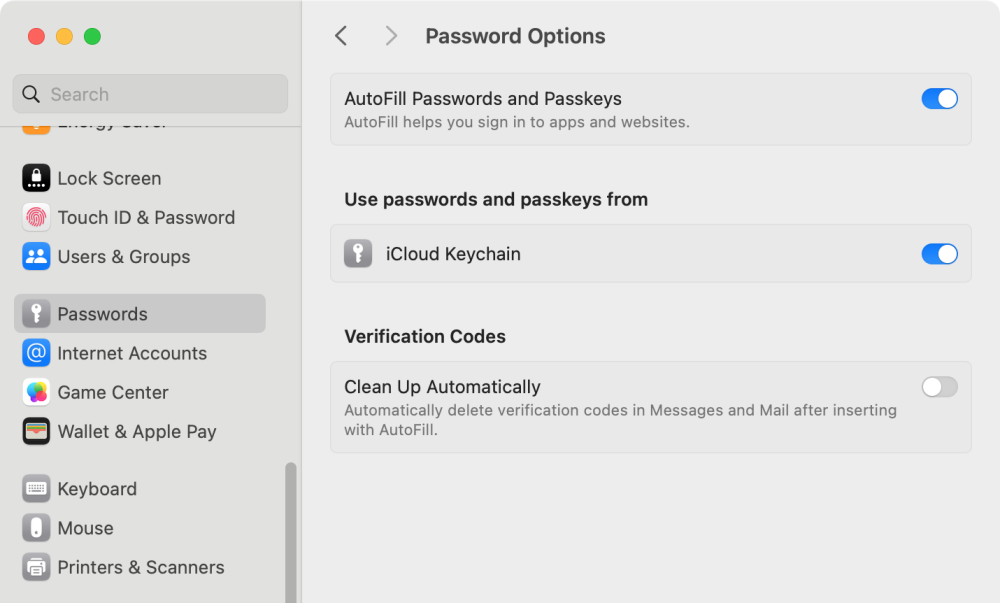
-
Hi, Autofill doesn't work for me on the form at https://mijn.freedom.nl/users/sign_in. When I try it, Enpass does add the correct username and password in the fields, but no other visible action is performed. Seemingly, the form is not submitted. In addition, after using the Enpass autofill, the form will no longer accept any input: clicking the "inloggen" (= "log in") button does not work. Only if I reload the page and fill in the same data manually, the form works as expected. I kind of suspect that some anti-bot feature is at play in this form. If you like to check what's going on with this form (and perhaps fix Enpass), I'd be very happy. I did create a temporary account here, with login enpass-test@macfreek.nl, if that helps in debugging this form (the form is from an small Internet provider, this is their settings page, I created a temporary mail box for you to test this form). For the password, use DM or ask me at freek@macfreek.nl (I'll reply only to employees with a @enpass.io mail address). Thanks, Freek
-
Thanks for tracking this down to iframes and Enpass extension. I can confirm that this issue is not limited to Firefox; I have the same problem with Opera (which is a Chromium-based browser). And because of this issue, I can't fill in forms on a Jira ticketing system, which is frequently used in our organisation. (And yes, it took me, and some of the support staff some time too to trace it to a bug in the Enpass extension! This was a painful dent in the reputation of Enpass to me! ) Thanks for informing us about the workarounds. I have deactivated the Auto Fill Menu; The feature is nice, but I rather stay on a more robust software track instead of dealing with features that are released prematurely. (And if I sound grumpy, that's because I've been dealing with this issue for the last months and only now realised that Enpass is the source of these problems)
-
I like to see a feature in Enpass, under audit, which lists all items that have an attribute of type "Expiry Date" whose date is: Within 3 weeks Within 3 months In an unknown format This would help me keep track of (bank) cards or (drivers) licenses (or any other item) that will expire soon, and that I have to act upon. Note: I am explicitly referring to attributes of type "Expiry Date", not type "Date" (which also exists). Also, the "unknown format" will help track down field that are in a format not understood by Enpass (since Enpass does not seem to do any input validation for these fields).
-
I like to see a feature in Enpass, under audit, which lists all website address that still use `http://` instead of `https://`. Current workaround: search for "http://" and you will get these yourself. However, it would be nice to have these under audit.
-
Hi Garima, thanks for listening to my rant, and taking the time to reply to it. I really appreciate that. The support was kind enough to provide a discount code to upgrade Pro to Premium, and I immediately bought the lifetime premium deal. I'm looking forward to continue to use Enpass.