JFS
Members
-
Joined
-
Last visited
-
Hi, since I have the new design version of Enpass, the arrow key doesn't work like before. Before, I could navigate through all fields when I used the mini version. Now I can only go into a login entry but can't navigate from one field to another with the arrow keys. This makes it really hard to use Enpass effectively. Best
-
Hi, and how does this work in MacOS? Here I don't have a Hamburger menu and in the threepoint menu is no printing function. Best
-
Hello, I have two vaults in Enpass 6.11.13 (2032) and I try to sync them over Nextcloud. But I the error taht I can only sync one vault with one user. How is this a problem if I use different paths? Or is there a ignore of subpaths? Will this work with native webdav? Best
-
Hello, four years later. Is any development to be expected in the near future? I would love to see a extension for Raycast. It would be a blast in my workflow. Best
-
Hi, I got a endless loop on Ubuntu 24.04.2 LTE if Chrome is locking for an open Enpass. It’s open but the search tab will open and close endless. Looks like a endless flash. And I don‘t found a way to stop this. Best
-
Is there a possibility to download the apk for Enpass directly from you? Google is pointing that my device is not supported. I use an chromecast google tv. In some apps I have an clipboard to paste passwords in so I want to try if this will work. But I don‘t want to download the apk from illegal sources. best
-
Hello, I have the same problem witch sharing. And I can remember that it worked before also without PSK. Why do you come to so problematic a decisions? And in which menuitem can I find the generated PSKs for my teammember? best
-
So I have the same problems since some days. According to all the other problems I have with Enpass which will not resolve.
-
Hi, super cool!
-
Hi, I use the Enpass version 6.8.5 (1256) from the Appstore, Mac OS Big Sur 11.7.4 (20G1120) and Enpass Extension is Version 6.8.3.
-
-
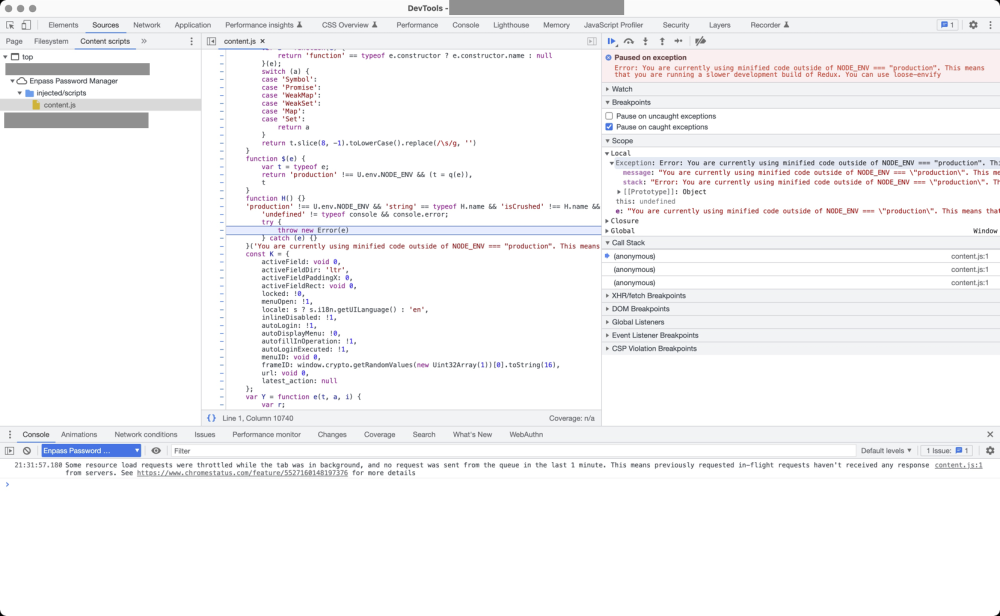
Hi, I'm a webdesigner who also develop websites and now i got a really strange error if I open the Devtools of Chrome 111.0.5563.64 and reload a webpage I work on. The loading of the webpage is paused on excerption with the error: ``` Error: You are currently using minified code outside of NODE_ENV === "production". This means that you are running a slower development build of Redux. You can use loose-envify ``` and in the sources tab is the content.js of enpass opend. I'm overwhelmed with this. Can someone help me?
-
-
Hello, if my iMac with MacOs Big Sur (11.6.7) goes in the sleep mode and I reactivate it mostly enpass 6.8.3 is crashed. Its really annoying to input again my Masterpassword. What can I do to support you to fix the problem? Cheers
-