


Tahreem
Enpass team member
-
Joined
Everything posted by Tahreem
-
Hello Enpassians, We have been getting sync with OneDrive business request from the last couple of years. But the APIs were not straightforward and hindered us from implementing it. Recently, there have been some changes to the API because of which things have been sorted out. Our dev team has already started working on it, and hopefully, it will be supported in the future updates. We appreciate your patience and cooperation. Thanks!
-
Hello @MkNight, Thanks a lot for the feedback. Enpass saves all the database locally on device and each person can use a separate Master password for the app. But if you enable cloud sync and synchronize the data then the app should have same password on each device. Else there will be sync error and the data will not be synchronized across the devices. Basically these features are supported in online or enterprise apps which we do not support at the moment.
-
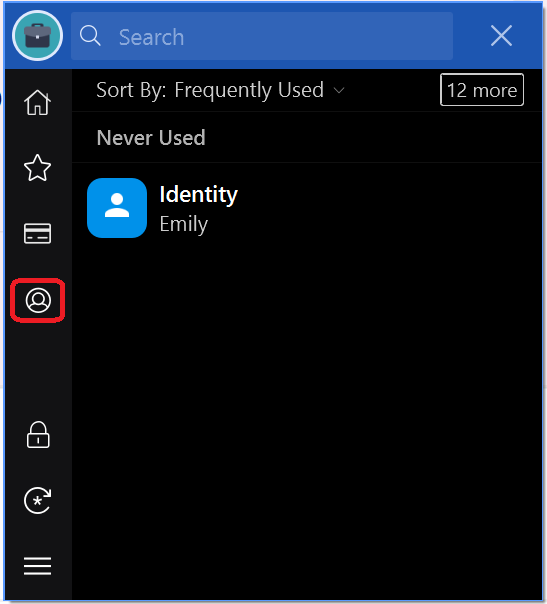
Hello @Stephan, Thanks for showing interest in Enpass. The auto-filling details via Identity will work differently. Like the login items, the identities aren't stored or showed by default for any webpage. We have a dedicated 'Identity' tab in the Enpass browser extension (see attached screenshot) which you will need to click to view and then double click the item to fill the details. I hope this clarifies!
-
Hello Enpassians, The feature is already in the roadmap, however, we do not have an exact timeline for when this may be implemented. Rest assured that we shall be bringing this to the app. Enjoy!
-
Hi @fmfranz_, Enpass autosave feature works when the username and password values are clearly available in the designated fields. If the values or the naming for the same fields are not perceived by the Enpass then it cannot be saved. Could you please share the link or the instance where you wish for us to save the same so that we can see if this can be worked upon?
-
Hi @creasy, Please follow the link given below to install Enpass on a Linux system. https://www.enpass.io/support/kb/general/how-to-install-enpass-on-linux/ If you face any issues, please reach out to us at support@enpass.io.
-
Hello Enpassians, Please note, the issue has been fixed in the latest update v6.3.3 for Windows. Please try updating the app and let us know if you still face any problem.
-
Hello @joepetrowski, In the case of multiple vaults, each vault will need to be synchronized with a separate cloud account. Although, by different cloud, we mean different accounts, not services. So if you wish that all the items be merged into one vault, then follow these steps: Disconnect sync from all the devices. Login in to your cloud account from a desktop browser. Please navigate to the Enpass files individually and save each file. Once saved, remove all the Enpass folders or files from the cloud account. Now enable sync on one device. Once connected, enable sync on another device with the same cloud account. The app on second device will ask you to either merge or replace data. Please select the merge option, and all the items will be merged and all your items synced to the app. In case, if there might be some duplicate items then you will have to delete them manually.
-
Hi @shyamrk and @piovino, We have recently released an upgrade for the app. Please try updating the app to the latest version and let us know in case you face any issues.
-
Hi @Django, Apologies for the trouble. If you have already purchased the Enpass app then kindly register your purchase (From Enpass settings) using an email id. Once registered, use the same email id across all your devices to unlock the Enpass pro version. Please let us know in case you face any issues.
-
Hi @BeZazz, For quick troubleshooting disconnects the sync from all the devices and reconnect it. If the issue persists, please share the demo account of your WebDAV via email at support@enpass.io so that we can investigate where the problem could be. Thanks for your cooperation.
-
Hi @My1, Thanks for the feedback. Yes, I agree with you that we can use 'Sign in with Apple' and 'Sign in with Google' for a smoother on-boarding. Please note, 'Sign in with Apple' will works seamlessly on iOS device; however, the issue arises when a user restores the purchase on another platform using the same email as the OTP verification is necessary on other platforms. Thanks.
-
-
Hi @radiecliffdon, The time for verifying the OTP is 5 minutes. However, users signing-in with an Apple account who register using private relay emails will receive the OTP later due to delay from online servers. We're working to tweak the mechanism; accelerate the mail sending and the subsequent OTP verification process. Please refer to this FAQ to know more. Thanks.
-
-
Hi @Andrej, The time for verifying the OTP is 5 minutes. However, users signing-in with an Apple account who register using private relay emails will receive the OTP later due to delay from online servers. We're working to tweak the mechanism; accelerate the mail sending and the subsequent OTP verification process. Please refer to this FAQ to know more. Thanks.
-
Hi @Mao71, Could you please check the System-Wide Hotkey for Enpass in your System. The default key for Enpass in Windows is "CTRL+ALT+\". Also, please try restarting the device.
-
Hi @Pien, To restore the purchase, please follow the below-given steps. 1. Please use the same App store email ID to download the app with which you had purchased the app. 2. Once downloaded, please enter the email ID you wish to link the Enpass subscription/purchase. 3. In the settings of the app, Open Enpass --> Click on ‘Settings’ --> Click on ‘Trial user/Account:_____ (1st option of the settings)' ---> Tap on 'Restore Purchase’ given on bottom of the app → Done Hope this helps!
-
Hi @flamewave000, Thanks for notifying us about this. We will be implementing this in the upcoming updates.
-
Hi @minidev, Please share the demo account of your WebDAV via email so that we can check where the problem could be. You can send us the test account details via direct message or at support@enpass.io. Thanks
-
Hi @Punk Funk, You need to create a new vault so as to restore the backup file into it and all the data from that file will be present in your newly created vault.
-
-
Hi @remo, Thanks for the message! As it seems that the issue is occurring in the iPhone only, you can disable to sync once in the phone and then enable it again. This may resolve the issue. If however, it doesn't work, feel free to message us at support@enpass.io.
-
Hi @Yoyi, Thanks for your message! Please note, the Enpass app is listed in the Microsoft store and since the Windows 10 supports all the apps listed in the Microsoft store, thus Enpass app can be used in the Surface X Pro. Please refer to the link for the same.
-
Hi @TwoShoes, Sorry for the trouble you are going through. This error seems to be at the MS store's end. I have found an article that may assist you. Please have a look at this link. Hope this helps!


