

Rudy
-
Posts
10 -
Joined
-
Last visited
-
Days Won
1
Posts posted by Rudy
-
-
Hi,
I can't enable enpass browser extension on Microsoft Edge on Linux. Installation worked, but further config does not work. The launcher launches enpass.
Please allow it in enpass. Thank you! I am a paying customer.
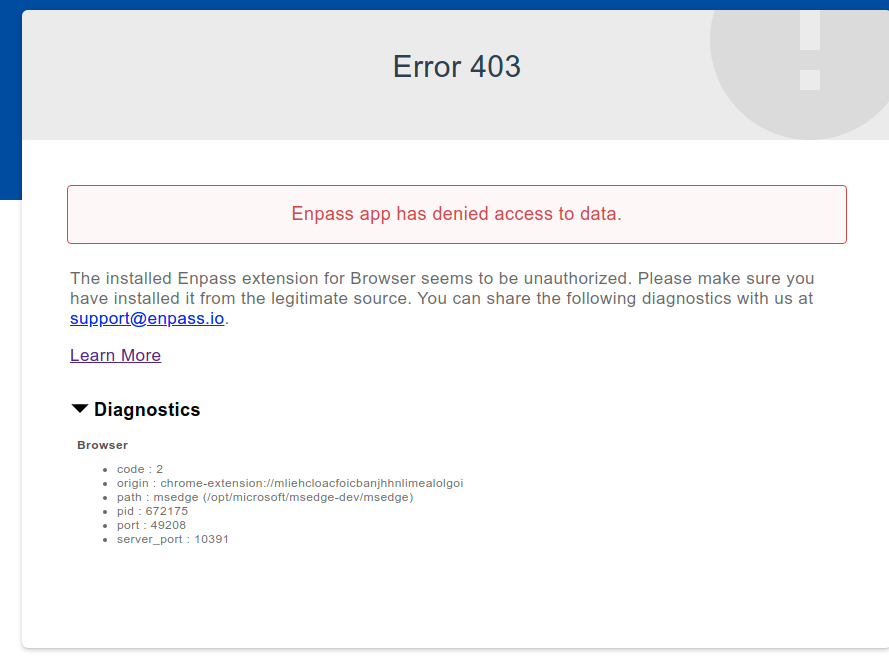
-
indeed the proposed fix works. haven't had a crash in weeks...
-
 1
1
-
-
6 hours ago, Pratyush Sharma said:
Hi @Rudi @Helmut Irle,
Could you please try to use the assistant in Docked mode and revert to us. To do so, go to General settings -> Enable Docked Mode option here. Thanks!
Initial usage shows a lot of improvement! It hasn't crashed since I enabled docked mode. I will report back in a couple of days.
-
1
-
-
@Garima Singh and @Pratyush Sharma can we get an update please?
Currently I am running a newer version and still have the same problem:
enpass:
Installed: 6.5.0.707
Candidate: 6.5.0.707
Version table:
*** 6.5.0.707 500
-
I can understand you ask me to try the beta, even though the release notes do not mention any fix for this issue. So I tried but unfortunately it didn't fix the issue.
To make it even worse now I can't even link chrome to enpass. It crashes direct.
-
Tried again, and now it should be in your inbox on this forum
-
1
-
-
I have sent you a link by private message. Yes I already uninstalled and reinstalled.
-
I have the same problem on Ubuntu 20.04
enpass:
Installed: 6.4.1.643
Candidate: 6.4.1.643
Version table:
*** 6.4.1.643 500
500 https://apt.enpass.io stable/main amd64 Packages
100 /var/lib/dpkg/status
google-chrome-stable:
Installed: 84.0.4147.135-1
Candidate: 84.0.4147.135-1
Version table:
*** 84.0.4147.135-1 500
500 http://dl.google.com/linux/chrome/deb stable/main amd64 Packages
100 /var/lib/dpkg/status
extension Version6.4.0I am seeing the same symptoms as described above:
- it works 1 or 2 times, then the extension vanishes quickly
- the app works perfectly stand alone.
I have paid for this software and have been very happy with it, until now. I was going to advise it to someone else, but because of this I did not.
-
I'm seeing the same behaviour
Installed: 6.4.1.643
Candidate: 6.4.1.643
Version table:
*** 6.4.1.643 500
500 https://apt.enpass.io stable/main amd64 Packages
100 /var/lib/dpkg/status
enpass browser edge extension on linux
in Autofilling and Desktop Browser Extensions
Posted
Please read this. I posted it already:
I can't enable enpass browser extension on Microsoft Edge on Linux. Installation worked, but further config does not work. The launcher launches enpass.
This is a new browser it is in beta on Linux
❯ microsoft-edge --version
Microsoft Edge 88.0.702.0 dev
enpass:
*** 6.5.1.723 500
500 https://apt.enpass.io stable/main amd64 Packages
100 /var/lib/dpkg/status