
Gulshan Dogra
Enpass team member
-
Joined
Everything posted by Gulshan Dogra
-
Hi @bestpika, Thanks for reaching out to us. For banking pages, you can use Webforms fields for storing multi field login information. Once you’re done filling the details in a Webform, click the Enpass Assistant icon → click on ≡ button → Save Webform. Enpass will detect all the fields and will automatically create an item with the details filled in. You can verify the details and finally Save the item. For more information refer to this link. Also, I have forwarded this to our concerned team for further investigation.
-
Hi @icar, Welcome to the Enpass community. For quick troubleshooting please disable the auto-fill feature and enable it again. If this doesn’t help, please share the following details so that we can help you better. Also, I have forwarded this with the concerned team for further investigation. On which device (along with OS version) are you using Enpass? Which Enpass version are you using? Are you facing the same problem with other browsers too? Thank you.
-
Hi @freibeuter, Thanks for reaching out to us. I have forwarded this issue to our concerned team for further investigation. I'll let you know as soon as I have any updates on this.
-
@Damasta, The direct link to download Enpass from Windows store https://www.microsoft.com/en-us/p/enpass-password-manager/9nj3kmh29vgj?activetab=pivot:overviewtab seems to be working at our end. Team is working to resolve store listing issue. Thank you.
-
-
Hi @Damasta, Thanks for reaching out to us. I have forwarded this to our concerned team for further consideration. I'll let you know as soon as I have any updates on this. You can also download Enpass installer from our website if it is not showing in Windows 11 store.
-
@Woutcam, Thanks for reaching out to us. I have checked the corresponding ticket on our internal system. I regret to inform you that we are not considering it at this moment.
-
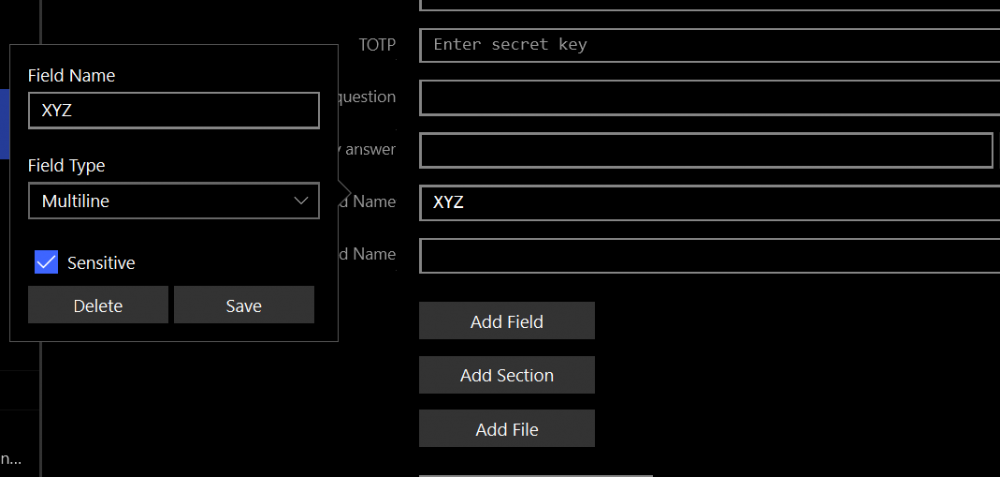
Hi @Lukasaz1999, Thanks for reaching out to us. Yes, you can store your backup codes in a sensitive field other than note. Follow the steps mentioned below: Open Item-->Click on Edit--> Select "Add Field"-->Click on new field's label--> Chose Field Type (Multiline) and check "Sensitive" checkbox--> Save. You can now paste any multiline text in this field. I have attached a screenshot for your convenience.
-
Hi @Kenny Park, Welcome to the Enpass community. I have forwarded this issue to our concerned team for further consideration. I'll let you know as soon as I have any updates on this. Thank you.
-
-
Hi @user from keepass, Thanks for reaching out to us. I have noted down this suggestion and forwarded it to the concerned team for further consideration.
-
@PASHKA, I would like to share that this issue has been reproduced on our end and our team is working for a fix. Thank you.
-
Hi @k3yb0ard, Welcome to the Enpass community. For security reasons Enpass only works with properly code-signed browsers. Please install a code signed version of this browser from official source if available. Also refer to this FAQ for more information. Thank you.
-
Hi @philippmn, Welcome to the Enpass community. It seems your have not setup iCloud account properly in you iPhone settings (not Enpass). Are you able to use your iCloud account in Files or other apps?
-
Hi @Costa, Welcome to the Enpass community. This generally happens when you have recently changed master password on one of your device. Enpass force you to have same master password on all devices. To remove this error, enter the latest master password in the prompt. This will change master password of Enpass data on all devices. Let us know if this not the case. Thank you.
-
Hi @compoundbow83, Welcome to the Enpass community. If your are using Synology Diskstation for WebdDAV server then this is a known issue where the WebDAV sync is broken for Synology devices with the latest DSM and it has been notified to them for a fix. If you are having this issue, then I will recommend you wait for the update from the Synology itself. The same is also discussed in this forum -Webdav error 908403. Thank you.
-
@DonT, Thanks for sharing the mentioned details. I have forwarded this to our concerned team for further investigation.
-
Hi @DonT, Thanks for reaching out to us. Please share the below-mentioned details so that we can investigate this further and assist you better. Which device along with the OS version are you using? Which Enpass version are you using? On which Browser are you facing this issue (mention version), does the issue persists with other Browsers as well? Are you able to see the saved items through autosave in the search list of Enpass? Share the URL with which you are encountering this problem. Thank you.
-
@el613, Thanks for the details. I have forwarded the mentioned details to the concerned team but, we require some more input from you for further investigation. Please provide the Enpass version of your device and the description used while sharing the crash reports. To check Enpass version: Open Enpass--> Click on Menu--> Select Help--> About.
-
Hi @fmfm, Thanks for reporting this issue with details. I have forwarded the details to the concerned team for further investigation. Meanwhile, try adding @@127.0.0.1 as an exception in brave://adblock which worked for other users in Brave's community. https://community.brave.com/t/brave-shield-blocking-enpass-extension/212460
-
@Woutcam, Thanks for sharing all the details and screenshots. I have forwarded this issue to the concerned team for further investigation. I'll let you know as soon as I have any update regarding this.
-
@pgo, Thanks for sharing the details. I have forwarded this to the concerned team for further investigation. I'll let you know as soon as I have any update regarding this.
-
@amiehe Thanks for sharing the details. This issue has been reproduced on our end. I'll let you know as soon as I have any update regarding this.
-
Hi @Kory, Welcome to the Enpass community. There is no need to worry because the process of Restoring backup over Wi-fi is a local only. The IP address you saw was your device IP, not any online service. If you close the app or navigate away from page, the generated IP address will become invalid. In other word, there is no copy of your backup anywhere. Thank you.
-
Hi @WhiteApfel, Thanks for sharing your feedback. Just making things clear– did you mention fetching icon from Favicon in general, or you pointed to this feature in Enpass where you can download the Favicon for the saved items automatically? Thanks for offering your help in improving Enpass with rich icons. I have forwarded your suggestion to our concerned team.