
Gulshan Dogra
Enpass team member
-
Joined
Everything posted by Gulshan Dogra
-
@Carroll D, Thank you for reaching out to us. I have duly noted your feedback and it has been forwarded to the concerned team for further consideration. Cheers!! #SI-2487
-
Hi @Carroll D, Welcome to the Enpass Community. Unfortunately from you comment we could not quite understand what your suggestion is, please provide some more information so that I can assist you better. Also in Enpass, you can efficiently organize your credentials/items by Marking Favorites, using tags and using categories.
-
Hi @SixOfNine, Welcome to the Enpass Community. Pro users on our platform will not be charged again and will never be forced to subscribe. Enpass does encourage its Pro Lifetime License holders to upgrade to Premium Lifetime License as it includes robust security features like 2FA Identification and Breach Monitoring, License conversion is completely user's choice and Enpass will respect that. The idea is not to take anything away from you as we go along, but to give you more security features. We do provide a discount to our registered Pro users (only) for upgrading to Premium. To know more about this contact us at support@enpass.io. We will continue to add more Pro-features without any additional cost, recent Pro-feature which we launched was Sync over WiFi (Cloudless Sync)
-
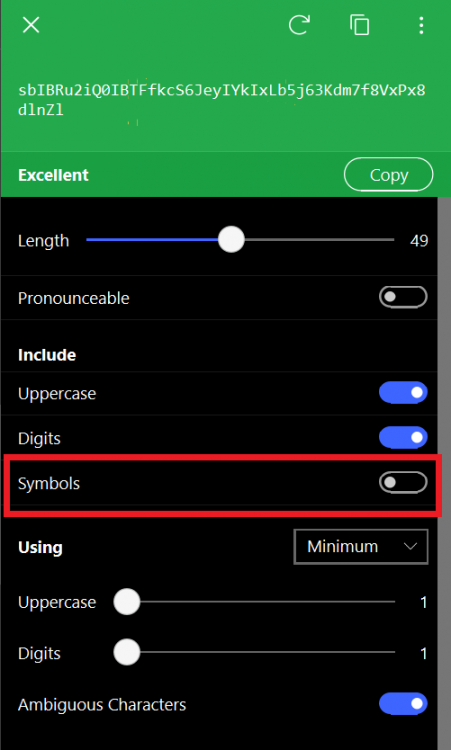
Hi @microbeman, Welcome to the Enpass Community. For this you can simply go to the Enpass Password Generator and disable the "Symbols" option to remove the "@ # $" etc from your generated password as shown in the screenshot below. You can also specify specific symbols you wish to include while generating passwords.
-
Hi @Telmen, Welcome to the Enpass Community. I have duly noted down your suggestion and it has been forwarded to the concerned team for further consideration. Thank you for exploring our app and taking time to provide this feedback. Cheers!! #SI-2478
-
Hi @alanj, Welcome to the Enpass Community. Error 403 signifies that the browser’s code signature isn’t verified. This error might occur in a mixed environment when browser is running and is recently updated in the background and newly open browser windows/tabs uses the updated version. Please restart your browser if any authorization/pairing prompt is shown and complete the process. Also would recommend you update the Enpass App to its lastest version from here. If the problem persists, please let us know the following details so that we can help you better. On which device (along with OS version) are you using Enpass? The versions of your Enpass, Enpass extension and Brave Browser are you using? Are you facing the same problem with other browsers too? #SI-2127
-
Hi @David_Moen, Welcome to the Enpass Community. I would like to share that Enpass is an Offline Password Manager and all the database and items are stored on your device only. Also, removing the Enpass application from Mobile does not hinder the database present on your Desktop version or vice-versa. No, it does not create complex passwords automatically, unless you have changed them manually by using Enpass Password Generator.
-
Hi @halbot, Welcome to the Enpass community. For quick troubleshooting would recommend you update the Enpass extension for Edge to its latest version from this link. Also, share the following details so that I can understand your issue and assist you better for the same. On which device (along with the OS version) you are using Enpass? The Version of your Enpass, Enpass extension and Edge browser? Share the screenshot of the issue you are facing? Are you facing the same problem with other browsers too? On which Web pages you are getting this issue? Are you using any Antivirus or third-party security-related extension? Did you recently made any changes in your system or updated the app?
-
Hi @ng4ever, Welcome to the Enpass Community, Cloud Sync : By the term cloud-sync, we mean that your data can be synced with the cloud of your choice (check supported clouds) and not with our server as we don’t store any of your private data. Cloudless Sync or Wi-Fi Sync: With cloudless sync, you can sync your data across devices over a local Wi-Fi/network, or with any folder on your device, without the need of any cloud service. To use Wi-Fi Sync, you need to start Wi-Fi Sync server from a desktop device on the network and host the vaults from that desktop to which other device on the network can connect and sync. So it’s a two step process– Setting up Wi-Fi Sync Server Configuring Sync on other devices. If you want to ensure your data never leaves your local network then this is for you. Every time you unlock your Enpass, an auto-sync is initiated. (If Sync is turned on). Auto-sync also happens after every 15 secs, while the app is in the foreground.
-
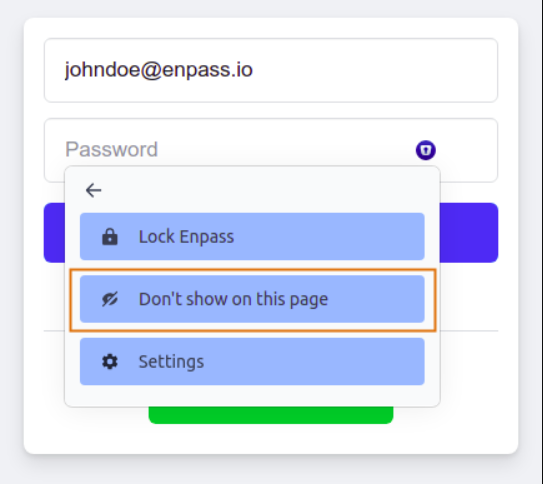
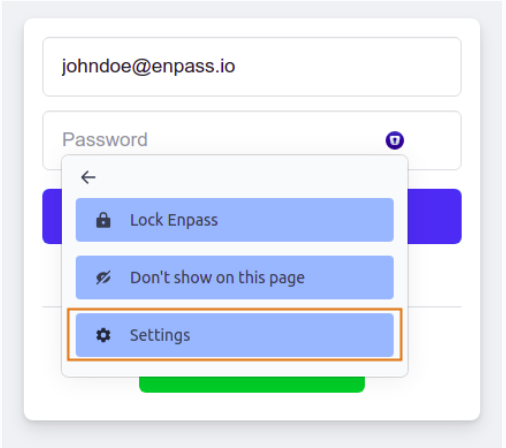
Hi @Dypsis, Welcome to the Enpass Community. You can not make it less intrusive or smaller but can manage the inline function by following steps if you select Don’t show on this page: this will add the current URL to the blocklist, thus preventing Enpass to show the Autofill popup menu in the future for this URL. Later you can unblock the URL list from the extension settings.
-
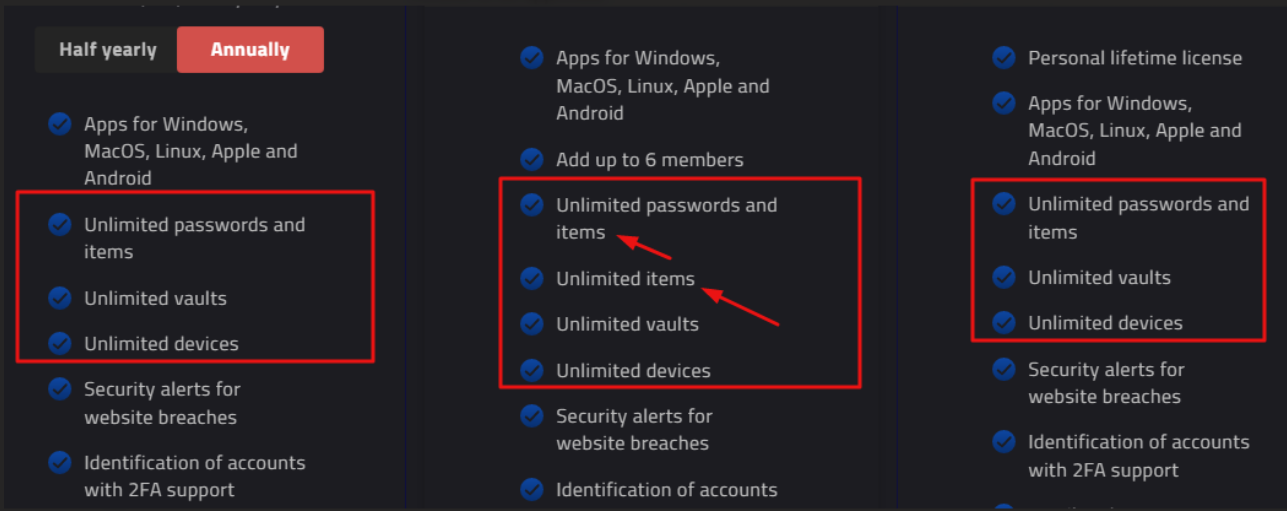
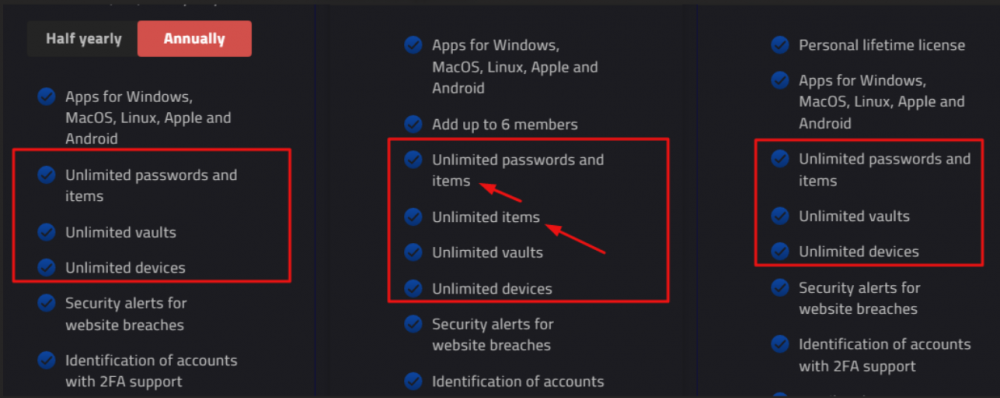
Hi @ironylife, Welcome to the Enpass Community. Thanks for letting us know about this glitch, I have duly noted down your feedback and forwarrded this to our concerened team to update this as soon as possible, Enpass appreciates your efforts. What is unlimited items? Enpass is absolutely free on the desktop version with unlimited items, passwords and vaults (a few features won't be available due to the free version) but in order to have the same unlimited experience on the Enpass mobile app, users need to purchase it like individual subscription plan, Family option or Lifetime membership. This purchase will also unlock premium features like 2FA & Breach monitoring for users on all platforms. Does the individual plan not have an unlimited item feature? Yes, Individual plan does have unlimited items feature.
-
Hi @BerndV, Welcome to the Enpass community. Please let us know the following so that we can assist you better. On which device (along with OS and Enpass versions) are you using? URL of the website/webpage you are getting this issue. Share the screenshot of the error. Are you facing the same problem with other browsers too? If yes mention all.
-
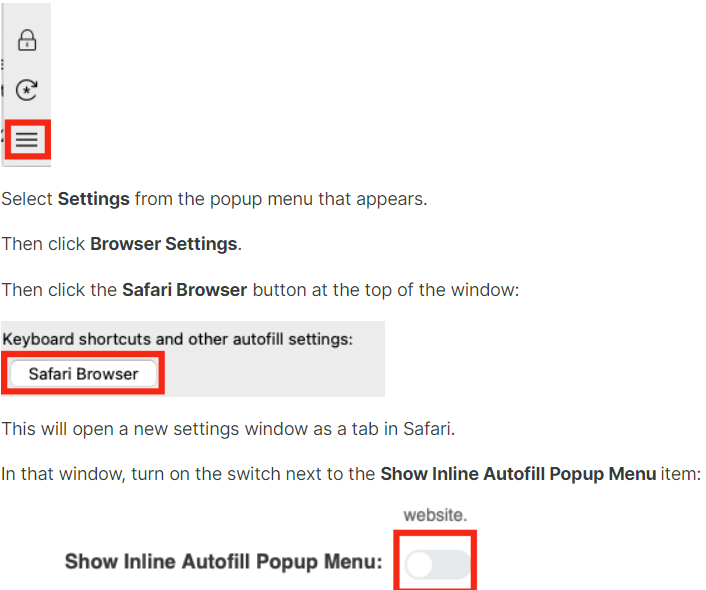
Hi @TVO Welcome to the Enpass Community. Please follow the steps mentioned in attached screenshot and share your findigs with me. In the Safari browser, the extension get installed automatically with the installation of the Enpass desktop application. Make sure the you enabled it from: Safari Preferences → Extensions → Enpass.
-
Hi @MarcSupilami, Welcome to the Enpass community. I am glad that you liked our product and I appreciate your efforts for exploring our App. I have duly noted your feedback and the it has been forwarded to the concerned team for further consideration. #SI-1632
-
Hi @sveen, Welcome to the Enpass community, Please share the following details so that I can assist you better. Which Chrome Browser version you are using? What is your new shortcut key that you have enabled? When you use the shortcut key is it opeing a new tab or browser window?
-
Hello Enpass Users, Thank you for sharing all the feedback and user experience here, we appreciate your efforts. Enpass would like to share that it is not a bug but a feature enhancement in the new Enpass 6.7.4 and Extension 6.7.0. We understand there'll be a little inconvenience in setting new shortcuts and getting accustomed to them, but for a better autofill experience using keyboard shortcuts, Enpass extension lets the browser control the keyboard shortcuts natively. It also makes sure our extensions work seamlessly in long term with the respective browsers and don't interfere with their default shortcuts. Keeping in mind, the best in the interest of our beloved loyal users, we decided to go with this change.
-
Hi @Thoughts?, Thank you for reaching out to us. In a nutshell, your cloud works only as a storage medium and no cryptographic operation (encryption or decryption) is performed there. All such operations are performed locally on your device (your data never leaves your device in an unencrypted format). Even if a hacker gets access of your Cloud credentials still he will be required to enter Enpass Master Password to decrypt that file. I have duly noted down your feedback and it has been forwarded to the concerned team for further consideration. We appreciate your patience in the meantime. #SI-2451
-
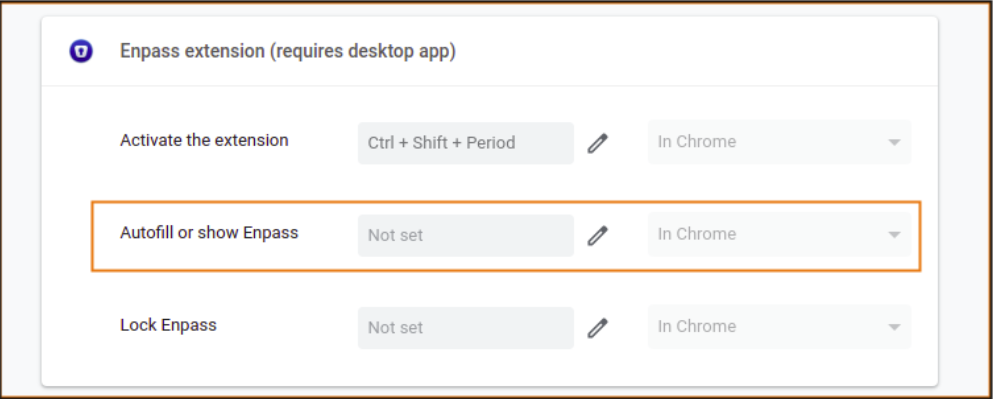
Hi @All, We would like to inform you that with this new Enpass version and Extension, our users can decide their own shortcut key with respective of the browsers they are using (No need to depend on a default shortcut key). Now it can be done by 2 ways, first via extension settings or secondly via clicking in the inline menu 3 dots section. For more information refer to this user manual. Browser Extension settings Inline Menu Settings
-
@Thoughts?, I would like to share that this issue has been reproduced on our end also and our team is working on it, it will be fixed in the future updates of Enpass. Thank you for reporting this issue. Your patience is highly appreciated. #SI-2426
-
-
Hi @Syd and @skywatcher, Thank you for contacting Enpass. Please share the following details so that I can assist you better. Although I have duly noted your feedback and the same has been forwarded to the concerned team for fuurther investigation. Which Enpass version you are using? (Is it downloaded from Store or Website). Are you using any Antivirus or third-party security-related extension? Did you recently made any changes in your system or updated the app? #SI-2428
-
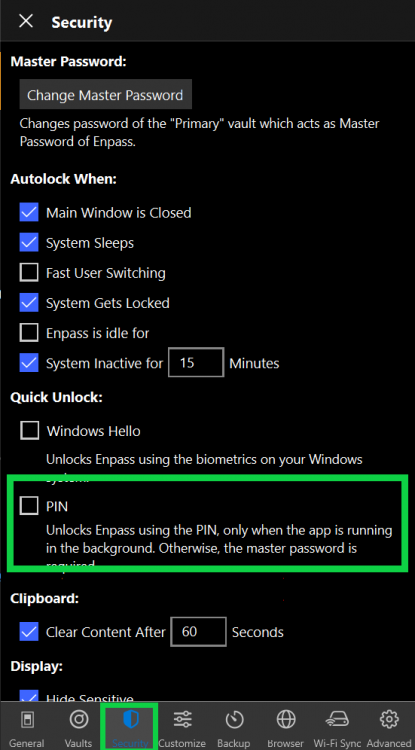
Hi @Thoughts?, Thank you for contacting Enpass. I appreciate you for sharing the details and it has been forwarded to the concerend team for further investigation. I'll let you know as soon as I have any updates regarding the same. I have duly noted your suggestion and it has been forwarded to the concerned team for further consideration. On Windows, you can use Windows Hello or a PIN to quickly unlock Enpass. To enable Windows Hello, select the Windows Hello option and you’ll be required to confirm the Windows Hello PIN or the biometrics. Open Enpass--> Go to Settings--> Click on PIN. Cheers!! #SI-2426 #SI-2427
-
Hi @Ivarson, Thank you for reaching out to us. I appreciate your efforts for exploring our app and provinding this feedback. I have duly noted your suggestion and it has been forwarded to the concerned team for further consideration. Cheers!! #SI-2423
-
@der_grund, Thanks for sharing the Enpass version. To help us diagnose this error further, could you please perform these steps with the website version of the Enpass app. Disconnect the vaults from syncing. Enable logs by following the steps- Open Enpass --> Settings --> Advanced --> Logs --> Enable it. Then setup sync again with Dropbox and wait for error. When you receive an error --> Go to Advanced settings --> Logs --> Copy the Logs in any text editor and share with us here over PM or via mail at support@enpass.io cheers!!
-
Hi @Elias, Welcome to the Enpass community. I apprecaite you for exploring our app and finding this valuable suggestion. I have duly noted your feedback and it has been forwarded to the concerned team for further consideration. Cheers!!. #SI-2408