


q9f
Members
-
Joined
-
Last visited
Everything posted by q9f
-
I have a pro subscription for years. I installed Enpass version 6.11.0.1000 on Android. After restoring my vault and logging in with my email, entering my OTP, I get an indefinetely spinning wheel. No error, no progress. I cannot access more than 10 accounts in my vault (300 items). Please help, I need this on my phone!
-
I solved it: Apparently, the synchronization does not only apply to the vault but also the settings. So having different sync-paths on different desktop devices caused an issue always looking for the sync data in a non-existing location. To solv this, I had to set it to the same path on all desktop machines. It's kind of weird though.
-
Hello, is there anything I can do? I can no longer synchronize my devices.
-
Thank you. I can confirm this issue across all my Linux devices. I sync them with an Android phone which does not have any issues with the folder sync.
-
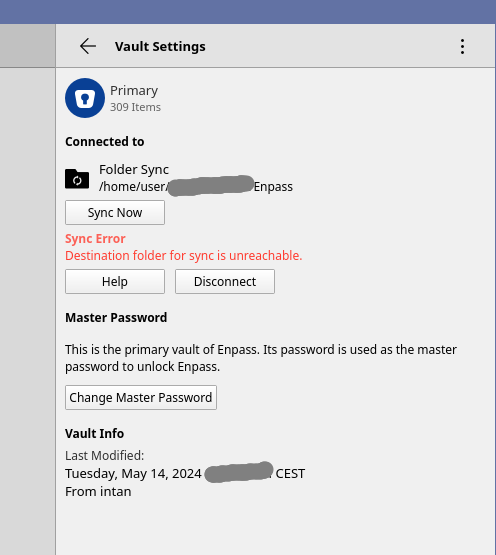
When I go to vault settings and click "Sync Now," the same issue shows. Disconnecting and reconnecting does not resolve this.
-
Hello, I have Enpass on Linux desktop and my folder sync errors every day. I always have to disconnect the folder and resync again. This is a huge pain point currently. This used to work very stable for years (I never used any other sync mode.) ~ ❯ uname -a Linux intan 6.8.8-arch1-1 #1 SMP PREEMPT_DYNAMIC Sun, 28 Apr 2024 15:59:47 +0000 x86_64 GNU/Linux ~ ❯ pikaur -Qs enpass local/enpass-bin 6.10.1.1661-1 A multiplatform password manager I don't understand the reason. This folder is a local folder on my hard disc. How can this be "unreachable?" Please help!
-
Any update on this? It has been an issue for 4 months now rendering the Desktop client unusable. Fortunately, I can still access my secrets through the mobile app.
-
This also affects me on Linux. Is there any timelone for a release? It has been a couple of months now.
-
Yes, ArchLinux with Enpass Desktop version 6.9.0.1467.
-
I have the same problem on all my desktop devices. Where can I find the logs?
-
Take a look at this thread. The devs already acknowledged this issue.
-
Hello, I am facing the same issue on ArchLinux with Enpass Desktop version 6.9.0.1467. For now, I can continue using the browser extension, assistent, and mobile app, but opening the full app on desktop asks me to verify the session every other day. I have a pro version both for mobile and desktop. Notably, I'm using folder sync, maybe that stirrs things up? Thanks q9f
