Matis
Members
-
Joined
-
Last visited
Everything posted by Matis
-
Try this: I uninstalled and reinstalled Enpass, I switched the reminder deactivation off and on twice with entering my masterpassword. Problem gone.
-
Hi! Version 6.12.2 (2551) is great, looks very good. Great that the notes field now stays unfolded. Unfortunately in edit mode the notes field does stay very small even if you expand the enpass windows. It would be great to have it also using the whole width. Thanks.
-
Appreciated, thank you!
-
I was so annoyed by this problem that I tried more things: I uninstalled and reinstalled Enpass, I switched the reminder deactivation off and on twice with entering my masterpassword. After that the permanent popup of the reminder is GONE! Maybe someone who has the same issue whats to verify this and try it himself. ------------------------------- P.S. Unfortunately the "lock after x minutes" still does not work, it want's a login always, but this is not as bad as the master-PW–Reminder.
-
Great, there is new Windows version. Could you please follow up with some hint when this terrible IOS misbehaviour will be fixed??? Enpass is almost NOT usable any more on IOS devices with this bug!!
-
Is there any support left to respond at least with a timeline? The current version is simply not usable!
-
-
Another month and nothing happend. You introduced a totally useless feature (master password reminder) and with it one of the worst and most annoying bugs you ever had in your software and still do nothing? Just get rid of this reminder bullshit! Instead please fix the ignorance of the login authentication timer. No matter what you put in the setting you have to login always, which is as annoying.
-
When will you remove this unnecessary feature again if you can’t implement it properly? I don’t need this reminder! The faulty implementation is driving me crazy. I’m about to replace Enpass. Please delete this nonsensical master password reminder! Now!
-
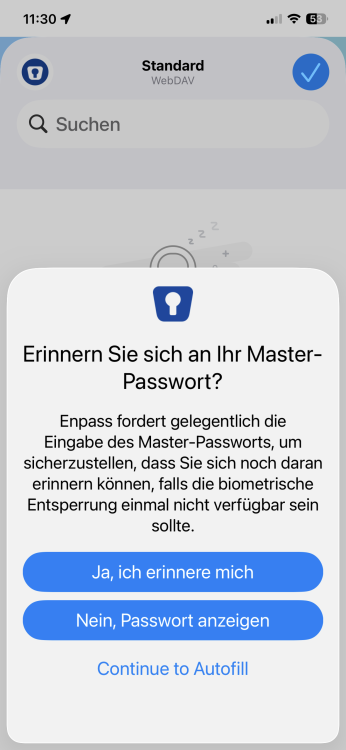
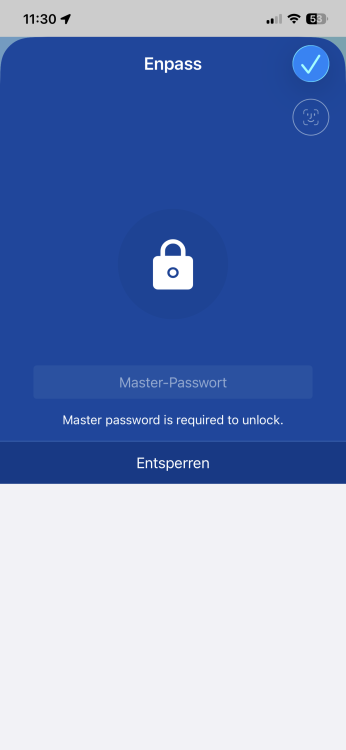
It takes me now all the time two additional clicks and screens. Would you PLEASE remove the silly feature from the app again, its useless and if anyone doesn't know yet how important the master password is he will not in the future with the annoying feature. I have disabled the reminder in the settings but the App does not care. This totally ruines the usage experience. Ignoring the reauthentication while ignoring the setting is already annoying enough.
-
I don't even understand why such a not needed feature was introduced and not even right. It would be much more important to fix some of the old annoying bugs instead adding features which do not add any value and just make the experience worse and more bugy.
-
This not a feature it is a bug since ever!
-
This new feature to annoy very often with the master password reminder and forcing to enter it while logged in is terrible. Fortunately it is intended to be switched of in security in settings. Unfortunately this switch is NOT working properly, this annoying forcing reminder comes up anyway. Please this soon. Introducing feature which just ruin my nerves and not working properly is really bad. Enpass 6.11.20 (1195) Ipad IOS 26.3.1
-
-
Any update? This is sooooooooooooooooooo anoying and a basic feature. How can you expect me to pay for additional plans if you are not able to fix bug for important features over years? I'm really frustrated every day I'm using enpass.
-
Guys, this is a basic feature of your configuration. It is so annoying to log in with IOS hundred times and I do not understand how you cannot work on a basic malfunction on your settings. Even not after years. How should someone recommend Enpass, if stone-old basic bugs get not fixed? Sorry, I'm just frustrated.
-
When I have created a passkey it show the line passkey "created 2 Minutes ago". But I cannot delete this line or the passkey. How do delete a passkey and where do find them, if they are not in the according entry?
-
-
-
It would be very much appreciated to have the same fix now for IOS. There is the same problem, it does not remember beeing login already and does not go with the settings. You have to lock in again even after you used it a second before.
-
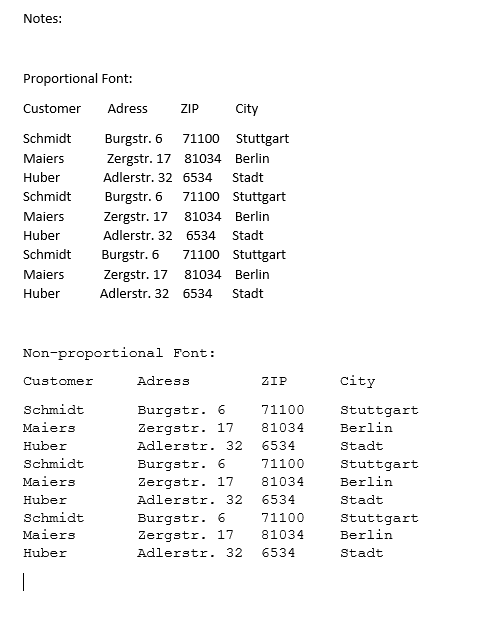
Of course. With a propotional font it is not possible to align colums:
-
Sorry, for not beeing more precise. My request was meant for the notes field. If you want to structure and align your notes, this looks always a bit messy, as every letter has is own width. This is not the case with non proportional fonts like Courier. Than you could creat aligned columns within you notes. It's for sure not a very important topic.
-
-
-