Matis
Members
-
Joined
-
Last visited
Everything posted by Matis
-
This is being ignored now since more than 4 years. Any update? Do you have any plans to respect this feedback?
-
-
FOUR YEARS have passend and the UI still has the same lousy look and feel. Non of the inputs have been espected or taken care off in the windows version. What a pitty.
-
Still not fixed! You still have to login everytime you want to use Enpass not matter which inactivity timer you have set. It should also for login activities. I'm not even sure why I'm still writing things here, how can issues be open for yours and beeing totally ignored?
-
More then 3 years nothing happening. Great job!
-
-
-
-
What you said does not make any sense. The wasted space is not at all used for any field or for longer fields. Just look at the screen dumps above. A tool should not eat up your screen with so much wasted space. And by the way notes is one of the options of the software that does make a lot of sence to keep the save. So notes are an essential part and should work smooth as well. You are free to make the tool fullscreen if you want but dont tell others they should see the wasted space as features. This is just ridiculoous.
-
I played with this feature as it is so anoying. Here what I figured out: If you switch ON "Lock after Leaving" and switch it OFF again, than it does what it is supposed to do. So there seams to be an issue with keeping the setting or with the initial setting. But at least this is a possibility to get is working.
-
Are you just shitting on inputs from your customers and commitments are worth nothing to you? Don't tell your users you are working on it and fixing it when this is simply not true. I'm disappointed.
-
This is still NOT fixed. Your support is really tiring in some cases. Really anoying things last years to get fixed. Are your really working on it? IOS devices lock immediately, no matter what you enter in the settings.
-
…. Still no update no change?! …. THREE YEARS later only promises.
-
This must be really difficult, since years no change. And customer satisfaction and inputs seem also to be not important. Very sad!
-
I have the german version as well: 6.5.1 (723)
-
Just change the theme and you have the former size again. With 6.5.1 they just made "classic" theme as default and it has small letter. "modern" still has big letters.
-
Oh there is even nothing new on the screen with the update. You just made the classic theme as default. Never mind. After two year a remindes seems to be worth while anyway.
-
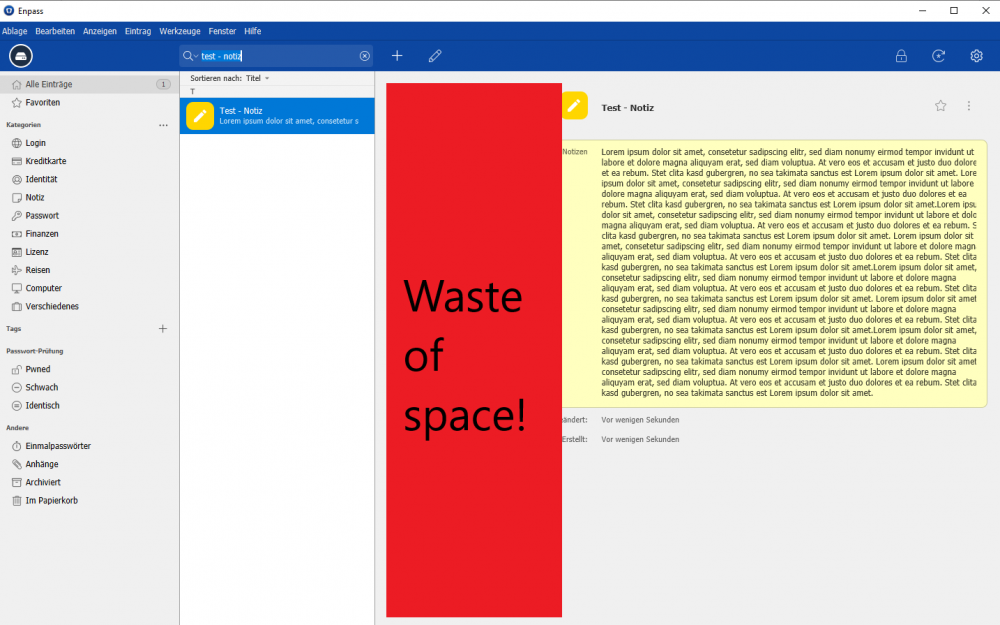
I do not understand you guys. Now you have deployed an update with smaler letters to display more stuff, BUT you still left this HUGE WASTE OF SPACE on the screen. It is unbelievable how difficult this must be. Do you not have an expert in HMI? I'm really disappointed. This is so annoying.
-
Even so I have configured to lock the app only after 30min and „locking when leaving“ is disabled I have to log in all the time. Also when just switching to a different app for seconds. This seems not to work. It would be nice to fix this!
-
You promissed to fix this. Since how many releases? Are u not able to fix something this simple? I‘m really diasspointed.
-
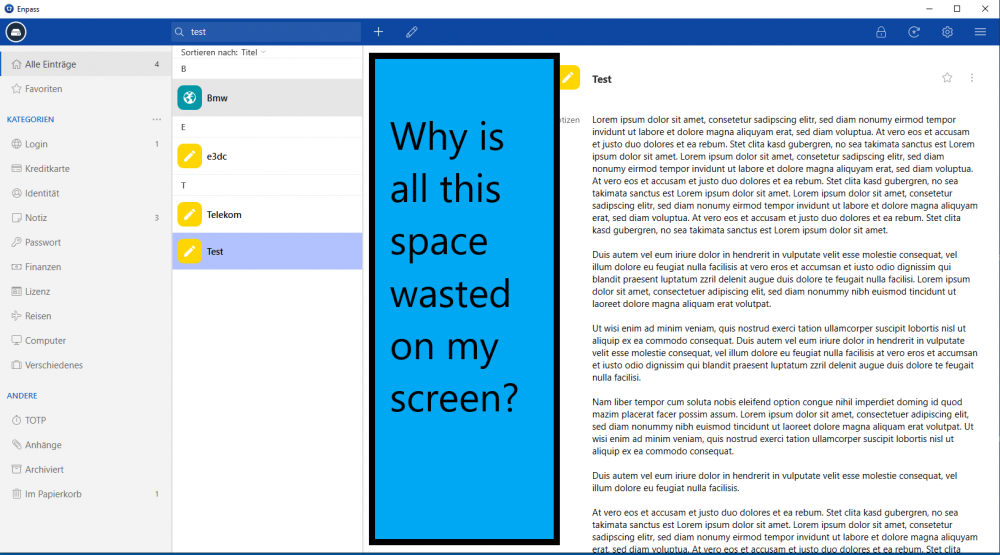
Update 6.3.3.: Still alle this wasted screen space. Is this so difficult?Please position the text left oriented using the complete space. It requires a much too big window right now to get an exceptional size of details, leaving a lot of space totally empty. Thanks a lot. Why
 Shit, some days later: same problem: WIN enpass does not update changes in IOS. I hate Enpass for this! It sucks!did try further, deleted the who win installation and databases and reinstalled. Now it works! Maybe something that went wrong during all the updates. case closed