JeffB
Members
-
Joined
-
Last visited
Everything posted by JeffB
-
Using Enpass for many years (greater than 8) initially on Windows and now Linux. It works best on X11 (for now) but does work on Wayland (XWayland?) with one nuisance. There are occasionally short pauses where a dialog appears with Force Quit or Wait. It often gets focus before I can press the Wait button. I am not deciding if staying on X11 to avoid the pauses, or go back to Wayland and just deal with the occasional frustration.
-
It appears that the install links are still for 6.11.12 but the update installs 6.11.13 with the new signing key. Until the download/install page is updated, you should be able to use the @randomguy instructions and execute an update/upgrade to get 6.11.13.
-
Will Enpass ever update? https://www.phoronix.com/news/Linux-7.0-Modules-No-SHA1-Sign
-
I agree SHA-1 is vulnerable, but it still requires significant effort. So far I am comfortable with the available security level. And I hope that the Enpass team can get their security updates distributed.
-
Thanks to @randomguy for a work around. It seems Debian is enforcing the secure certificate test, and Ubuntu and derivatives are more permissive; I don't get the error there. I too wonder if there is any real team there, at least on Linux. But for me, it is still the best solution and as long as it continues to work, there are no reported vulnerabilities, and there are no clear alternatives, it seems like it will be best to continue. However, I plan to evaluate periodically.
-
Is there any update on this issue? It is still objecting and an updated signing key would remove the error. Thanks
-
I noticed in the last few weeks that Enpass Android hanging while trying to sync. Using version 6.11.1.1022. If I wait, it will eventually come back, but it can be 15 to 30 seconds. It can by during autofill, or updating entry. It happens some with OneDrive, but particularly bad with Box. Box is so bad, it is unusable as sync target. Workable but a nuisance at times. Phone: OnePlus N10 5G running Android 11. Model BE2028.
-
The DDG browser has improved and now easily uses Enpass security without needed to switch to the Enpass keyboard.
-
With the Beta release of the DuckDuckGo browser on MacOS, and now on Windows, it would be fantastic to be able to AutoFill in that environment. The browser will AutoFill with its own password repository, but it appears they may not support extensions (presumably for security reasons) although that is not clear. I have submitted feedback on that for the browser, but also adding a note here to explore how Enpass Password Manager (my one and only), but presumably others, could be used on the Desktop with the DDG browser. The DDG browser is very functional and fast, but still early days. Hopefully there can be some vision for other password solutions. That may be limited by the desktop OS, since it does not have the same AutoFill extensibility as on Android, etc. and I wouldn't expect the OS developers would make a move there. Thanks
-
I have been using the DuckDuckGo browser on Android since it was available. Support helped me to work through the problems. The best solution is to enable the Enpass keyboard (settings) and then switch to that keyboard when you need to AutoFill. It works very well and with only a slight inconvenience.
-
A command line version of Enpass would be great. I would like to install on my local headless Raspberry PI and use WiFi Sync for group password management. Thanks
-
Yes, I agree. There are no suggestions, but if typed and hit enter, the tag will be saved. It would be nice to be a little cleaner. Thanks
-
Ahh, I see my problem. Unlike the Desktop version, I have to add Tags from the Browse menu. I have to select the TAG and then (+) to open the menu and select the Existing Items option to choose the item to add the TAG. I little clunky, but it is not something I do often on mobile. However, there does seem to be a bug. The count on the TAG is not updated although selecting the TAG shows all of the items. After a refresh, the count is correct.
-
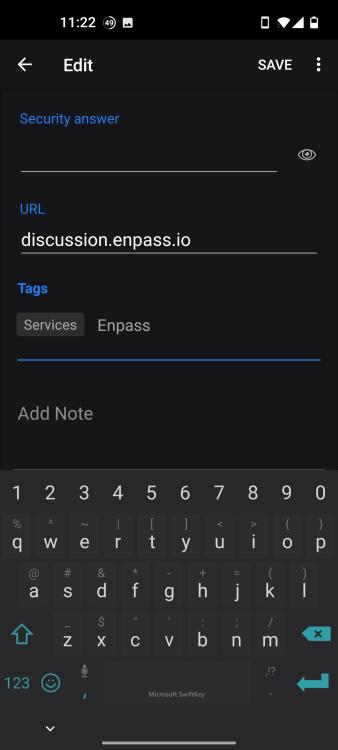
I have attached a screenshot. The entry has one TAG and I am attempting to add another (that already exists). There is no error, the existing TAG is not displayed and saving the item does not update. The device is a OnePlus Nord 10 5G running Android 11.
-
Abhishek. I think you are misunderstanding the problem. It is not the size of the backup files that was causing the slowness, it was the size of the SQLCipher database. It appears that there was some sort of internal corruption or duplication that was being reflected in both the sync file and the backups. I am glad there was procedure to restore the integrity of the database. Maybe you would pass this information to the developers for their future reference. Thanks.
-
After the latest update, I am not able to enter TAGS on my phone. Existing TAGS are displayed, but I cannot enter existing one.
-
Abhishek, I have been able to update my Android phone and my two windows machines to the latest build. The sync and backup files remained about 10 times usual size. So... I exported the primary vault (where the problem has been) to a JSON file. Then disconnected all of the instances, removed all of the vaults, deleted the app and reinstalled one machine at a time, and rebuild with the JSON export. Then set up each of the machines and vaults again. Now the sync file is 2.9MB instead of 38MB. I will monitor the performance and sizes periodically, but I am confident things will remain stable for a while. And now I have a good procedure to rebuild the if in may be needed again in the future. It is nice that there are ways to resolve the problem with the existing tools and capabilities. Thanks, Jeff
-
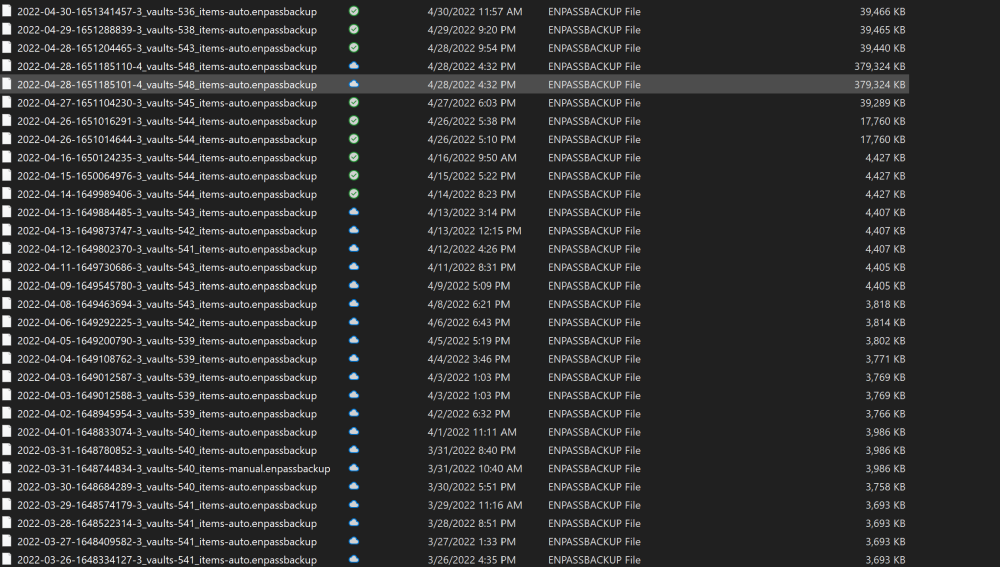
Abhishek, I am not commenting on the number of backup files, I posted the image to show the dramatic size increase of the backup files starting in the middle of April. The size increase was unexpected and by April 28 it was pathological. After a major effort, I am working again, but still the sync and backup files are larger than the historical size by a factor of 10. But at least it is not >100x.
-
Abhishek, I am attaching a folder listing of my vault backups that shows the progress of the problem with repository size (and presumably the source of the speed problem). The jump from 3.7MB to 4.4MB does not seem significant, but then it jumps to 17MB and then to 39MB and ultimately to 380MB (where the performance issues became significant). My efforts to recover brought the file size back to 39MB but it still seems too large. I am reluctant to try to recover back to the 4MB range as I would lose some significant entries. Do you have any suggestions as to a way to clean up the vaults, or any suggestions about alternative recover mechanisms? Thanks
-
Abhishek, I am glad to hear the garbled item fix is on the horizon. As to the slowness, I was able to resolve it after noticing the sync database and the backups had grown significantly. Here significantly means the sync database growing from about 38MB with over 500 items to almost 500MB and the backup file growing from 18MB for three different vaults to over 350MB. I was able to shut off sync on the two windows computers, and an Android phone, and then reinstall on one of the Windows machines starting with a backup. Then setting up sync again on the other devices. All seems to be humming along as before now. If I can provide any more information about the root cause of the problem, I will need some direction. However, I am content for now that everything is working well.
-
It has been over 3 weeks without a resolution. Is there any word on progress or timeframe? I have also noticed a significant slowness in the app on all platforms. Are these related issues and fixed soon? Thanks
-
Dear Abhishek, I appreciate the feedback. It can be a nuisance, however it does not impact my support for Enpass as the best password manager. We will look for the update. Thanks,
-
Dear Abhishek, I am glad to were able to reproduce the problem. Now I am seeing it on my second laptop as well, so it is a bigger problem. Is there an estimated time for a solution to roll out? Thanks
-
Dear Abhishek, I am very glad you were able to reproduce the problem and it is not something odd with my system. I will look forward to the update you it is ready. We love Enpass and appreciate the both the responsiveness of the team and the dedication to making improvements. Thanks
-
It appears this is happening on the 18th or 19th entry in the item list. It is happening on each of the vaults on my machine. But it is only happening on my Surface Pro 5, not on other machines. I would guess it is related to the high resolution screen of the Surface Pro.