vampyren
Members
-
Joined
-
Last visited
Everything posted by vampyren
-
Cool, then we can close this. I think i will move to OneDrive for both devices as primary now
-
ahh thanks i missed that. Ok so atleast if the sync dissapears it should work from local copy then. Good to know. Thanks.
-
Yes that was what i was thinking but i see the usecase with segregated vaults also. How do you do the copy/move ? i had to export from primary to a file and use the "Backup File" for the new Vault to move the items there. Is there another way? Still i do see a usecase for having multiple vault for the same data as data backup protection. Say my iCloud account somehow gets hacked or i cant access it i want to have a additional sync up and running. Maybe users could choose between that and segregated vaults. I understand the oath-based argument but without going into deep discussion i just want to use iOS stuff on my iPhone and thats it. Thanks for the help.
-
Hi, You sort of understood it but not fully. To start with yes my primary vault is iCloud on windows. I added secondary vault also on windows and assume all the data from primary would be also updated on secondary. So then on my android i added the secondary from the Windows (on OneDrive). So the question is how can i have 2 vault with the same data? I want to use iCloud for some devices and OneDrive for other. I dont want to have iCloud on Android as it works really bad plus i want to use OneDrive there. Is this doable? I still dont understand why i can add multiple vaults when data is not backed up there from my Primary?
-
Hi I have been using IPhone with iCloud vault but recently purchased an Android and wanted to have another vault in OneDrive so I can sync with that for my Android but the problem is that nothing is added to this new vault. It sync without issue but there is zero items. Don't see what else I can do? Does it not work to have more than 1 vault?
-
Thanks. The macro problem is really old though so please dont just dont say we look into it. Thanks!
-
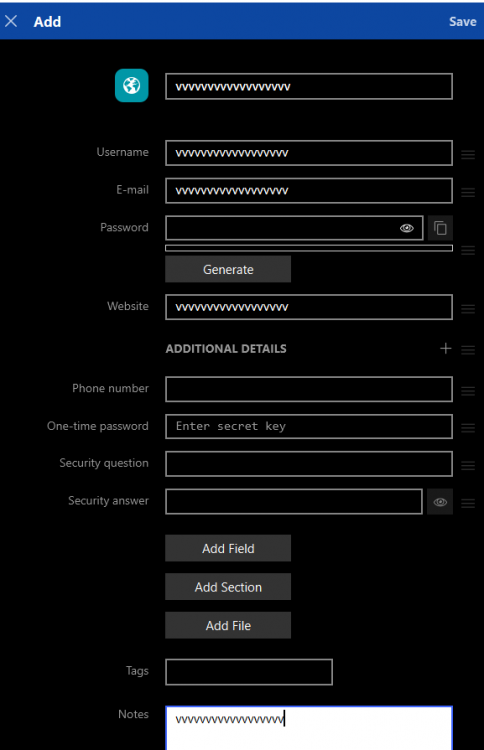
Hi, I have 2 very annoying bugs that i hope you can fix. I been waiting a long time but so far they have not been fixed. 1) When i close enpass by pressing the X on the app or select close from taskbar it flashes and wants me to authenticate. This is very annoying. I show this in the clip i attach. Rename the file to IMG_1124 .mov (could not upload with .mov extention, this needs to be changed as well) 2) Using Macro on my Logitech G915 does not work in Enpass. And this is the only program that does not work with macro. I use my macro keys for simple email and numbers i use often but in Enpass it comes out as "vvvvvvvvvvvvvvvvvv". IT works perfectly fine on websites and evey program i use so this is Enpass bug! Please fix it. I use the latest version of windows 10 x64 + all patches + the latest Enpass v6.6.1 (804) Hope you can look into these issues. IMG_1124 .plist
-
-
-
-
-
Thanks! This is on a windows 10 (latest patch v2004). Enpas also latest version 6.5.2. I has never worked really with the macro key but got really annoyed now so i reported it. Also since this is the only program it fails to work in.
-
Hi, Found another annoying bug! IT only happens in Enpass too. I did not report it earlier but its getting more annoying by the day since i sign up to several sites as of late. I have a Logitech G915 keyboard where i have set a macro for one of the keys called G1. When i press this G1 it will type my email where ever i am, be it on the web, in a word file or any other program. But for some reason in Enpass in the Email field or any field for that matter when i press the G1 it will type vvvvvvvvvvvvvvvvvv instead of my email. The number of characters matches the email exactly but the result is just the first letter of my email typed like that. Why is Enapass the only program behaving different from everything else? ps. i even added a delay before typing the macro but no help. Please fix this.
-
-
-
Hi, For some reason one of my apps called Celsius always fail to find the login/password in Enpass so i have to search for it. IS there anything i can change or do to fix this? i tried to add it as a login and app with the title matching the app but it dont work. Also tried adding a tag..... I think the login is a webapp so i added the url in also -->https://celsius.network/ Any ideas?
-
Sure. Hope its fixed for the last time. Always work on mSecure so it cant be a huge thing.
-
Thanks, please let me know if you hear about a fix date.
-
Hi, I'm not starting to use Enapas on my Macbook pro as well. Sometimes when i open Enpas from the notification area (Windows) and now from the topmenu (on OSX) i use the short command (Command+E) to open the full view. On Windows when i authenticate using Windows Hello (TouchID) using the mini view and then open the full view using (CTRL+E) then i dont have to authenticate again since i have already done so. On MAC however its not working correctly. When i authenticate in mini view and open the full view it ask me to authenticate once more. Why? It is really annoying to be honest. And the worst is that it dont accept touchID directly, just like windows i have to click on the icon to the right side to even prompt for touchID. This seems like a bug to me. It cant be the expected behaviour? My OSX is Catalina and 6.4.2 for the app which is the latest.
-
Sure will do. Just noticed that the problem with password generation for "generate password and fill" is now fixed. When i press the fill it dont change the generated password any longer. Nice update
-
I'm testing the new version now. Hope it solves the iCloud issue. I also checked the box to keep logged in. Hope it works.
-
Ok i thought you meant its already working in the mini window. SO its a feature that is not working now. On the main window yes it works to just right click but on mini window its buggy. Strangely enough it works after many tries but not reliably. Then we wait for the update. Thanks for info.
-
Sorry but it dont work all to well. I can make it work but its very buggy/clunky. I literally have to move the mouse on several items and right click 10-15 times before one item gets "activated" or going to blue color at which point the right click will work. But no it dont work right away after opening the mini windows. By the way if i double click on an item it will open a tab in my browser so i dont see what you mean? One additional thing i notice now is also that i get logged out from iCloud once in a while. Is there a way to make it last? A bit annoying to every second day login.
-
Sure. Can you also add another annoying issue please. When you open the Enapss through the icon in notification and hover the mouse over items it shows they are selected but you can not right click on them. First i have to left-mouse click before right click works in order to copy password. Why the extra click? Its much more convenient to simply hover the mouse over a item and right click.
-
Thank you. Will look into it as well. I must say i like the features of Enpass but i'm in doubt about the quality and update frequency. Simple things like what we reported cant take 1 month. I'm in software development and with agile teams hell weekly delivery is a thing now. I mean basic functionality that is broken must be fixed fast. By the way this is a huge huge plus: Bitwarden is a 100% open source password manager