


jscgn
Members
-
Joined
-
Last visited
Everything posted by jscgn
-
Same problem here (still)... @Garima Singh Do you have any updates on this issue? Thanks.
-
Yes, we need a portable version! What is the big complication? Not hating, just want to understand, because there is no different functionality...
-
Awesome, thanks!
-
Hi, i am using the newest Enpass 6 beta with the Chrome extension. There is one annoying thing: I have a convertible laptop and in tablet mode i cannot auto-fill logins via touch input. If i try to double-tap on the entry nothing happens. I have to select the entry (one tap), open the on screen keyboard and press enter... I hope this can be fixed. Best regards Jan
-
Same problem here. I tried with Chrome + Firefox, no luck....
-
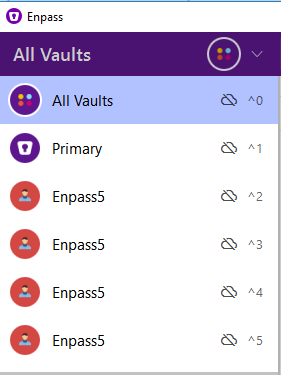
I had the same problem. Also, Enpass6 apparently created multiple vaults for every try to enter the password:
-
I would like to know too... I asked via Twitter and blog comment, no answer...
-
I would like to know that too... The release notes on the official website are not up to date.
-
-
I also experienced this a few times. But it only happens sometimes and it's not reproducible, so the bug is hard to find i think...
-
-
Hi @Anshu kumar thanks for the quick response. I tested a little more: 1. It was first running on a network drive. If i put it on the local HDD, it works much better (with search in all fields)! Is the application accessing the drive while searching? Isn't the database cached in RAM? Normally, the network drive is not very slow, other apps work fine on it. 2. I have 516 items in total. 3. CPU usage is 0% in idle and goes up to about 20% while searching. EnpassPortable.exe uses ~37 MB RAM and EnpassPortableHelper uses ~ 10 MB. 4. If i set it to titles only, the search goes faster (on the network drive). Best regards Jan
-
Hi there, I am using EnpassPortable 5.3.0 on a Windows 7 64 Bit PC. Every time i try to search for something, the whole application freezes for about 10-20 seconds. This can get quite annoying as you can imagine ;-) The system is powerful enough (Intel Core i5 3,1 GHz, 8 GB RAM) and all other apps are running fine. Any solutions/fixes? Should i provide more info? Best regards Jan
-
-
