


Abhishek Dewan
Enpass team member
-
Joined
Everything posted by Abhishek Dewan
-
Hi @chris007, @halbot Once you have created a new vault, you can share this vault with the below steps - Moving data to this vault - Copy all the items from your other vaults to this newly created vault which you would like to share with other people. You can Select the items from other vaults → Right-click -> Add to Vault → Select Newly Created Vault → Continue. After the items have been moved to the new vault, please setup sync on that vault with the cloud account of your choice. Sharing Vault - Now you can share the password of that vault and the new cloud account details with whom you wish to share the vault. Once they are on the welcome screen of Enpass or have created a new vault, tell them to sync via the same cloud details you shared with them.
-
Hi @Miraculix Please disconnect the Wifi-Sync and follow the steps in the link to set up Wifi-Sync manually. You can also refer to this link for troubleshooting steps. If the issue persists, request you to please elaborate on your concern and share the below details with me, so I'll be able to get this checked for you - Version of the Enpass app and OS you are using. Screenshot of any error which may be occurring.
-
Hi @agent92 To assist you better with your query, please share the below details with me, and I'll get this checked for you - Version of the Enpass app and OS you are using. Are you facing a similar issue on other browsers as well?
-
Hi @deanso, @ng4ever You can exclude the password of any item from being audited so that the "Weak Password" yellow banner is not displayed. To exclude the password from Audit, click on the Password Field from the Edit screen of Item → Click on Exclude from Password Audit → Save Field → Save Item. Hope this helps!

-
Hi @TheColin21 You will be pleased to know that the feature you requested is on our development roadmap. Right now, our tech team is looking into its feasibility to implement it in the future Enpass versions. Appreciate your patience in the meantime. #SI-1426
-
-
Hi @Mazy Welcome to the Enpass community! We are happy to hear that you like our new Inline menu feature. Could you also please confirm if are you facing a similar issue on other browsers as well? Awaiting your response
-
Hi @jaydee73 The URLs shared by you appear to be locally based and are not accessible from our end. Could you please share with us the HTML page for all three pages - login, password, with and TOTP? Our Development team can use those to try and analyse the reason behind this issue.
-
Hi @FireFly Welcome to the Enpass Community. We are happy to hear that you are liking us! I have shared your suggestion as feedback with our concerned team so they may check the feasibility of coming versions of Enpass. Appreciate your patience in the meantime. #SI-1270 #SI-924
-
Hi @nmcgn Welcome to the Enpass Forums. To assist you better with your query, please share the below details with me, and I'll get this checked for you - Version of the Enpass app, Extension and OS you are using. Link to the webform on which this issue is occurring. Screenshot depicting this issue would be immensely helpful.
-
Hi @BleenPaper Welcome to the Enpass Forums, and thank you for the suggestion. You will be pleased to know that our development team is aware of this feature request and is looking into its feasibility so it may be implemented in the Enpass future versions. I have also duly noted your comment and shared it with the team as feedback. Appreciate your patience in the meantime! #FR-1966
-
Hi @pj2ok Welcome to the Enpass Forums. The option to change database location is only available for app downloaded from Enpass website. If you have downloaded Enpass from app store, it won’t be possible to change the database location. To change the database location in website version, please follow these steps: Open Enpass → Under Settings, go to Advanced → Click on Change Location to change the data location.
-
Hi @False Thank you for the suggestions, and we are happy to hear that you like our new Inline pop-up menu! The features you have requested (Displaying the name of the vault and disabling auto pop-up when a site loads) are definitely something that will be nice to have. I have noted these suggestions and shared them as feedback with our tech team so they may look into their feasibility and implement them in the future Enpass versions. Appreciate your patience in the meantime! #SI-2455
-
Hi @JillB Welcome to the Enpass Forums. If you have updated your Enpass application to 6.7.4, and Enpass Extension to 6.7.0, then you must have received a page for setting up Enpass as a default password manager for your browser. If you have not set Enpass your default browser and to use the latest Inline feature, please refer the steps in the user manual. Hope this helps!
-
Hi @jaydee73 We are working on the issue reported by you for Autofill with Synology DSM7 not working, but we need some additional information. Could you please share the URL for DSM if possible? That will immensely help us in analyzing this issue further. Moreover, please verify the below-mentioned two settings, if they are enabled or not - In Enpass App Go to Settings → Browser → Check below setting In item for Synology go to item details → Check below setting:
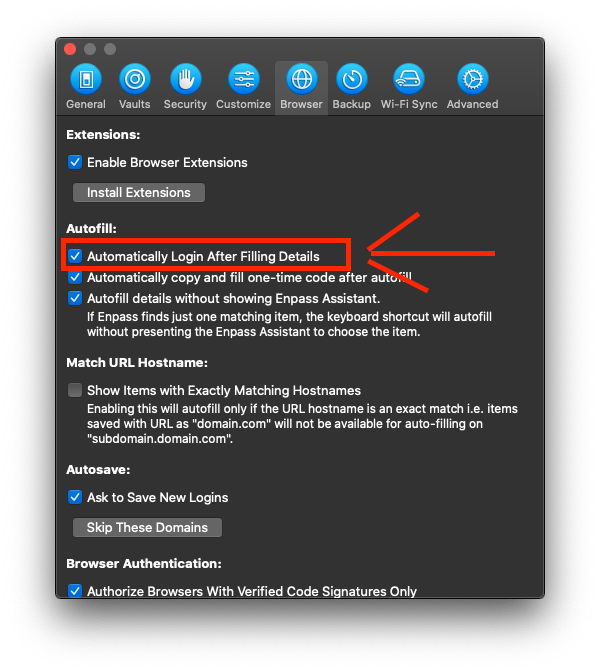
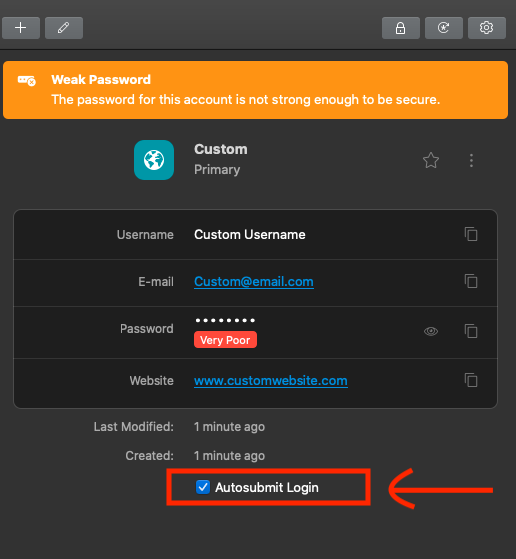
-
Hi @Anthony You can remove Enpass as the default password manager on Edge by following the steps below - Go to the Extension Settings page on your Edge browser -> Select Enpass Password Manager -> Scroll down and select "Extension Options" Here, you can disable the option "Set as default"
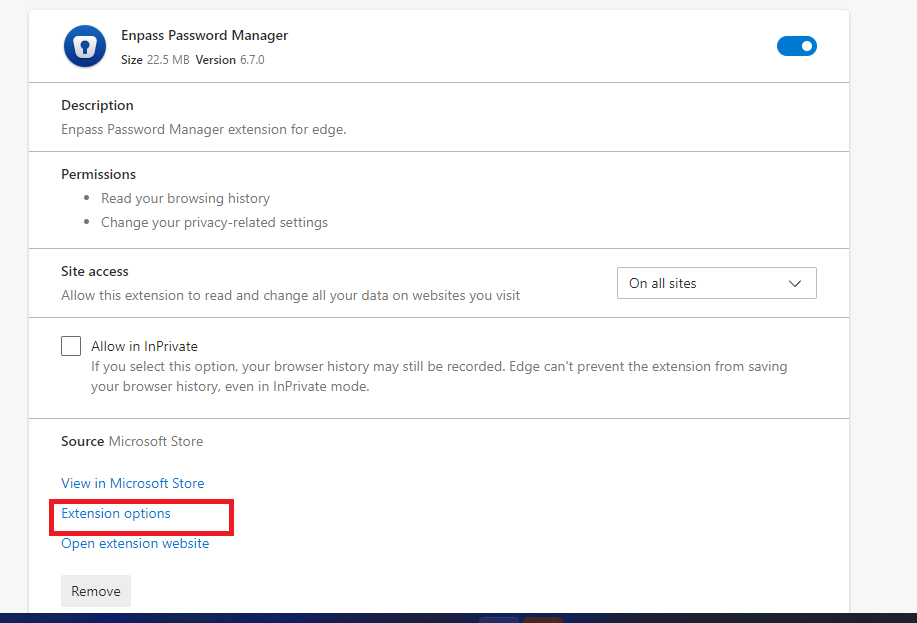
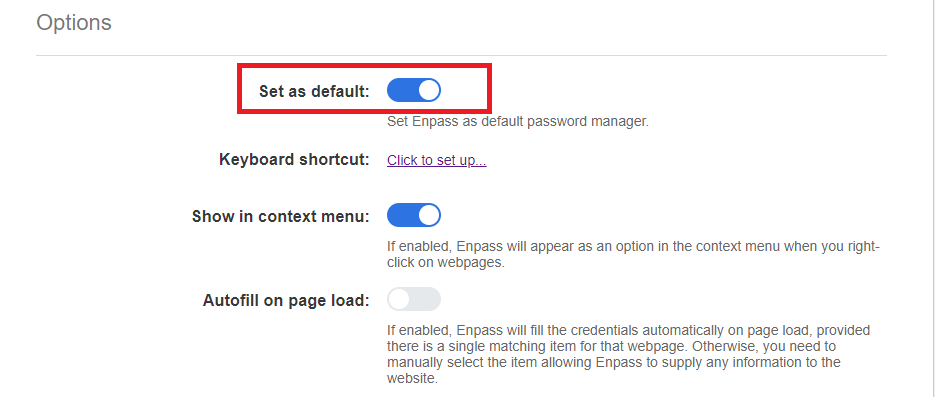
-
Hi @kadomix I will gladly help you with your query. Please share the below details with me once, and I'll get this checked for you - Version of the Enpass app and OS you are using. When you right-click on such an entry, do you see the options greyed out or does nothing happen? A screenshot of it would be helpful.
-
Hi @justaguy Thank you for this suggestion, and it is definitely something that I will take it forward to our development team. We strive to make Enpass easily accessible for all, and our goal is to keep bringing improvements to enrich the overall user experience. Taking away our users control over the app is never our intention, Enpass wouldn't be here without the support of its amazing customers. Taking this as a feedback, your suggestion has been forwarded to check its feasibility in the future Enpass versions. Enpass really appreciates your support and patience in the meantime! #SI-2444
-
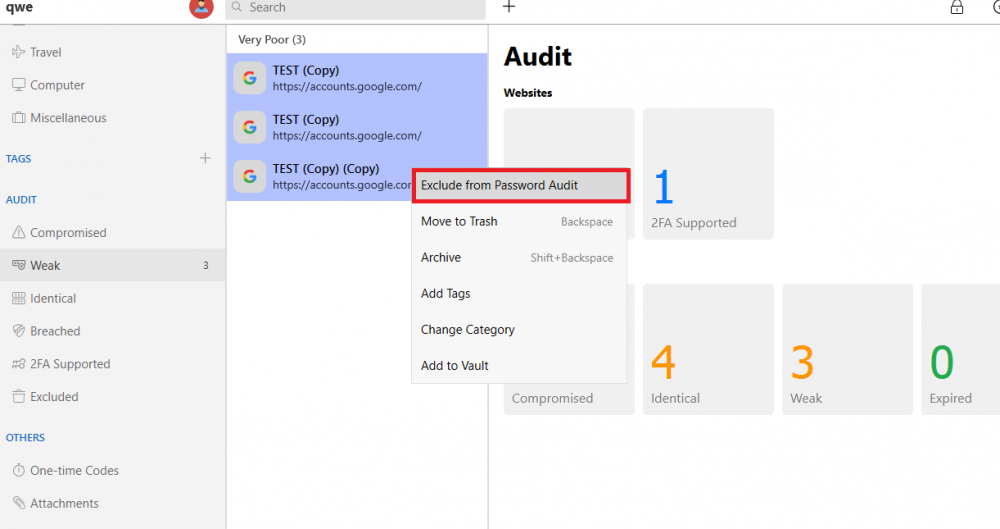
Hi @justaguy The password Audit feature actually plays a major role in keeping you on top of security, and informing you about any weak, compromised, or breached passwords by segregating them in different sections. That is the reason an option to completely disable this feature is not present in the application. However, I understand where you are coming from, and as you have multiple passwords for which you wish to disable this feature, I'll gladly help you with it. On your Enpass application, go to "WEAK" section under the Audit tab on the left pane. Here you can multi-select the items (Select the first item, hold shift and then select the last item). Then right-click and choose "Exclude from Password Audit".
-
-
Hi @justaguy You can exclude the password of any item from being audited so that the "Weak Password" yellow banner is not displayed. To exclude the password from Audit, click on the Password Field from the Edit screen of Item → Click on Exclude from Password Audit → Save Field → Save Item. Hope this helps!
-
Hi @Mahmoud Abolfadl Thank you for bringing this bug to our attention. Our concerned team has successfully reproduced the bug on their end for the auto-filling issue you are facing, and a fix will be implemented in future versions of Enpass. Appreciate your patience and support in the meantime!
-
Hi @jaydee73 Welcome to the Enpass community! Could you please confirm if you are facing auto-filling issue with just Synology or any other webpage as well? Awaiting your response.
-
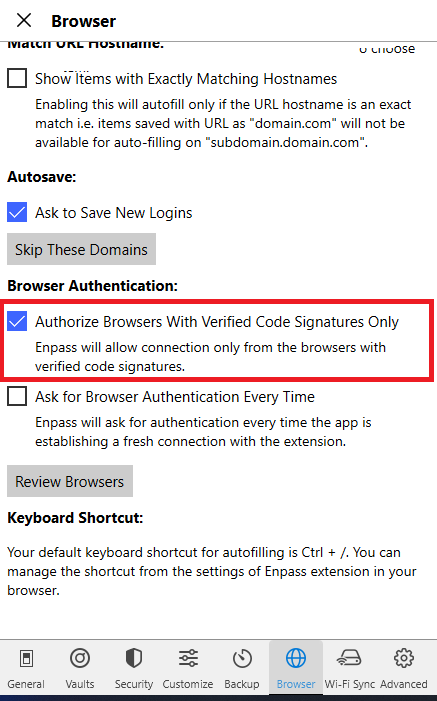
Hi @ewryghdbf For security reasons, Enpass only works with properly code-signed browsers. Please install a code signed version of this browser from the official source if available. Also, please refer to this FAQ for more information. You can also try unticking the "Authorize Browsers With Verified Code Signatures Only" option under Settings -> Browse.
-
Hi @pmcruiser Welcome to the Enpass Forums. Apologies for the inconvenience in this case. For quick troubleshooting, please create a manual backup first, then remove the synchronization from all the connected devices and resync them again. If the issue persists, please share the below information with me, and I'll be happy to get this checked for you - Version of the Enpass app on your M1 Mac Book air Are you facing a similar issue on your iPhone and Mac mini as well?



