
Sunil Kumar
Enpass team member
-
Joined
Everything posted by Sunil Kumar
-
Hi guys, Sorry for the inconvenience. Enpass 6 imports only XML file format of the Keepass V2.40(Windows). Please follow the following steps Export XML(2.x) file format from the Keepass Go to Enpass 6, Select Keepass from the password managers import page Choose the XML file and import it. Cheers!
-
-
Hi all, Sorry for the inconvenience. Please follow the following steps. Visit browser extensions page on Enpass website to install the latest extension Edge. You’ll be directed to Microsoft Store. Install and launch to run the extension, and you’d be redirected to the Edge browser with a pop-up asking for your permission to turn the extension on. Click Turn it on to enable the extension. If Enpass icon doesn’t show up in the toolbar. Go to the option ⋯ in the top right corner. You’ll see the Enpass icon there, right-click on the Enpass icon and choose Show next to address bar. Hope this will work!
-
Hi @Brilletje Sorry for the inconvenience. Please try this, Go to the Watch App. Re-enable the Enpass option. Go to the Enpass app and enable Apple watch option. Cheers!
-
Hi @GeoLuz This feature is still there. Please follow this guide. Cheers!
-
Hi @Prateek Sorry for the inconvenience. We are waiting for crash reports (takes a day) and will release a fix soon. Thanks
-
Hi guys, Sorry for the inconvenience. Please follow this FAQ to restore your Enpass 5 data. Thanks.
-
Hi @Brant Sorry for the inconvenience. Please quit Enpass app and go to "Your home folder ▸ Library ▸ Containers ▸ in.sinew.Enpass-Desktop ▸ Data ▸ Library". Take a copy of walletx.db file as this is your main database. Now rename/delete walletx.db from Library folder and start Enpass again. Choose restore from backup file option and pick previously taken copy of walletx.db. Optionally, if you have synced data to a cloud previously, you can follow this FAQ to restore it.
-
Hi @Scott Please login to your webdav account and download sync_default.walletx then restore it to Enpass 6 as an existing user through backup file. Cheers!
-
Hi @jmlee0404, Sorry for the inconvenience. Is it happening consistently? Have tried restarting the App? Thanks!
-
Hi @Laurent P. Sorry for the inconvenience. For Opera browser, you first need to add the Install Chrome Extensions by Opera Software to Opera browser and then follow these steps 1. Open Enpass Extension for Chrome 2. Click ‘Add to Opera’ button. Cheers:)
-
Hi @fnkr Thanks for reporting issue. Will release a fix very soon. Thanks.
-
Hi @makzono It seems Enpass is picking wrong scale factor for your display. From the desktop, right click the Computer icon. Then go to Properties from the context menu -> Advanced system settings -> Environment Variables -> New. Please add the following environment variable to force for 100% scale on your primary display QT_SCREEN_SCALE_FACTORS=1 Now, restart Enpass. If it looks too small, you can adjust above variable to 1.25, 1.5, 2 as per scale factor of your display. Cheers:)
-
-
-
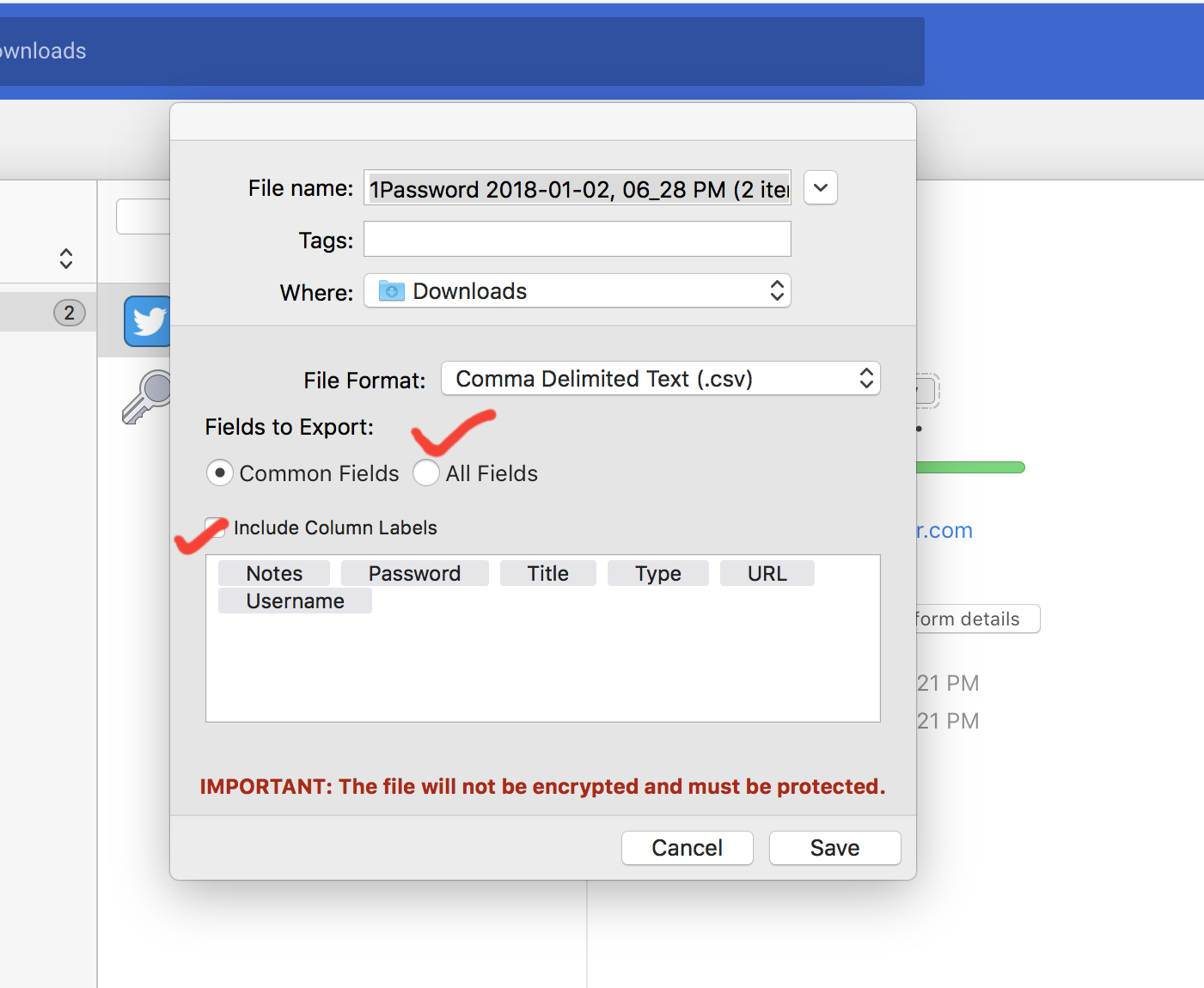
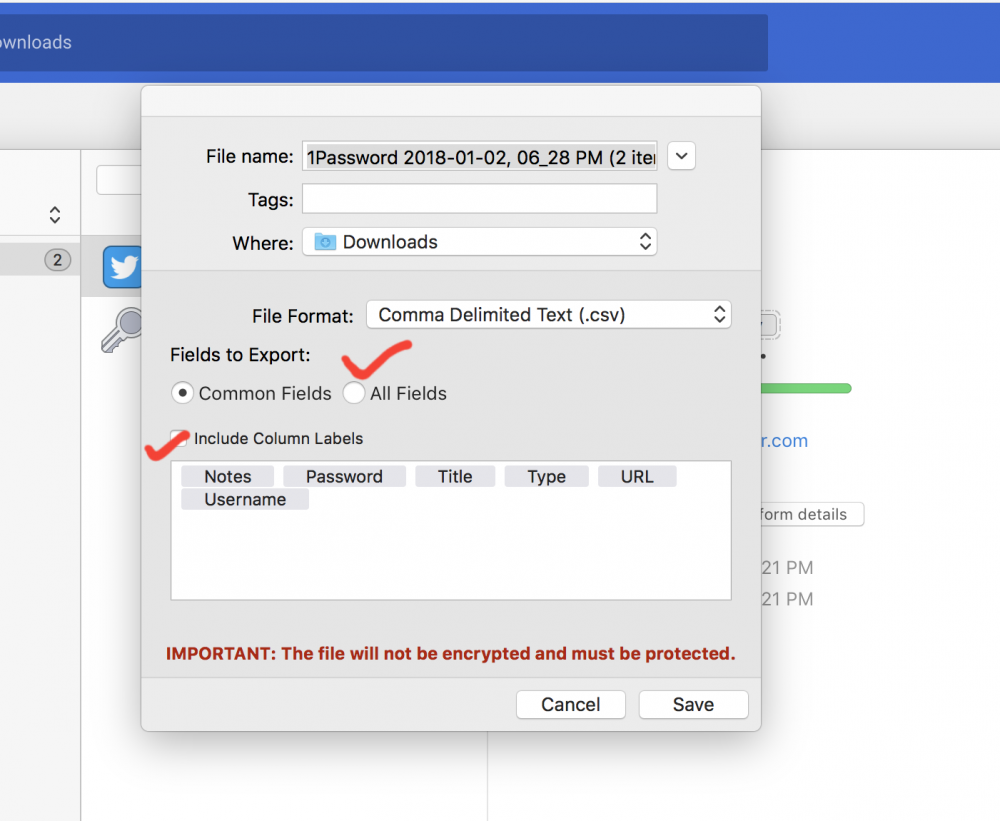
Hey @Jay Please make sure you have selected All items and include column labels options when exporting data in CSV. Without it data will be exported as garbage as in your case. Cheers,
-
Hi @durnoy Thanks for taking the time to let us know. We are aware of this issue and it will be fixed in the next update. Till then I request you to please bear with us.
-
-
Hi @Stuart Simon Sorry to hear about your trouble. Since last update, you have to manually turn ON High DPI support from Enpass settings as discussed in To bring in the effects of this settings, you need to restart the PC. Cheers!
-
Hi @sysfu, Are you trying to run Enpass from Terminal? If yes, correct command to run Enpass from terminal is: /opt/Enpass/bin/runenpass.sh Cheers
-
-
Hi @Binh Truong TOTP support for Windows 10 UWP is done and may be available in the next update this month. cheers!
-
Hi @hirozed, This issue has been fixed yesterday. Please update Enpass and let us know if you need any further assistance. Cheers!
-
Hello @John Kattenhorn I am glad that you were able to find this out. We have noted your request for adding overlays for help. Thanks for that.
-
Hi John Kattenhorn, There is no need to copy/cut/paste any value from Edit page as you can copy it directly from Detail screen. On mobile or handheld devices, long pressing will show a Copy option and on UWP app, right clicking on any field will solve the purpose. You can also copy username, Email and Passwords of login items and card number and CVC of credit cards directly from the items list by long press or right click.