


ikabupini
Members
-
Joined
-
Last visited
Everything posted by ikabupini
-
Hi. I use sharing with PSK and sending it via the Signal app or Viber's disappearing messages.
-
I have the same/related inquiry-- My wife and I are currently Pro users. Is there a way for us to be syncing to the same shared vault with our existing licenses?
-
-
Any ETA on this?
-
+1 to this error. My Enpass installation on my Win10 x64 laptop also gets stuck just before the Windows Hello challenge. I have to restart the Enpass app (store version) for the Windows Hello verification push through and open my vault.
-
Any indication on the ETA of the fix?
-
+1 to this report. In my case I have to resync the vaults to get the entries to reappear.
-
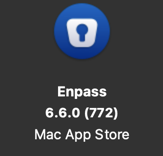
I also noticed the Mac desktop app crashing a lot recently as I've been updating my database--updating passwords, URLs, reorganizing, & deleting entries (using 2 vaults synced with Dropbox and OneDrive respectively). At one point it crashed 4 times in 5 minutes. OS and app versions below:

-
+1 The article from the Bitwarden site gives a good explanation why this is a good feature to have esp due to COVID.
-
-
When I updated to version 5.3.0.1 I noticed that the auto submit login function is not working on some websites (I've tested it so far on Outlook.com and Sandisk's customer care site). Never had this problem before during 5.3.0.

