

Dypsis
Members
-
Joined
-
Last visited
Everything posted by Dypsis
-
Same here. I didn't see this thread at first. I posted about it over here. This is not good news. If its a password manager, you need to be able to rely on it.
-
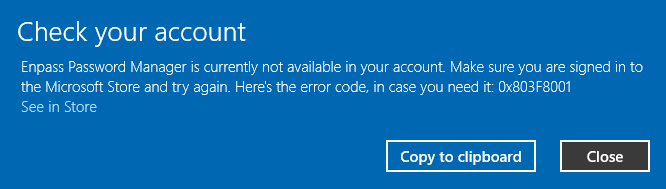
Hi. Something has gone wrong with Enpass today on my computers. It think it might be related to the latest Microsoft Store update. Below is the full error message.
-
-
That seems to have worked. Thank you, Discordant.
-
Thanks for adding that additional information, Alan.
-
Hi Gulshan. Thanks for your reply, but I don't think that is a very good solution. Also. I couldn't follow the extensions settings link instructions.
-
After a recent Enpass update, I started getting this when signing into sites in my browser. Is there any way that I can make it less intrusive or smaller?

-
There is something wrong with the latest version in regards to the autofill popup. Every time I log in to a site, Enpass pops up unnecessarily even though I already have the login details pre-filled from my browser. I am using Firefox. I am not sure if it happens with other browsers. Edit: I have just had an update to v6.72.886.0, and my problem appears to be gone.
-
I have the same problem with many icons wrong. Some website icons are wrongly duplicated on others. If I go into Customize and untick "Use Website Icons", it will display the default icons again. Then I go back in and enable it, and my icons are fixed. I am not sure how long they are fixed for though.
-
I also bought this via the Windows Store, but when I clicked that I am already registered, it said that my email email address wasn't found. So, I selected the other option to register with my email address. How do I know if I have the Pro version? If I go to Help > About, it doesn't show anything. The process is a bit confusing for people who have already purchased. Edit: I found where it shows Pro. Go to Settings and click on Account: Email Address.
-
Yes, Pale Moon is indeed getting popular, and I am also interested in an Enpass extension.
-
This bug has reared its ugly head again with the latest update. It fails to prompt to save any new logins on all the browsers that I have tried. These browsers are: Firefox, Chrome, Edge, Edge Dev, Vivaldi. Enpass Password Manager 6.11.424.0 (July 12, 2019)
-
-
-
Do you mean receiving prompts for new logins? If that's the question, then the answer is "NO".
-
I think I'll have to give up on Enpass. I get no prompts to save new logins, so it makes Enpass rather useless. I'll die before you guys fix it.
-
Thanks @Anshu kumar.
-
Is it possible to disable Most Frequent in v6? In v5 I could do it, but I cannot see how to do it in v6. It's a BIG security risk, in my opinion.


-
Have any of you guys found a solution yet? I've been very patient, but the core feature of a password manager is broken, and I am thinking of abandoning Enpass and trying something else. The sound from developers is deafening.
-
Is there any news on when this will be fixed. I have switched over to the Windows 10 Store version and paid for it, but it still doesn't prompt for new logins. Obviously, this is very annoying. Version 5 worked fine. Prompting for new logins is one of the core features of a password manager, but it seems the developers have nothing to say. I have now tried Firefox, Vivaldi and Edge and Chrome browsers on my Desktop and Laptop computers.
-
How did you get it to work? I am using the Desktop version. I just get the spinning dots. I have tried changing default browsers. I think the Windows App version is taking over the Desktop version.


-
Oh. yeah. I guess that's why it's not working for me.
-
I am not getting any prompts to save new logins since upgrading to version 6. Version 5 worked fine. How do I fix it? I have used Firefox, Vivaldi and Edge.
-
Has anyone found the tray icon sometimes becomes non-responsive? When it happens, I have to close it down and re-open it.
-
I'd like to see a poll on this forum. I'm sticking with the desktop version, even though I went into the store and paid for the UWP version.