Abhishek Dewan
Enpass team member
-
Joined
Everything posted by Abhishek Dewan
-
Hi @Lucas Bodin Welcome to the Enpass Forums. Enpass is always grateful for our active users, and your support and effort are greatly appreciated. However, we forwarded this request to our developers and would like to inform you that they have investigated its feasibility. Unfortunately, this request cannot be taken into consideration at the moment.
-
Hi @dimidrol, @Earos I forwarded this concern to our dedicated team, and they were able to replicate this issue on their end. Our development team is now working to fix it, and soon a patch addressing this issue will be released. We appreciate your support in the meantime and apologize for any inconvenience caused in this case.
-
Hi @firegate666 Our dedicated team was able to reproduce the bug on their end, due to which this issue is occurring. In addition, our development team has confirmed that future builds will include a fix for this concern. We appreciate your cooperation and support in the meantime.
-
Hi @flyingbirds After clicking 'Save Page As', an HTML file and a folder of that webpage will be saved on your PC. Select both documents and compress them into a ZIP file. Then share that ZIP file with us, and we will get this issue further investigated. In case this forum does not support ZIP format, please share it with us at support@enpass.io and mention this forum. We appreciate your cooperation in this matter.
-
Hi @Passer Our development team is already aware of this issue, and they are working on resolving it. Unfortunately, I will be unable to share any ETA right now but rest assured, I will be sure to post any updates regarding a fix on this forum.
-
Hi @Secure Please remove the synchronization from all the connected devices. While doing so, you will also get an option to 'Delete data from Google Drive'. Please proceed with it and after doing it, enable the synchronization again. Once done, reinstall the Enpass app and restore the cloud backup from the same Google Drive account with which you set up synchronization in the above steps. Your cooperation in this case is appreciated.
-
Hi @Uday Welcome to the Enpass Forums. Stack social is our 3rd party vendor and there is no difference between the Enpass Lifetime license they are offering and the one on our website. For pricing and purchase, please refer to their webpage.
-
Hi @Firebird Welcome to the Enpass Forums. For security reasons, your iCloud session expires periodically. Please refer to this link for a handy step-by-step guide to resolve this issue.
-
Hi @firegate666 Thank you for sharing the requested details. I have forwarded this concern to our dedicated team and will be sure to update you on this forum as soon as they update me on this matter. Your patience in the interim is appreciated. #SI-3203
-
Hi @rdfhrn I certainly understand your point. We forwarded this request to our developers and would like to inform you that they have investigated its feasibility. This feature request may be included in future Enpass releases even though we have not yet received any specific version updates. Your support and patience are greatly appreciated. #SI-2448
-
Hi @rdfhrn Thank you for your feedback. I have duly noted your comments and have shared them with our development team for feasibility checks and future consideration. Your support and patience in the meantime are appreciated. #SI-3202
-
Hi @Secure Thank you for sharing the details with me. Could you please confirm if you tried the steps in our troubleshooting guide and ensure that you are synchronizing with the correct cloud account? Also, please confirm the number of vaults you have saved in your Enpass app on your other devices. The master password is used to access the Enpass app and is associated with the Primary vault. Any other vault you create in the Enpass app has its own vault password. Now, for example, let's say on your other devices (laptop, iPhone, iPad) you are using multiple vaults, say Vault 1 (Primary) synced with cloud account 1 and Vault 2 (Secondary) synced with cloud account 2. Now, if you try to restore your Vault 1 data from your cloud account 1 on any other device, the app will require the master password (as the master password is associated with the Primary vault). However, if you try to restore Vault 2 data from your cloud account 2 on any other device, you will need to enter the Vault password to access it and not the master password (Secondary vaults are associated with their vault password).
-
Hi @sdudulon Thank you for sharing the details. During our investigation, we found that it is highly likely you are facing this concern because of your Webdav account. If possible, could you please DM me dummy credentials for your Webdav, which could be accessed publicly on our side?
-
Hi @Secure For quick troubleshooting, please try the below steps - I recommend checking this highly useful troubleshooting guide. Ensure that you are synchronizing with the correct cloud account. The cloud account from which you are trying to restore your data should be the same as the one you are using to synchronize your data on other devices. If the above instructions do not help, kindly share the below details with me and I’ll get this investigated for you - The version of the Enpass app and OS you are using on your devices. Please share a screenshot of any error message you are getting. Is the master password working on your other devices or are you accessing the Enpass app through biometrics/Face ID? The number of vaults you have in your Enpass app on your other devices.
-
Hi @rdfhrn While generating random passwords, you can set your own rules and decide the length of the password, and the minimum number of uppercase, digits, symbols, etc used in the passwords. Please refer to this link to know more about it.
-
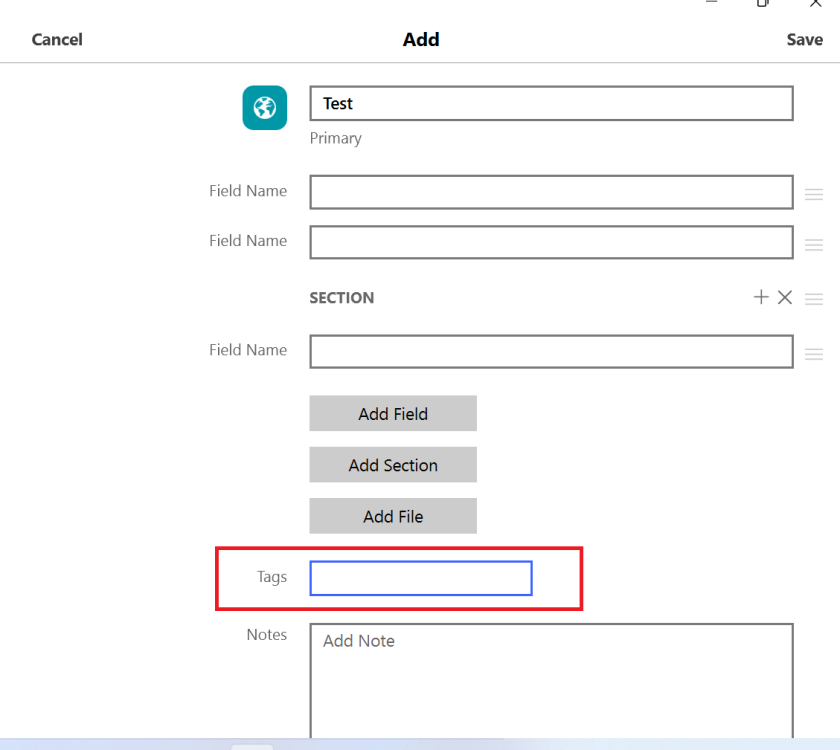
Hi @rdfhrn While creating Items after choosing template, you can add any tags you wish to the Item from the 'Tags' section (Please refer to the below screenshot) -
-
Hi @ironylife Please contact us at support@enpass.io and share the email address with which you bought the license. We will then get this further investigated for you.
-
Hi @Tom12345 Thank you for sharing your valuable feedback. I have duly noted your comments and have shared them with our dedicated team so they may check its feasibility and consider it for future Enpass versions. Your patience in the meantime is appreciated. #SI-3200
-
Hi @Oxal Thank you for sharing your valuable feedback. Could you please share the OS on which you are using Enpass? I will then share all the details with our development for future consideration.
-
Hi @sdudulon Thank you for sharing the details. I have forwarded every bit of information to our testing team and will update you soon regarding this matter. While we get this checked for you, could you please confirm if you are facing this issue with just the Safari browser or any other browser as well? Also, please share which Webdav server you are using, try disconnecting Webdav sync on the affected device and check if you are still facing this concern?
-
Hi @Jetah You can disable 'Show Items with exactly matching hostnames' in your Enpass app Settings -> Browser -> Match URL Hostname. This way, Enpass will be available for autofilling on "subdomain.domain.com" for the Items saved with the URL "domain.com".
-
Hi @Davve123 Welcome to the Enpass Forums. I have duly noted your comments and have shared them with our dedicated development team so they may check this feature's feasibility and consider it for future Enpass versions. Thank you for your patience in the meantime. #SI-3198
-
Hi @Jetah You can add a field or change a fields function of any Item in Enpass. Please refer to the steps in this link on how to do so.
-
Hi @Embacuta Welcome to the Enpass Forums. We have received your query on support@enpass.io and have responded to the same. To avoid duplication of efforts and confusion, we request you to please revert to the same.
-
Hi @cmac18 We forwarded this request to our developers and would like to inform you that they have investigated its feasibility. This feature request may be included in future Enpass releases even though we have not yet received any specific version updates. Your support and patience are greatly appreciated. #SI-2050