Samuela
Members
-
Joined
-
Last visited
Everything posted by Samuela
-
Hey @jshea, Are you facing this probem in Enpass app only or other apps too? Also, have a look at the troubleshooting steps mentioned in this link: https://windowsreport.com/copy-paste-windows-10-problems/
-
@Bob___ might he will be confused about version number, the latest one is 6.7.0 866. Have you tried deleting old fingerprint and adding new one?
-
Hey @Bob___ The version 6.7.0 866 is the latest build. Have you tried re-setup the Windows Hello from device settings and leter on try to enable on Enpass.
-
Try these troubleshooting steps : https://www.enpass.io/troubleshooting-wifi-sync/ hope it helps!
-
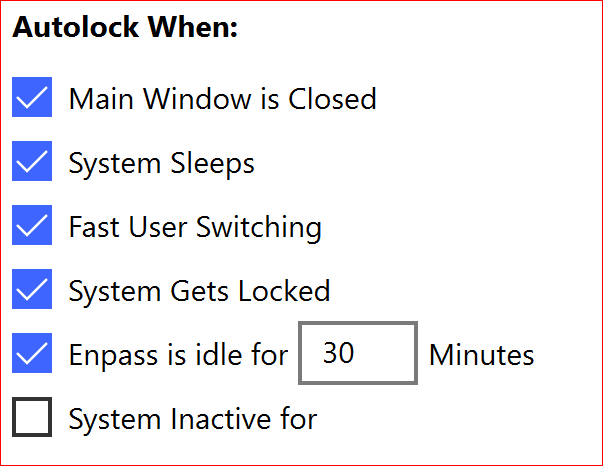
Try changing the lock timing from Enpass security settings and check. You can change as per your convience.
-
Hey, Does the Enpass extension gets locked after 5 minutes and you need to enter the master password or do you need to enter the 6 digit pairing code every 5 minutes?
-
-
@Vik, try reconnecting the Google Drive sync and make sure Enpass is up to date.
-
-
-
-
@tox1c90, you have downloaded the website version or store one?
-
I am facing the similar issue and found interesting behaviour, after rebooting the device fingerprint gets deleted. You can check by Follow the mention steps: a. Add 5 fingerprints on the device settings. b. Enable Biometrics in Enpass. c. Reboot the Phone. d When the device open --> Go to settings and check how many fingerprints are there? Does it display 5 fingerprints or any of them get deleted?
-
@jemershaw check this troubleshooting steps mentioned by Enpass Team: https://discussion.enpass.io/index.php?/topic/5314-roll-back/&do=findComment&comment=11435
-
@charlotte why don't you try re-installing the app and this time enable access to document for Enpass.
-
I had similar issues and I contact to the support team and they suggested this workaround. Step 1: Download the previous version of Enpass5 from this link. Export the 1password data and import into Enpass 5. Step 2: (After successfully completing the above steps perform these steps). Take the backup of Enpass 5 data and save it manually on the device. Open Enpass 6 --> Take the backup of Enpass data and save it manually on the device. Open Enpass 6 -->Settings --> Advanced --> Apply Erase Everything function. Now open Enpass 6 and restore Enpass 5 backup file. Hope this helps!
-
@lcfieldYou can restore previous backup on a new vault and later delete it in case if you don't want to overwrite the existing vault data.
-
Common @jfd, they also know how to run business. First of all it's a beta version and definitely having some issues in my opinion we should wait for catalina final update.
-
Finally!! iCloud issue is fixed seems like issue persisted from Apple side.
-
In v6 'Restore' option appears only in two scenarios: 1. When the app is newly/freshly installed. 2. Creating a new vault. (The app is already installed and contains database).
-
Have you try installing app (Traditional Win32) from their website: https://www.enpass.io/downloads/
-
To autofill, you have to create three different items in Enpass.
-
@juppes5 you can download the previous version of app and extension for firefox from here: https://www.enpass.io/support/kb/troubleshooting/where-can-i-download-older-version-of-enpass/
-
To start with welcome screen Go to user Document folder --> Rename Enpass folder as 5Enpass and check.
-
you can download enpass 5 from here: https://www.enpass.io/support/kb/troubleshooting/where-can-i-download-older-version-of-enpass/