


Samuela
Members
-
Joined
-
Last visited
Everything posted by Samuela
-
Hey @Rolyac, Try setting Firefox as your default browser and then attempt to sync with iCloud.
-
Please make Firefox as the default browser and then try to sync. Hope it works!
-
Go to Document Folder -> Rename Enpass folder and then try to open Enpass, it should display a welcome screen.
-
-
When you authorized with the login credentials and it displays re-direct button as the above attached image. Copy the URL and then open Enpass, Google Drive sync should be connected. Hope that works!
-
@oranges in the recent update 6.9.0 they have mentioned in release notes that windows hello auth may required second times. Can you please confirm are you facing this problem each time when you unlock the app using windows hello?? :https://www.enpass.io/release-notes/windows-10-desktop/ Strengthened the security of your vaults by optimizing the key generation process. The encryption key derived from your master password, which is used to secure your data, will now undergo 320K rounds of PBKDF2-HMAC-SHA512 iterations, a substantial increase from the previous 100K rounds. All existing vaults (excluding backups) will be upgraded. (Note: May require a second authorization for using biometrics)
-
I have reported this issue and will be fixed in next update. cheers!
-
@Brian185, Have you disabled lock on leaving from Enpass security settings? If yes, please enable and take backup. It should work.
-
@Abhishek Dewan Working again with the latest update 6.8.5 758
-
@Louwy You can install the updated build by using these simple steps. 1. Download the exe file from this link: https://dl.enpass.io/stable/windows/setup/6.8.4.1167/Enpass-setup.exe 2. Double clicking on exe file and follow the screen instruction and Enpass will get update.
-
-
Have you guys running any network sniffing app? If yes, please close the app and then register Enpass app.
-
@KHK, Have you try running the application after fresh install ( uninstall and re-install again)? Also, please go through the troubleshooting steps mentioned in the given link: https://support.microsoft.com/en-us/topic/-windows-cannot-access-the-specified-device-path-or-file-error-when-you-try-to-install-update-or-start-a-program-or-file-46361133-47ed-6967-c13e-e75d3cc29657
-
@johnq please try re-connecting the Dropbox sync one more time. I have similar issue which gets fixed after re-connecting. Thanks!
-
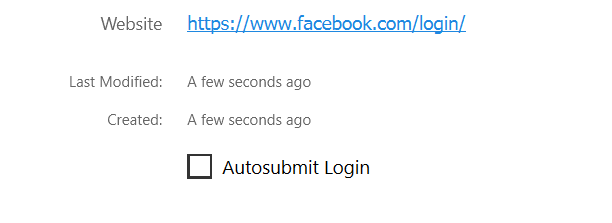
Hey @ng4ever Try disabling Autosubmit login option from Enpass item details page and then check, should work
-
Can you please share the url or screenshot with the error?
-
@J K try these troubleshotting steps mention in FAQ.
-
-
Sorry to bother you again! I just want to know the name of the app which icon preserve after the update. Thanks for your time!
-
@mark chang, you need to use wildcard url for the particular websites. Please add this URL in Block list menu: https://www.dianxiaomi.com/* Hope this helps!
-
When you update the 4-5 app simultaneously then in this case app doesn't relaunch, but if you update Enpass app alone successfully it gives a notification message about app update and clicking on it gives an option to launch ( correct me if I am wrong). Can you do let me know the app name which icon doesn't gets hide after update. Hope to hear from soon!
-
That's really strange! Have you tried re-installing opera?
-
@ewryghdbfHave you tried re-installing the Opera browser? Opera version 80.0.4170.63 with Enpass extension version 6.6.2 working fine for me on Windows 11 Enpass store build.
-
@Pivopiev Try setup Chrome/Firefox as default Browser and then try to sync in case if doesn't setup as your default Browser.
-
@testuser1234 have you imported data from any other Password manger? The reason being I have tested this issue on same OS version and autofill is working fine. Could you please suggest any of the URL which you are using?


