datarepos
Members
-
Joined
-
Last visited
Everything posted by datarepos
-
The Issue came up again on my m4 MacBook Air. Crashing always when quitting the app independent if CMD +q or menubar. Enpass-2026-10-28-163800.ips
-
I can confirm that Firefox 157.0.1 has triggered the issue again. Workaround: Manual Firefox Downgrade or switch to Firefox ESR.
-
I completely agree. The quality control for the software is definitely not sufficient, and the support is highly unsatisfactory.
-
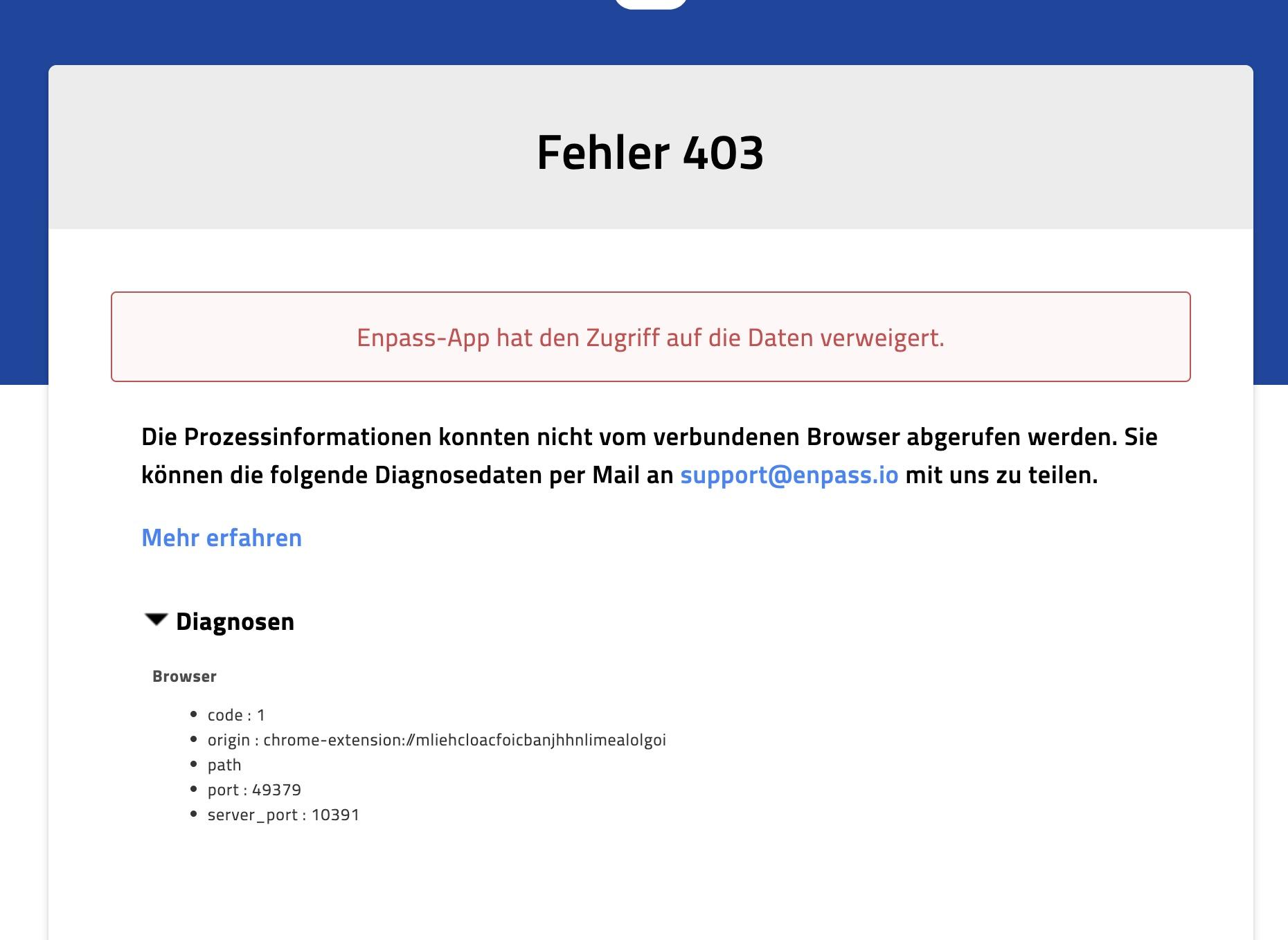
This worked until you guys released 6.11.18.2. Now the 403 is back. Disabling code signature check is a workaround, but no solution.
-
Hi, after upgrading my Macs (M5 Pro and M3 Pro) to macOS 27 Golden Gate, the Browser Extensions on Firefox and Edge are unable to connect to Enpass app. The Extension in Safari is working as expected. You can find the error messages attached. Enpass Version 6.12.6 (2772) Mac AppStore Firefox 155.0.1 - Extension 6.11.17.2 Edge 153.0.4234.32 - Extension 6.11.17 I would appreciate quick support.


-
OK, but it sounds that's a different issue and has nothing to do with this conversation. Maybe you should start a separate conversation about it.
-
Hi, In the meantime, I've found a solution. Apparently, Enpass had entered a strange state and saved it. I closed Enpass once via the menu bar: Enpass -> Quit. This apparently corrected the issue. After doing that once, I can now quit Enpass using Cmd + Q without it crashing. Please give this a try.
-
I have the similar Issue on my MacBook Air M4.
-
Funny Enpass guys: Different replies to the same topic:
-
Worst support ever….
-
The reported error has existed for 3 months now. Dear Enpass team, it's not nice to stall your paying customers like this. It would be nice if you would not only care about launching new paid features, but also fix bugs in a timely manner.
-
I played a little with the settings of the add-on for testing. In doing so, I noticed that the problem no longer occurs when I disable the "Show popup menu to auto-fill" setting. All other settings have no influence on the problem, also the sync settings of the vault have no influence. Maybe this will help the Enpass team in their analysis. Regards datarepos
-
I have the exact same problem. It appears with the extension 6.8.0 (Enpass 6.8.4) on my M1 Mac in all browsers. I played a little with the settings of the add-on for testing. In doing so, I noticed that the problem no longer occurs when I disable the "Show popup menu to auto-fill" setting. All other settings have no influence on the problem, also the sync settings of the vault have no influence. Maybe this will help the Enpass team in their analysis. Regards datarepos
-
I have the exact same problem. It appears with the extension 6.8.0 (Enpass 6.8.4) on my M1 Mac in all browsers. I played a little with the settings of the add-on for testing. In doing so, I noticed that the problem no longer occurs when I disable the "Show popup menu to auto-fill" setting. All other settings have no influence on the problem, also the sync settings of the vault have no influence. Maybe this will help the Enpass team in their analysis. Regards datarepos
-
The behavior of the Chrome extension on the mac sounds very similar to the behavior of my Firefox and Safari extension on the mac: https://discussion.enpass.io/index.php?/topic/28733-autofill-and-connection-error-when-trying-to-log-into-microsoft-websites/
-
I have been noticing for a few days that logging into Microsoft websites (Outlook.com, Office.com, etc.) is no longer possible. The Enpass Extension no longer performs a login on these sites. When trying to start the extension via the icon, nothing happens anymore. I also noticed that the extension completely loses the connection to the Enpass app after opening the Microsoft pages and subsequently no longer works on other websites. Only a restart of the Enpass app solves the problem. If a Microsoft website is opened again, the extension loses the connection again. Enpass Extension 6.8.0 (Safari + Firefox) Enpass 6.8.3 (AppStore Version) MacOS 12.6 on M1 MacBook Pro 14"
-
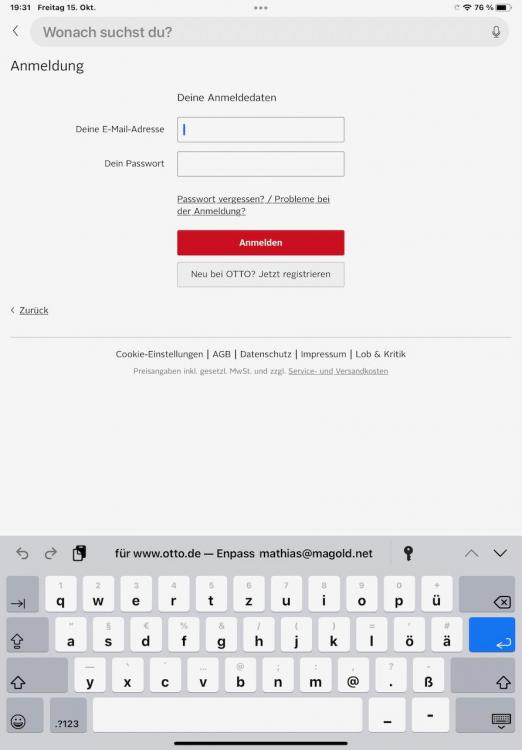
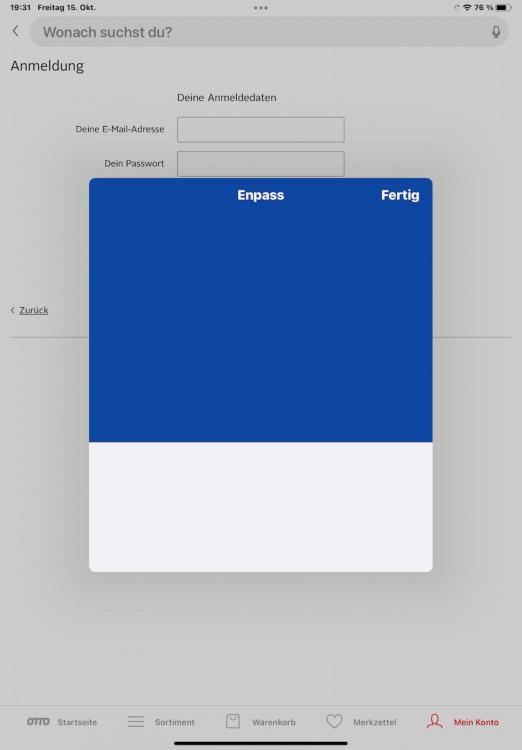
Hi, I am using Enpass 6.7.1 with iPadOS 15.0.2 on my iPad Air 2020. When starting the autofill function in safari, enpass comes with touch id request. Using the same function in any other app than safari, enpass comes up but no touch id request comes up. On iOS 15.0.2 the same function works great in any app. I have attached screenshots. Thank you for your help. Regards Mathias
-
Hi @all, I have the same issue logging into my amazon.de account. I have to click enpass twice (email adress and password), it is not turning from the 1st site (email adress) to the 2nd (password). Enpass extension 6.6.2 - Firefox 93.0 - macOS 11.6 Please ask if you need further informations. Regards Mathias
-
This is the same answer as last year and the problem still exists. This kind of support is not very helpful for your paying customers.
-
Hi Enpass Team, any updates from your side. The autofill for my banking website is still not working, it is now march 2021, and the Extension 6.6.0 in use. Thanks and regards Mathias
-
Hi, I am using enpass 6.4.2 with browser extension 6.4.0 on macOS 10.15.4 Regards Mathias
-
Hi Enpass Team, the webform of my online banking is not saved correctly and autotype is starting in the 3rd of the 4 field. I have tried to create new entries and to save the form manually. All withe the same result. Could you have a look at it? Thanks in advance. https://meine.norisbank.de/trxm/noris/ Kind regards Mathias
-
Hi all, I can reproduce this behaviour on on my macbook pro 10.14.2
-
Hi all, I am syncing my iEnpass vault on my iOS Devices and Mac with the WebDAV Server on my Synology NAS. The NAS is accessible from my local network but not from the internet. If all iOS Devices (iPad Air 2 + iPhone X) are connected to my local network and the NAS is accessible, everything is fine. This worked great before the ugrade to enpass 6. Now, if I leave my local network and the devices cannot connect to the WebDAV share, Enpass on iOS is unusable (The GUI is freezing and the app is crashing). I can avoid this with opening a vpn connection to my network before opening enpass. Please fix this. Thanks in advance. Regards Mathias