


Anshu kumar
Enpass team member
-
Joined
Everything posted by Anshu kumar
-
Hey @GeoCrackr, Hope you are doing well! Can you please confirm are you facing the same problem with v6.0.6 too? Thanks for your co-operation.
-
Hey @StrangeNoises, Thanks for reporting this issue. We have tested this issue and found the problem. Our dev team is working into it. Thanks for your co-operation.
-
Hey @Bowjest, Yes, it is compatible. Please install and share your feedback. Thanks!
-
Hey @71titan, Thanks for your prompt reply and sharing more details. This issue has been fixed in v6.1 and will try to push an update asap. Till then please co-operate with us.
-
Hey @Bowjest, Please check your inbox we have just shared a new build and share your findings. Thanks!
-
Hey @zorglups, Sorry to hear that the workaround didn't help. We have fixed some sync related issue in v6.1 where sync gets stuck in some devices and will try to push an update asap. Meanwhile, if you are using Enpass on any other devices then please follow these steps: Open Enpass on the particular device --> Take the backup of Enpass data and save it manually on the device. Now transfer the backup file to the Windows PC and restore it. Thanks!
-
Hey guys, Sorry for the trouble you are going through. We have done the major upgrade in the import functionality and the beta version of Enpass 6.1will be available within a couple of weeks. Till then we request you to please co-operate with us.
-
I'm afraid to say that I am not able to understand what did you mean by It would be great if you can explain the scenario a little bit more. It will help us in getting a more clear picture about the issue before further proceedings. Thanks!
-
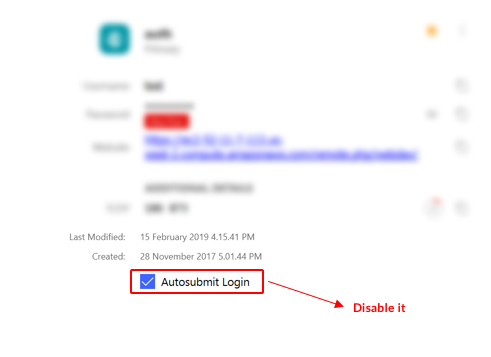
Hey @71titan, Sorry for the trouble you are going through. Please let me know have you disabled Automatically login After Filling Details from Enpass Browser settings. Also, please try disabling Autosubmit-Login option for the particular item and share your findings. Thanks for your co-operation.
-
Hey @TheoOrl45, Sorry to say but currently there is no option to import Dashlane data. However, we have added this option in v6.1 and will try to push an update asap. Till then please co-operate with us.
-
Thanks for sharing the details. I have forwarded it the QA team to look into it. Thanks for your co-operation.
-
Hey @zorglups, Sorry for the trouble you are going through. Please follow these troubleshooting steps and let me know if the problem persists. Create an empty keychain with the same master password. Now open Enpass and enable sync with Dropbox. Hope this helps!
-
Hey @nephilim, Thanks for sharing the details. Our QA team is looking into this issue and I'll keep you update if we found anything conclusive. Thanks for your co-operation.
-
Hey @xarekate, Please share the crash report via PM or at support@enpass.io so that we can investigate where the problem could be. Thanks for your co-operation.
-
Hey @Raffaelo, Thanks for reporting this issue. I've noted down this issue in the bug tracker and notified the dev team to look into it. Thanks for your co-operation.
-
Hey @RHPT, Can you please tell me precisely for which platform you want a beta so that I can help you in a better way. Thanks!
-
Hey @Maarten Sorry to say but It's not possible to install outdated versions from the Google Play store. Thanks for your understanding!
-
Hey @BrigoNortensson, We are really sorry for the trouble you are going through. We have checked this issue with the different WebDAV accounts and got some feedback from the customer that its working fine. It would be a great help if you can share the demo account of your WebDAV via PM so that we can check where the problem could be and try to fix asap. Thanks for your co-operation.
-
Hey @nephilim, Can you please let me know which Proxy or Firewall client are you using so that we can investigate further. Thanks for your co-operation.
-
Hey @Andrew Myers Sincere apologies that the issue took more time than expected. It's been resolved, and an update v6.1 with the fixes will be rolled out soon. Meanwhile please click on the Merge button. Thanks for your co-operation.
-
Hey @Peter Suto, Hope you are doing well! We have tested this issue in our lab and were unable to reproduce it. It would be a great help if you share more details about the Remote desktop Machine and Citrix Virtual Desktops configuration which you are running so that we can proceed further. Thanks for your co-operation.
-
Hey @nephilim The reason behind getting the error code 504056 is that Enpass is not able to access the internet. So please make sure the internet connection is stable on your device. In case if you are using proxy and then please try manual configure the proxy in Enpass Advanced settings. Also please try reconnecting the sync from Enpass settings. Hope this helps!
-
Hey @jjmrx, This issue has been fixed, and an update v6.1 with the fixes will be rolled out soon. Thanks for your co-operation.
-
Hey @pio93qwertz, Thanks for your suggestion. I have noted it down and forwarded to the concerned desk for further consideration. Cheers!
-
Hey @Bub_Bit, Thanks for writing in. No! I would like to share that Enpass is tied with Google Play services and can only be downloaded and purchased from the Google Play store. We strongly recommend users to install Enpass only from the respective app stores (Google Play Store in your case) as apps on Store are signed with developer certificates and delivery through it assures that software is genuine and not tempered. While installing Enpass from other websites or stores might put you in trouble of security risk like data theft. Cheers!

