


Anshu kumar
Enpass team member
-
Joined
Everything posted by Anshu kumar
-
Hey @Telenic, I would like to share that Windows Store apps store their data inside app sandbox and it's not possible to change the default location. To change the default location of the app, please download the Traditional Win32 version of Enpass from our website. Thanks!
-
Hi @Telenic We are sorry to inform you that you cannot separately disable automatic updates of Enpass. The updates are managed by the Microsoft Store and you can disable the updates by the following method: Go to Microsoft Store > Open Settings > App updates > Disable the setting 'Update apps automatically'. Thanks!
-
Hey @Lenny Thanks for your suggestion. I have noted it down and forwarded to the concerned desk for further consideration. Cheers!
-
Hey @Emmitt, Sorry for the trouble you are going through. Please let me know what error message or code are you getting while using WebDAV sync so that we can proceed further. Thanks for your co-operation.
-
Hey @crazyheinke, Sorry for the trouble you are going through. The reason behind getting the error code 908417 is that the server is not responding correctly to WebDAV quries made by Enpass. If possible, please share the demo account of your WebDAV via PM so that we can investigate it further. Thanks for your co-operation.
-
Hey @Red0210, Thanks for reporting this issue. I have noted it down and forwarded to the dev team for further improvement. Thanks!
-
Hey @enpass-user-11, Thanks for reporting this issue. I have noted down this issue in the bug tracker and notified the dev team to look into it. Meanwhile please click on the error dialog box and click on Merge option. Hope this helps!
-
Hey @mrk, Thanks for writing in. Sorry to say no! You can make it work by creating a new vault. The feature of the WiFi sync is already in our roadmap and will be available with the subsequent update. Thanks!
-
Hey @Finariel Sorry for the trouble you are going through. Can you please share which Windows 10 build version are you using? Also, please let me know have you downloaded Enpass from Enpass website or Windows Store? Please follow these simple steps mentioned in the forum post: Hope this helps!
-
Hey @dvdr, Thanks for writing in. Sorry to say currently there is no option to delete or edit the entries from credentials list. However, this is already in our roadmap and will be available with the subsequent update. Thanks for your co-operation.
-
Hi @Jan Skutil Sorry for the trouble you are going through. If you are using multiple Google account then please follow these steps: Remove all Google accounts (temporarily) except the one from which you had purchased Enpass from your device. Take the backup of Enpass data. Uninstall the Enpass app. Now install the Enpass app --> Pro version will be restored. Restore your database. Add other Google Accounts, after restoring the purchase. Hope this helps!
-
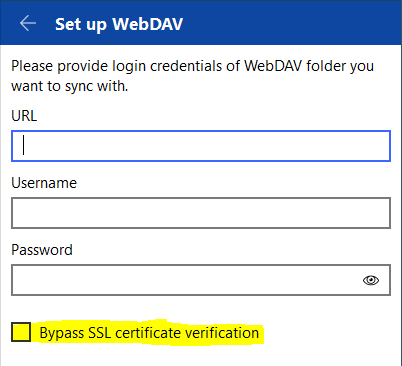
Hey @fuehrm Sorry for the trouble you are going through. Can you please let me know have you enabled Bypass SSL certificate verification option in the sync page? If not please try enabling it. If the problem persists, please let me know the device OS and Enpass version which you are using? Also, if possible please share the demo account of your WebDAV via PM so that we can investigate it further. Thanks for your co-operation.
-
Hey @Aurélien ML, Thanks for reporting this issue. I have noted down this issue in the bug tracker and notified the QA team to look into it. Till then please co-operate with us.
-
Hey @Gabor_O, Thanks for using Enpass. Regarding purchase receipt, you may have to contact Microsoft Store team who will give you exact information about the purchase. You can refer to the Microsoft Support page link. Hope this link.
-
Hey @Exar-Kun, Thanks for writing in. Please have a look at this FAQ . Hope this helps!
-
Hey @jcalonso Sorry for the trouble you are going through. To restore the pro version on your iOS device, please re-install Enpass with the same Apple ID with which you have purchased Enpass earlier. NOTE: Before uninstalling the app make sure you already have the backup of Enpass data. Thanks!
-
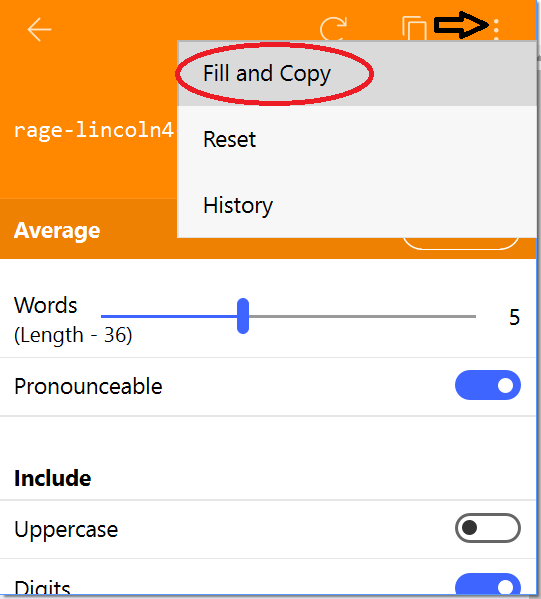
Hey @jakejohn, Thanks for your suggestion. I would like to share that Enpass Extension already have the option Fill and Copy while generating the password. I would like to share that when you generate password through Enpass password generator (Either from App or Enpass browser extension), it keeps a record of the password that you used, along with their respective timestamps. For more details please refer our user manual. Hope this helps!
-
Hey @th3Chris, Sorry for the trouble you are going through. Please share some more info so that we can help you better. On which all devices (along with OS version) are you using Enpass? Which Enpass version are you using on each device? If possible, please share the demo account of your WebDAV via PM so that we can investigate where the problem could be. Thanks for your co-operation.
-
Hey @H.S ROH, Sorry for the trouble you are going through. The error code 209997 usually occurs when Enpass doesn't have permissions to write on default location of Enpass database. Please share some more info so that we can help you better. On which device (along with OS version) are you using Enpass? Which Enpass version are you using? While creating an item what problem are you facing? Have you changed the default location (The default data location is under theUser Document) of Enpass database? Thanks for your co-operation.
-
Hey guys, The portable version of Enpass is already in the QA phase and we will try to push an update soon. Till then we request you to please co-operate with us.
-
Hey @kamal, Sorry for the trouble you are going through. Please share some more info so that we can investigate where the problem could be. Which Android device and Android version are you using? Which Enpass version are you using? Are you able to access Enpass data on any other device? If yes, please share the OS version and Enpass version. Thanks for your co-operation.
-
Hey guys, Thanks for reporting this issue. Our dev team is already looking into it. Meanwhile please run this command in the Terminal and then run Enpass. launchctl setenv QMLSCENE_DEVICE "softwarecontext" Hope this helps!
-
Hey @Vipul, Thanks for reporting this issue. I have noted it down and notified the dev team to look into it. Thanks for your co-operation.
-
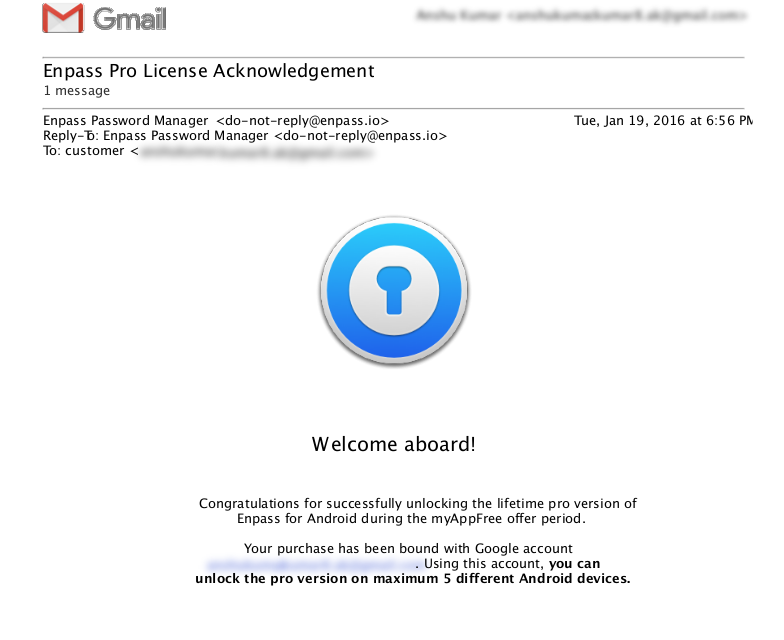
Hey @Delano Thanks for writing in. If your device limit has been reached, then I am really sorry as the limitation can't be cleared. As we sent a conformational email to you for successfully unlocking the Enpass Pro version during this promotional offer. In the sent email, we clearly mentioned that 'Using this account, you can unlock the pro version on maximum 5 different Android devices.' You can check it in your Gmail inbox and for the confirmation, a copy of the same email has been attached Thanks for your understanding!
-
Hey @dan45, No! To restore the pro version on notebook please download Enpass with the same Email ID with which you have purchased Enpass earlier. Hope this helps!


