Search the Community
Showing results for tags 'vault'.
Found 16 results
-
Using version: 6.9.4.934 I've loaded a second vault onto Samsung android tablet. - I can see the vault name under Settings / Vaults - I can not see the contents How do I see the contents of the second vault? Tapping on the new vault Name / Vault Settings, only options that appear to be working is; - Edit name - Sync Now Have I missed something?
-
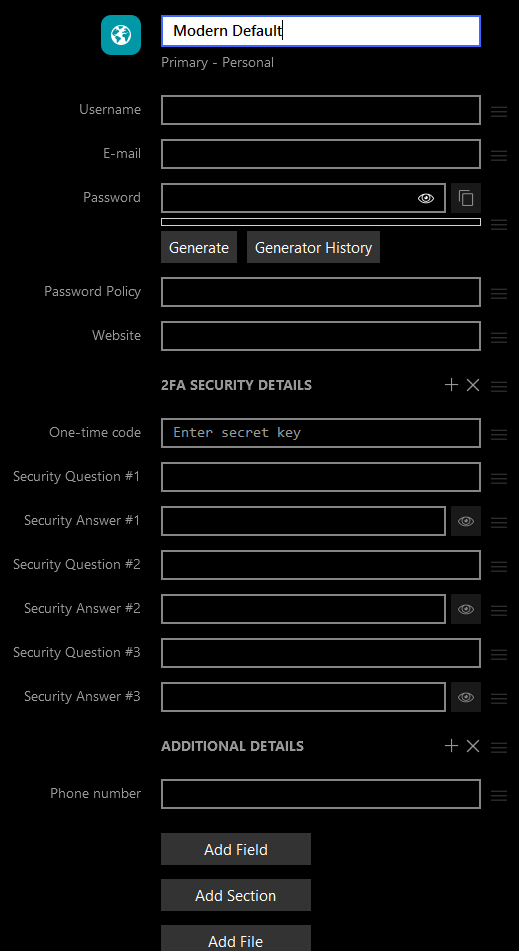
.thumb.png.18d5ca31a9a3b5e1b86913420f39b434.png) Hi all, Been using Enpass for the past several years now, and I've even introduced it to my organization as a better means for managing shared credentials via Teams. One thing I like about it is that it allows the creation of Custom Templates for the creation of new credentials in various pre-defined/custom categories, one of which I've showcased below: However this feature tends to get overlooked/forgotten, as those templates are not available for the automatic creation of new credential entries from website; only the Login category "Default" template is used for those new logins, which tends to defeat the use of those custom templates. That "Default" template is lacks entries that I tend to keep track of as a standard for any new accoutns, and isn't organized the way I like, hence why I created the "Modern Default" template as pictured above. Please could you provide an option in the Enpass vault settings to set a different template as the default for new credentials added to that vault? This way, the pre-defined/custom template can also be saved to the vault file, making it readily-available wherever the vault is synced to, especially handy for various teams in organizations. Thanks in advance.
Hi all, Been using Enpass for the past several years now, and I've even introduced it to my organization as a better means for managing shared credentials via Teams. One thing I like about it is that it allows the creation of Custom Templates for the creation of new credentials in various pre-defined/custom categories, one of which I've showcased below: However this feature tends to get overlooked/forgotten, as those templates are not available for the automatic creation of new credential entries from website; only the Login category "Default" template is used for those new logins, which tends to defeat the use of those custom templates. That "Default" template is lacks entries that I tend to keep track of as a standard for any new accoutns, and isn't organized the way I like, hence why I created the "Modern Default" template as pictured above. Please could you provide an option in the Enpass vault settings to set a different template as the default for new credentials added to that vault? This way, the pre-defined/custom template can also be saved to the vault file, making it readily-available wherever the vault is synced to, especially handy for various teams in organizations. Thanks in advance.
-
Adding a second existing vault to Enpass from the cloud is a pain, especially on mobile devices. One has to insert the cloud credentials, the cloud url, and the vault password. However, I normally have all this info in one item of my primary enpass vault. I envision a feature where I can select an item within enpass and setup a second vault from this item. Process: Settings > Vault > New > From existing item > Match elements of items, select cloud provider > Finished This would also simplify the process of sharing a vault with someone else: Create a pre-shared key and send via secure channel Send encrypted enpass item containing cloud credentials and vault password Import enpass item and decrypt with pre-shared key (only insert one password) Select item and setup vault from cloud sync I am looking forward to your reply. Regards, Rafa
-
Hello, i love the new inline popup and i always missed it. But i have one "issue" with the popup, i have multiple vaults and each vault have a login for the same website (in that case netcup). If the popup is open i just see the name "netcup" twice and the username (which is a customernumber), so i would love if you could the name of the vault somewhere. I don't know which customerNumber is for which vault. I guess that feature makes sense :-) One little other request: Could you add a option to disable the auto popup as soon a site is loaded ? greetings, False
-
I have set more than one vault. They are hosted on different cloud services. I would like to have them all synchronised but in the settings I can see only "Always Save Items to Vault:" and I can select only one. Am I missing something?
-
After using 1Password for a long time, I plan to go back to Enpass, the first password manager I used. This is mainly because multiple vaults are available in the latest Enpass versions. My 1Password account is secured with a master password, secret key and 2FA. At Enpass I will have to use a keyfile to make the vault just as safe. But where can I store my keyfile the best and easiest so that I can access it on any device (Windows, Android smartphone, Chromebook)?
-
Hi, just created a new vault , for business. (on app onh desktop in mac Not showing on mobile app How to share or invite business team members How to save, as you must select where to save as default in settings. pls help....
-
I got a note that Enpass now supports OneDrive for Business. Many thanks for this! I have a question. On my Windows 10 laptop, i got the Enpass app installed. 1) i have a personal vault (primary) located on OneDrive Personal 2) i have a second vault located on OneDrive for Business. Windows 10 gives the option to choose on which account you want to signin. On my laptop everything works well as aspected. On my iPhone XS (latetst) app: 1) i have my personal vault synced with my personal Outlook.com account 2) i would like to connect with the second vault, but the thing is, the pop-up screen goes directly away when i want to signin with my business (office 365) account. Can there also by an option where u can choose with what kind of account you want to sign in with? Sorry for the bad English (i am from the Netherlands).
-
 Hello, I upgraded to 6.0 today and was really looking forward to the vault feature in the hope that one vault would be shared while the other would not. My setup consists of 3 windows devices and 2 android devices (each with their own PRO licence). I managed to generate the new vault but when I come to tell it to sync to the same google drive location I get an error telling me that this is not possible. In my opinion the name of the first vault was system generated while 2nd vault onward require a name. Can't this name be used to generate a unique file name? Thanks and Regards,
 -
I would love to use Enpass for my everyday life and at work to share passwords with my teammates securely. But I don't want them to see my personal passwords obviously, so we need to create a second vault. Problem is that there is no way to open multiple vaults at a time.
- 100 replies
-
- 13
-

-
 I use Enpass on two Win 10 laptops and a Pixel 3. I'm syncing to one of my google drive accounts. I have disconnected and reconnected several times, but cannot find any evidence of Enpass data anywhere in the on line or local versions of my drive folder. I check for most recent data in Drive right after Enpass says it just did a sync, but there is nothing there. What am I missing?
 -
Is it possible to lock a browser extension to specific vaults only? I use multiple browsers / chrome profiles and multiple vaults. It would be great if there was an option to lock these to only be able to read specific vaults. For example, I don't want my work chrome profile or browser reading from my non-work vault and vice versa.
-
Hello, please add an option where I can define a hotkey that locks the database. At work it would be helpful when I have Enpass minimized but want to lock it when my boss comes in. Best regards OLLI
-
I created a test vault just to go through the process and to see I was able to choose the storage location of the vault file (i.e. a network drive). However, I wasn't able to choose the storage location and really have no idea where the file was saved (I did not choose a cloud sync of any sort). Now I want to delete this second, unused vault but I don't see any delete option. Is there a way to go about this? The Enpass documentation makes it sound as though this option is available. Thanks for your help.
-
In the new Enpass you can sort search by Title, URL and various other criteria. Can you please add the ability to sort by Vault. In those situation where you have a common phrase used in different vaults, this option would really come in handy.
-
Hello. I really like Enpass. But everytime I want to export vault as .txt or as .csv, the program just crash... Using Enpass 5.5.3 on Windows 10 Pro (x64).