


Pratyush Sharma
Enpass team member
-
Joined
Everything posted by Pratyush Sharma
-
Hi @Dennis Maaß, Welcome to the forums! That's Strange! Sorry for the trouble. If I have understood you correctly, you're are able to see all vaults in main Enpass but the you try to autofill in Chrome using Enpass you don't see all the vaults. Please let us know the following details so we can help you better: Do you see all the vaults in Safari browser or App? Have you created those vaults in your iPhone or restored them from any cloud/backup? Did you start facing this issue lately? Are you able to access other vaults in main Enpass app?
-
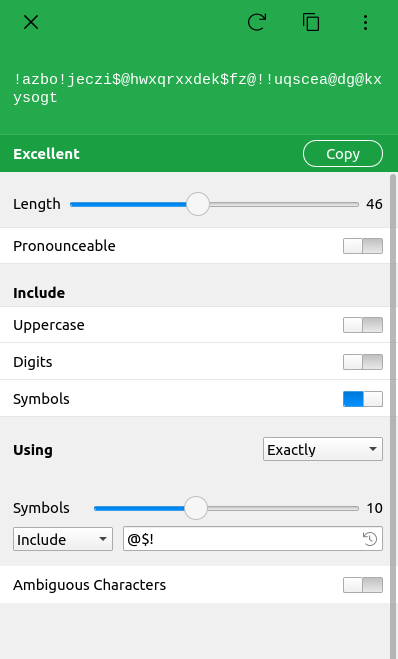
Hi @Wenuy, Thanks for writing in. Enpass do support adding and excluding symbols while generating the password. Please have a look at the below attachment, and if you have any other queries, let us know.
-
Hi @Jonathan, I can understand your concern and apologies for the same. As @Garima Singhhas mentioned the issue is Firefox specific and they do not expose the url using which Enpass could have suggested the matching items. Thanks!
-
Hi @Jonatan, I can understand your concern and apologies for the same. The issue is because of Firefox behavior and we have reported it to them. I'll keep you update once we hear from them. Thanks!
-
-
Hi @bllfr0g, We need a little input from you regarding the Autolock issue. Have you started facing this issue after updating Ubuntu or Enpass? Thanks for your co-operation.
-
-
Hi @Wenuy, Thanks for using Enpass. I appreciate your effort in providing us inputs for improvement in our product. I've forwarded your suggestions to the concerned team. Thanks!
-
Hi @Wenuy, Thanks for writing in. All those items which are weak and you don't want to show in Audit, can be excluded from audit. To do that, go to list of Weak items in Sidebar under Audit section, right click the item(s) and choose option Exclude from Audit. If you have any further queries, please feel free to contact us.
-
-
Hi @Peter_b, Sorry for the trouble you are going through. As @Garima Singh suggested, please try to skip the particular web page domain in Enpass browser setting and let us know if the issue persists. To do so, have a look at our user manual.
-
Hi @mP7, Thanks for writing back in. I have received the shared video, and our team is looking into it. Noted.
-
Hi @mP7, Thanks for sharing the inputs. I understand that your Desktop and Android device are not syncing. The reasons could be: Desktop is syncing with a OneDrive account different than your Android devices. In case of Microsoft OneDrive, they could have same email address but different account type (Personal or Work/School). It is syncing to same OneDrive account but to different folder than the Desktop devices are. Don't worry, we can solve this issue by checking both the above reasons one by one. Make sure if all devices are syncing to same OneDrive account by looking into Enpass sync-setup page. All devices should show same OneDrive account ID. If it is showing different account, please disconnect sync in Enpass and reconnect. Please note that your browser has remembered your OneDrive account, so before connecting sync again, please log out from your OneDrive account on browser. To look for second reason, you need to login to your Microsoft OneDrive account on browser and check for Enpass folders. Please check for both reasons and share your findings.
-
Hi @mP7, Thanks for sharing the inputs. It would be a great help if you can share the video of the issue with us at support@enpass.io with a mention of link to this forum. It will help us to clear understanding the problem before further proceeding. It seems the opera browser is causing an issue in autofilling details. Please try to autofill using Enpass in any other browser and let us know if the problem persists. Thanks for your co-operation.
-
Hi @Alan in Oakland, Sorry for the inconvenience caused to you. We are aware of this rare issue which is affecting only few users. It has been fixed now and will be available in any of near future updates. Thanks for your understanding!
-
Hi @Jean-Michel, Welcome to the forums! Please revert to us with the answer to the following queries and we will get it sorted out for you: On which device (along with OS version) are you using Enpass? Which Enpass version are you using? Are you using multiple monitors? Thanks for your co-operation.
-
-
Hi @Omricon, Welcome to the forums! I have noted down your valuable suggestion and forwarded it to the concerned team for further consideration. Keep suggesting!
-
Hi @Asperson, noted and forwarded to the concerned desk for further improvement.
-
-
Hi @PASHKA, Thanks for sharing the details. I have taken note of this and our team is now analyzing into the issue.
-
Hi @Giuliano, Thanks for sharing the details. I have taken note of this and our team is now analyzing into the issue.
-
Hi @ampminfo, Thanks for writing back. I had taken note of your feedback and forwarded it to the concerned team for further consideration.
-
Hi @bunnyhero, Thanks for your feedback. I had taken a note of your feedback and notified the concerned team.
-
Hi @MarcS, Sorry for the inconvenience caused to you. We have fixed the issue, and the beta with that fix has been released. It is available to download from here as Enpass v6.6.2. If you try the beta version, please share your feedback with us, or you can wait for the stable version, which will be available soon. Thanks!

