


Tarun Singh Rawat
Enpass team member
-
Joined
Everything posted by Tarun Singh Rawat
-
Thanks for the details and screenshot. We've informed our technical team and will get back to you as soon as we have an update.
-
We've shared your feature request with our technical team. It's pending for a future roadmap. We appreciate your patience and understanding.
-
Our technical team is investigating the issue and working on a scalable solution. While there's no ETA yet, I’ve followed up and will share any updates as soon as we have them. We appreciate your patience and understand this is important. SI-3844
-
This feature request is shared with our technical team. However, it's pending for prioritization, and we sure would look to add this in our roadmap in the near future. We thank you for your patience and understanding!
-
Thank you for sharing the crash details. We'll follow up with you directly via the support ticket.
-
This feature is on our development roadmap. However, we don’t have an ETA at this time. Thank you for your understanding.
-
Thank you for taking the extra effort to check the slowness issue. Does it occur in a specific browser or across multiple ones? If it's limited to one, please share the browser name to help us investigate further. #SI-4412
-
To assist us in investigating the issue further, could you please provide the following additional details? Total number of items stored in Enpass Total number of attachments (if any) Number of vaults currently in use Cloud service(s) being used for vault synchronization (e.g., iCloud, Google Drive, Dropbox, etc.)
-
The requested feature is planned, though we don’t have an ETA yet. We’re sorry for the wait.
-
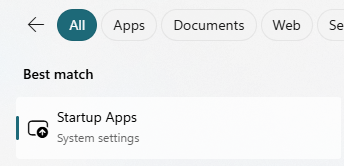
To access the Startup Apps settings on your Windows 11 device, please type Startup into the search bar next to the Start menu. From the results, select Startup Apps to view and manage the applications that launch at startup.
-
Thanks for sharing the details about the freezing problem you’re facing with Enpass on Windows 11. To get this sorted as quickly as possible, could you please: Update your Enpass browser extension in Firefox to the latest version. Let us know if the freezing happens only when using Firefox or if it also occurs with other browsers. Tell us if the Enpass desktop app itself freezes, or if it’s only during browser actions like autofill.
-
We are excited to announce that we’ve addressed this issue in our latest Enpass macOS beta release: Try out Enpass beta For the Enpass App Store version (requires macOS Monterey 12.0 or later), you can join our TestFlight program to access the beta. Alternatively, you can download the Website version of the Enpass macOS beta. Thank you for your patience, and we’ll notify you as soon as a stable update with the fix is officially released.
-
We are excited to announce that we’ve addressed this issue in our latest Enpass macOS beta release: Try out Enpass beta For the Enpass App Store version (requires macOS Monterey 12.0 or later), you can join our TestFlight program to access the beta. Alternatively, you can download the Website version of the Enpass macOS beta. Thank you for your patience, and we’ll notify you as soon as a stable update with the fix is officially released. The issue with messages not being displayed on the forum was due to a technical glitch. We've since resolved the problem and implemented measures to prevent it from happening again. We appreciate your understanding!
-
We are excited to announce that we’ve addressed this issue in our latest Enpass macOS beta release: https://www.enpass.io/beta/ For the Enpass App Store version (requires macOS Monterey 12.0 or later), you can join our TestFlight program to access the beta. Alternatively, you can download the Website version of the Enpass macOS beta. Thank you for your patience, and we’ll notify you as soon as a stable update with the fix is officially released.
-
We thank you for reporting the issue and it has been escalated to our technical team, and they're currently looking into it. We'll share updates as soon as we have more information. #SI-4430
-
A backend glitch led to the accidental deletion of some forum posts. We've resolved the issue and implemented safeguards to prevent it from happening again. Thank you for understanding! Regarding the lag with the Enpass Chrome extension in the MIDI editor, our technical team is actively looking into the issue, and we’ll get back to you as soon as we have an update. #SI-4412
-
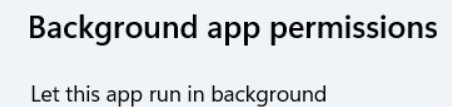
To help resolve the issue, please follow the steps below and let us know if the problem still persists: Open Enpass and enable the "Open Automatically at System Startup" option in the app settings. Go to Startup Apps in your Windows settings. In the list of startup apps, locate Enpass and click the “>” (More Settings) icon next to it. Check the Startup behavior setting. Make sure the value is set to "Always". If you've completed these steps and are still experiencing the issue, please let us know so we can assist you further.

-
I've shared your suggestion with our technical team for further review, and they will evaluate it as a potential feature request. Thorough consideration will be made before this could be added in our roadmap. #SI-3967
-
We totally understand the follow up. Our technical team still do not have an ETA for this, but we’ll keep you posted as soon as there are any developments. Thanks for understanding!
-
To help resolve the issue you're experiencing, please follow the steps below: Ensure that both the Enpass app and the Enpass browser extension are updated to the latest versions. Clear your browser's cache and cookies. After completing these steps, check if the issue is resolved. If the problem persists, kindly provide the following details so we can assist you further: The operating system version of your device and the browser you are using. Whether the credentials have been saved as an item in the Enpass app. A complete screenshot of the page where you are encountering the issue.
-
We’ve escalated your suggestion to the technical team. They will examine its feasibility and consider it for a future roadmap update. #SI-4419
-
The issue has been escalated to our technical team, and they're currently looking into it. We'll share updates as soon as we have more information. #SI-4418
-
Our technical team is informed and is currently investigating the issue. We’ll update you as soon as we receive an update from them. #SI-4417
-
Please reach out to us directly at support@enpass.io so our support team can look into this and assist you promptly.
-
Enpass stores its vault in a hidden app-specific folder on Google Drive, so it won’t appear in your main "My Drive." To confirm its storing data: Go to drive.google.com and click the Settings icon. Select "Settings" > "Manage Apps." Find Enpass in the list. If you see the option "Delete hidden app data," it confirms Enpass is storing data on your Drive. This indicates that syncing is active, even if the files aren't directly visible.

