


Tarun Singh Rawat
Enpass team member
-
Joined
Everything posted by Tarun Singh Rawat
-
We've already added the feature you requested to our development roadmap, and I've passed your feedback along to the team. While we don't have a specific release timeline at the moment, please be assured that it will be available as soon as it's ready. #SI-1404
-
Please download the latest version of the Enpass app and check if the issue is resolved. If the problem persists, kindly share a few URLs where you're experiencing the issue.
-
Please try the following troubleshooting steps: Disconnect and reconnect your cloud sync in the Enpass settings. If the issue persists, take a manual backup of your latest Enpass data and make sure you remember your master password. Afterward, uninstall and reinstall Enpass. If the problem continues, kindly confirm the OS version of your devices.
-
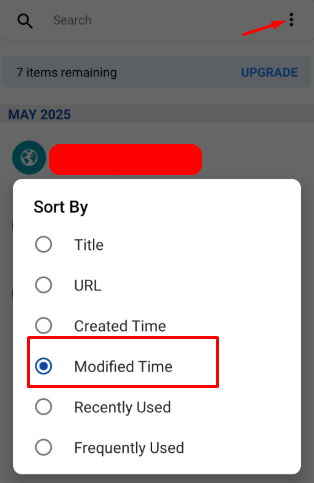
Open the Enpass app on your Android device, tap the three dots menu, and select the option to sort items by modified time. If you are not getting the option, please share the screenshot with us.
-
Please disconnect the sync between your Enpass vault and Onedrive, then reconnect it and check if the issue is resolved.
-
The latest Enpass version 6.11.10 is supported on macOS 13 (Ventura) or later. Please update your operating system to download and install the latest Enpass app.
-
To update the email address linked to your purchase, please follow these steps: Unlock Enpass on your iOS or Android device. Navigate to Settings > License Information > Change. Enter the new email address you’d like to use. The purchase will be transferred automatically. Note: Ensure you are signed in to the iOS App Store or Android Play Store with the original purchase-linked email address when completing the above steps.
-
Please set Firefox as your default browser on your device and then attempt to sync with iCloud.
-
Please review the CSV format supported by Apple and compare it with the CSV file from Enpass to ensure that the column headers are present and properly formatted. Once you've confirmed that the file includes the correct headers, attempt to import it again into Apple Passwords.
-
We are looking into the issue with the technical team and will follow up with an update soon. #SI-4339
-
I've shared your suggestion with our technical team for further review, and they will evaluate it as a potential feature request. Please understand that there are several factors to consider before any changes can be made. #SI-4338
-
We've already added the feature you requested to our development roadmap, and I've passed your feedback along to the team. While we don't have a specific release timeline at the moment, please be assured that it will be available as soon as it's ready. #SI-1441
-
To help us assist you more effectively, could you please provide the following information: Which email provider are you using with Mailspring (e.g., Gmail, Yahoo, Outlook)? If you're using an external email provider (not a Mailspring account), which browser did you use to sign in during the authentication process?
-
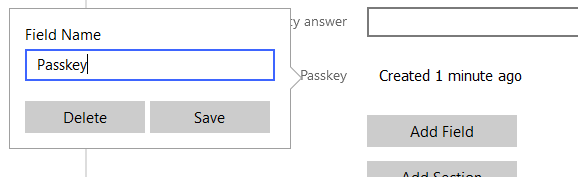
You will need to edit the item for which you created the Passkey, click on the "Passkey" title, and then select "Delete." If the passkey is not appearing in the corresponding entry, please verify if the passkey was actually created for that item in Enpass.
-
Thank you for your inquiry. We don’t have a progress percentage to share yet, but our team is actively working on it and will keep you updated.
-
Please set Firefox as your default browser and then try syncing with iCloud. Additionally, our technical team is actively working on a fix for other browsers and will provide an update once it's resolved.
-
In the Enpass app desktop version, you can either connect your vault to an existing cloud account or use the "This PC" option to restore your vault from a backup file.
-
Please follow the troubleshooting steps below: Ensure you're using the latest version of both the Enpass app and your Safari browser. Make sure the Enpass application is running in the background when using the browser extension. Go to Safari Settings > Extensions > Enpass, then check the box next to the Enpass Extension in the sidebar. Click the "Turn On" button in the pop-up. Once the extension is installed, connect it to the Enpass desktop app to access your saved accounts and passwords. Note: If the extension is already enabled, try disabling and re-enabling it.
-
Please refer to the following link for instructions on importing data from Norton Password Manager into Enpass: https://support.enpass.io/app/import-export/importing_data_from_norton_password_manager.htm If the issue persists, kindly provide OS version of device and screenshot of the error.
-
I've shared your suggestion with our technical team for further review, and they will evaluate it as a potential feature request. Please understand that there are several factors to consider before any changes can be made. #SI-4288
-
Please download the latest version of the Enpass app store version and verify if the issue has been resolved. If the issue persists, kindly provide the device's OS version, processor(Intel or AMD) and TPM version.
-
We've already added the feature you requested to our development roadmap, and I've passed your feedback along to the team. While we don't have a specific release timeline at the moment, please be assured that it will be available as soon as it's ready. #SI-3664
-
Please unlink the sync between the Enpass vault and Google Drive, then check if the Enpass app is crashing. Next, follow the same steps on the Android device. Additionally, kindly share the OS version and Enpass app version of your Android device with us at support@enpass.io.
-
The issue has already been resolved. Please update both your Enpass app and Enpass browser extension to the latest version.
-
We have released a stable version of the Enpass app that resolves the Autofill issue on iOS 18.4. Please visit the App Store to update to the latest version 6.11.10
